

TL;DR:
- Digital workforce solutions automate high-volume business tasks using AI agents, enabling faster processing and error reduction.
- They extend traditional RPA with unstructured data handling, multi-agent orchestration, and decision-making capabilities for end-to-end processes.
- Success depends on clear scoping, modular architecture, governed AI models, and starting with a focused pilot before scaling.
Digital workforce solutions use AI agents, orchestration layers, and system integrations to automate high-volume business tasks and grow your processing capacity without adding headcount. The core outcome is faster cycle times, fewer errors, and human staff freed for work that actually requires judgment.
Three things to know before you read further:
- What they automate: Document processing, transactional workflows (accounts payable, claims, onboarding), and customer-facing interactions. These are the processes where volume is high, rules are definable, and errors are costly.
- Speed to value: A well-scoped pilot typically produces measurable results within weeks. A scaled deployment across multiple processes generally takes several months, depending on integration complexity.
- How vendors price them: Three models dominate: project-based (fixed scope, fixed fee), subscription (productized SaaS like DocuPOW), and outcome-based (pricing tied to transactions processed or FTEs replaced).
POW IT UP is one provider operating in this space, building custom AI agent systems and offering productized tools for document intelligence and portfolio analytics. The sections below give you the evaluation framework to judge any vendor, including them.
Table of Contents
- What do digital workforce solutions actually mean today?
- What does the architecture of a digital workforce look like?
- What business benefits and ROI can you realistically expect?
- Which industries and use cases benefit most?
- How does implementation actually work?
- What governance and security controls should you require?
- How do you evaluate and select the right vendor?
- How does POW IT UP deliver digital workforces?
- What do real deployment outcomes look like?
- What should your 30–90 day action plan look like?
- Key Takeaways
- The part most leaders get wrong about scoping
- Ready to build your digital workforce?
- Useful sources and further reading
- FAQ
What do digital workforce solutions actually mean today?
The term gets used loosely, so the distinction matters. Traditional robotic process automation (RPA) is deterministic: it follows a script, clicks through a UI, and breaks the moment the interface changes. It cannot read an unstructured email, interpret a scanned invoice with a non-standard layout, or decide which exception to escalate. Modern digital workforce solutions extend RPA by layering in machine learning, natural language processing, and generative AI, so digital workers can handle unstructured data and make context-aware decisions.
The result is what IBM Research calls AI-powered digital employees: agents that act autonomously, collaborate with other agents and humans, and execute end-to-end processes rather than isolated task steps. That is a meaningful architectural shift, not a marketing upgrade.
Capabilities that mark a genuinely agentic digital worker:
- Context awareness: Reads and interprets unstructured inputs (PDFs, emails, forms) without a rigid template.
- Long-running plans: Maintains state across multi-step processes that span hours or days.
- Document intelligence: Extracts, validates, and routes data from varied document formats.
- Conversational actions: Handles customer or employee queries through natural language, not keyword matching.
- Multi-agent orchestration: Delegates subtasks to specialized agents and reconciles outputs.
- Feedback and retraining loops: Improves from corrections rather than requiring manual rule updates.
Pro Tip: When a vendor claims “agentic AI,” ask three questions: Can the system explain why it made a specific decision? Does it have a defined retraining cadence when accuracy degrades? Can it handle a process that branches based on document content it has never seen before? A vendor who cannot answer all three concretely is selling RPA with a new label.
What does the architecture of a digital workforce look like?
A digital workforce is not a single product. It is a stack of coordinated components, and knowing who owns each one prevents the most common implementation failures.

| Component | What it does | Typical owner |
|---|---|---|
| Digital workers / agents | Execute tasks, process documents, interact with systems | Vendor / AI engineering team |
| Orchestration layer (BPM/ABPMS) | Sequences tasks, manages exceptions, routes work | Operations / process owner |
| Integration connectors | Connect agents to ERP, CRM, databases, APIs | IT / vendor engineering |
| Data layer and MDM | Provides clean, governed data for agent decisions | Data engineering / IT |
| Observability and monitoring | Tracks performance, flags anomalies, logs actions | IT / operations |
| Model management | Versions, validates, and retrains AI models | AI/ML team or vendor |
| Security and governance | Controls access, encrypts data, enforces policy | IT security / compliance |
Scalable AI architectures rely on modular design, clear model governance, and rigorous testing to prevent drift and reduce integration risk. That modular principle is what lets you add a new agent for a new process without rebuilding the entire stack.
- Vendor-managed components: Digital workers, model management, and often the orchestration layer require engineering depth that most internal teams do not have on day one.
- Business-user components: Process definition, exception routing rules, and monitoring dashboards can typically be managed with low-code tools once the underlying plumbing is in place.
Pro Tip: Before signing any contract, map each component to an owner. The most common failure mode is a pilot that works in isolation but cannot connect to the production ERP because nobody assigned IT ownership of the connector build. Get that in writing during scoping.
What business benefits and ROI can you realistically expect?
The primary benefits are capacity scaling, error reduction, faster processing, 24/7 availability, and the redeployment of staff to higher-value work. Those are real, but the timeline and magnitude depend entirely on process selection and implementation quality.
KPIs worth tracking from day one:
- Processing time per transaction (baseline vs. post-deployment)
- FTE-equivalent hours saved per month
- Error rate and exception rate
- End-to-end cycle time
- Cost per transaction
- Customer satisfaction (CSAT) for customer-facing automations
- SLA attainment rate
A pilot-first approach with clearly defined success criteria accelerates adoption and reduces risk compared to large-scale initial deployments. Pilots scoped to a single, well-understood process typically produce measurable results within weeks, not quarters.
Timeline from pilot to scale, in practical terms:
- Weeks 1–4: Process mapping, baseline measurement, data access confirmed, pilot scoped.
- Weeks 5–10: Pilot deployed on a single process with defined success metrics.
- Weeks 11–12: Results measured against baseline; go/no-go decision on scaling.
- Months 4–9: Integration expanded to additional processes; orchestration layer matured.
- Months 10–18: Full-scale deployment across target process portfolio; continuous improvement cycle active.
The FTE-equivalent savings and cost avoidance numbers vary by process type. Document-heavy back-office workflows tend to show the sharpest early gains because the baseline is so labor-intensive. Automation ROI examples from service businesses consistently show that the fastest wins come from processes where humans spend most of their time on data entry and validation rather than actual decision-making.

Which industries and use cases benefit most?
The honest answer: any operation with high transaction volume, repetitive data handling, and a cost for errors. That covers more industries than most leaders initially assume.
Top use cases by volume of deployments:
- Accounts payable and receivable: Invoice capture, three-way matching, payment scheduling.
- Claims processing: First notice of loss intake, document validation, adjudication routing.
- Customer service triage: Intent classification, ticket routing, first-response generation.
- HR onboarding: Document collection, system provisioning, compliance checklist completion.
- Contract review: Clause extraction, obligation tracking, renewal alerts.
- Sales operations: CRM data hygiene, quote generation, pipeline reporting.
- Portfolio monitoring: Client health scoring, alert generation, reporting automation.
Industry focus breaks down this way. Finance and fintech see the fastest ROI because transaction volumes are high and error costs are quantifiable. Insurance benefits most in claims and underwriting support. Healthcare gains in prior authorization, patient intake, and billing. Professional services firms automate proposal generation, time entry, and compliance reporting. Logistics and manufacturing apply digital workers to freight documentation, supplier invoicing, and quality exception handling. E-commerce uses them for order management, returns processing, and customer communication.
Agentic AI enables collaboration between agents to complete complex tasks and can continuously learn and optimize processes, but adoption currently lags technical capability. The gap is not a technology problem — it is a scoping and change management problem. Organizations that start with one well-defined process consistently outperform those that try to automate broadly from day one.
AI-powered workforce management platforms are also integrating automation into payroll, time tracking, and fraud prevention, extending the use-case map into HR and finance operations that previously seemed too judgment-heavy for automation.
How does implementation actually work?
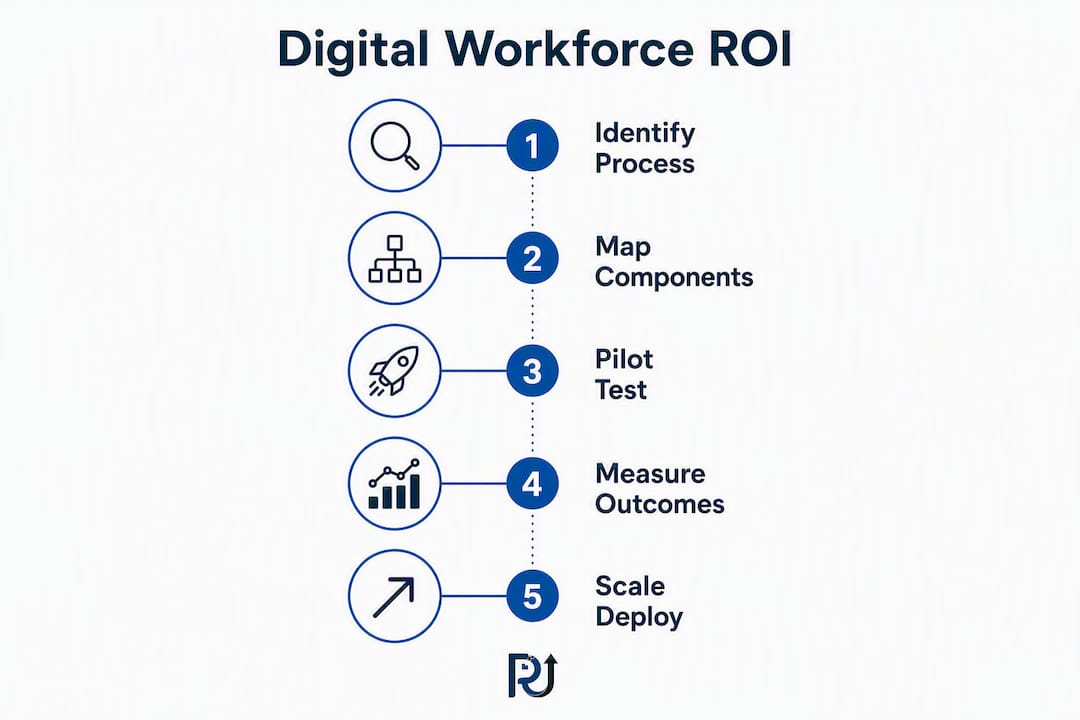
The path from “we want to automate” to “it is running in production” has five stages. Skipping any of them is where projects stall.
- Value discovery: Map the target process end-to-end. Measure baseline metrics: volume, time per transaction, error rate, cost. Identify the data sources the agent will need to access. This stage takes 1–3 weeks and produces the business case.
- Pilot design: Define success criteria before writing a line of code. What does “working” look like at week 10? Set a specific threshold: processing time cut by a defined percentage, error rate below a defined level, SLA met on X% of transactions.
- Pilot execution: Deploy on a narrow, bounded version of the process. Keep scope tight. The pilot is a learning exercise, not a production launch.
- Measurement and iteration: Compare results to the baseline. Identify where the agent struggled (usually edge cases and data quality issues). Retrain or adjust rules. Document what changed and why.
- Scaling plan: Use pilot learnings to scope the full deployment. Expand connectors, add processes, mature the orchestration layer, and build the continuous improvement cycle.
Pilot checklist — what must be confirmed before you start:
- Data access confirmed in writing (no “we’ll figure it out” on data permissions).
- Success metrics defined and agreed upon by all stakeholders.
- SLA expectations documented for the pilot period.
- Rollback plan in place if the pilot needs to be paused.
- Change management plan for the team whose work the agent will touch.
- A named process owner who is accountable for outcomes, not just the vendor.
Pro Tip: The three most common pilot anti-patterns: scoping too broadly (three processes instead of one), starting without confirmed data access, and running a pilot with no defined owner for the outcome. The vendor can build the agent. Only you can own the result.
What governance and security controls should you require?
Operational risk in digital workforce deployments is real and specific. The top risks are not the ones that make headlines.
- Model drift: The agent’s accuracy degrades as real-world data patterns shift. Without a retraining cadence, you will not notice until errors spike.
- Data leakage: Agents that process sensitive documents need strict access controls and encryption at rest and in transit.
- Lack of explainability: If an agent makes a wrong decision and you cannot trace why, you cannot fix it or defend it to a regulator.
- SLA gaps: Vendors often define uptime for the platform, not for the agent’s accuracy or throughput. Those are different commitments.
- Hidden TCO: Integration engineering, model retraining, and ongoing support often cost more than the initial build. Get a full 24-month cost model before signing.
- Integration fragility: Agents that connect directly to UI layers (screen scraping) break when the underlying application updates. API-based connectors are more durable.
Governance controls to require from any vendor:
- Role-based access controls with audit logging on every agent action.
- Observability dashboards showing throughput, error rates, and exception queues in real time.
- Documented model validation schedule (at minimum quarterly).
- Incident response procedure with defined escalation paths and resolution SLAs.
- Data residency confirmation and encryption standards (AES-256 at rest, TLS 1.2+ in transit is a reasonable baseline).
- Third-party risk review process for any subprocessors the vendor uses.
Pro Tip: Add one clause to your pilot agreement: the vendor must provide a model behavior report at the end of the pilot period showing accuracy by document type, exception rate, and any retraining actions taken. Vendors who resist this clause are telling you something important.
How do you evaluate and select the right vendor?
Vendor selection for digital workforce deployments fails most often at the demo stage, where polished interfaces substitute for real capability. Here is a scoring framework that cuts through that.
Technical criteria (weight: 40%)
- Pre-built connectors for your core systems (ERP, CRM, document management).
- Orchestration capability: can the platform manage multi-step, multi-agent processes with exception handling?
- AI planning and explainability: can the agent show its reasoning?
- Security posture: SOC 2 Type II, data residency options, encryption standards.
- Model governance: retraining cadence, version control, drift detection.
Commercial criteria (weight: 35%)
- Pricing model transparency: subscription, project, or outcome-based — and what is included.
- SLA commitments: platform uptime AND agent accuracy/throughput SLAs.
- Full TCO over 24 months including integration, support, and retraining.
- Contract flexibility: can you exit after a pilot if results do not meet criteria?
Change management criteria (weight: 25%)
- Vendor-provided training and documentation for process owners.
- Post-launch support model: dedicated CSM, ticket-based, or self-serve?
- Reference customers in your industry willing to speak candidly.
Red flags during demos and proposals:
- Demo uses synthetic data that does not resemble your actual documents.
- Vendor cannot explain what happens when the agent encounters an exception it has not seen before.
- Uptime SLA is defined for the platform only, with no accuracy or throughput commitment.
- Pricing is “custom” with no published starting point or reference range.
- No case studies from your industry or a comparable process type.
Questions to ask during RFP or scoping calls:
- What data access do you need from us, and in what format?
- What is your retraining process when accuracy drops below threshold?
- Can you provide a rollback procedure in writing?
- What does your post-launch support look like for the first 90 days?
- Can we speak with a current customer who automated a similar process?
Pro Tip: Ask for a small, time-boxed pilot with a defined exit criterion rather than a vague proof of concept. A real pilot has a start date, an end date, a success metric, and a clear answer to “what happens if we do not hit the target.” A POC without those elements is a sales exercise, not a test.
Reviewing automation tool categories before vendor conversations helps you speak the right language and avoid being oversold on features you do not need.
How does POW IT UP deliver digital workforces?
POW IT UP functions as a strategic technical architect, not a software reseller. The firm designs, builds, and deploys custom AI agent systems for enterprise and SMB operations, with a service model that spans project-based engineering engagements and productized SaaS subscriptions.
Two productized offerings anchor the portfolio:
- DocuPOW: An AI document intelligence tool for reading, validating, and routing documents. It handles varied formats and integrates with orchestration layers for end-to-end automation. AI document processing at this level eliminates the manual review bottleneck that slows most back-office workflows.
- AuraPOW: A portfolio monitoring and client health analytics platform. It automates the data aggregation, scoring, and alerting that portfolio managers and client success teams currently do by hand.
Both products offer live demos and subscription pricing, with a path to bespoke engineering for organizations that need custom connectors or non-standard process logic.
POW IT UP’s signature capabilities:
- Custom AI agent development with context-aware, autonomous execution.
- AI integration across ERP, CRM, document management, and proprietary systems.
- Low-code orchestration for business users combined with engineering-backed connectors for complex integrations.
- Model governance and continuous improvement built into every engagement.
- Cloud analytics and data engineering to support agent decision-making with clean, governed data.
What do real deployment outcomes look like?
The clearest proof of digital workforce value comes from the gap between baseline and post-deployment metrics on a specific process. Three representative deployment patterns illustrate what is achievable.
Accounts payable automation: A mid-market services firm processing a high volume of invoices manually. After deploying a document intelligence agent with three-way matching and exception routing, the team eliminated the bulk of manual data entry. Processing time per invoice dropped sharply, and the AP team shifted from data entry to exception review and vendor relationship management.
Claims intake for insurance: A regional insurer handling first notice of loss documents across multiple formats. An AI document agent extracted structured data from unstructured submissions, validated against policy records, and routed clean claims to adjusters. The result was a faster average intake cycle and a measurable reduction in adjuster time spent on data gathering.
Portfolio monitoring for a financial advisory firm: AuraPOW replaced a manual weekly reporting process that required an analyst to pull data from multiple systems and compile client health summaries. The automated version runs daily, flags at-risk accounts in real time, and delivers structured reports without analyst intervention.
Organizations that combine AI document processing with orchestration layers consistently report the sharpest early gains — because document handling is where human time is most concentrated and most replaceable by well-trained agents.
The pattern across all three: the biggest gains come not from the agent itself but from the combination of the agent, clean data access, and a defined exception-handling process. Organizations that skip the data-access step in scoping consistently underperform their projections.
What should your 30–90 day action plan look like?
A digital workforce deployment does not require a 12-month planning cycle to get started. Here is a realistic 30/60/90 day plan for a leader who wants to move from interest to a running pilot.
Days 1–30: Identify and scope
- Identify one or two high-volume, repetitive processes where errors are costly or staff time is disproportionate.
- Secure a named executive sponsor who owns the outcome and can unblock data access.
- Measure the baseline: volume, time per transaction, error rate, cost.
- Engage a vendor for a scoping conversation. Bring your baseline data.
- Define pilot success criteria before the vendor writes a proposal.
Days 31–60: Launch the pilot
- Confirm data access in writing with IT.
- Agree on SLA expectations for the pilot period.
- Establish a rollback plan.
- Launch the pilot on the narrowest viable version of the process.
- Assign a process owner who reviews results weekly.
Days 61–90: Measure and decide
- Compare results to baseline metrics.
- Document exceptions and edge cases the agent struggled with.
- Hold a structured go/no-go review with the sponsor and process owner.
- If results meet criteria, begin scoping the scale plan.
- If results are mixed, identify the root cause before expanding scope.
Internal commitments required for this to work:
- An executive sponsor with budget authority.
- A process owner who knows the workflow in detail.
- An IT liaison who can confirm and provide data access.
- A vendor point of contact with engineering authority, not just a sales rep.
POW IT UP’s intelligent automation consulting is structured to support exactly this kind of time-boxed pilot, with defined success criteria and a clear path to scale.
Key Takeaways
AI-driven digital workforce solutions deliver measurable capacity gains when scoped to high-volume processes, governed with clear model oversight, and deployed through a time-boxed pilot before scaling.
| Point | Details |
|---|---|
| Start with a bounded pilot | Scope one process, measure the baseline, and define success criteria before any build begins. |
| Agentic AI beats basic RPA | Modern digital workers handle unstructured data and multi-step decisions; traditional RPA cannot. |
| Govern from day one | Require model validation schedules, audit logging, and explainability reports from every vendor. |
| Track the right KPIs | Measure processing time, FTE-equivalent hours saved, error rate, and SLA attainment from the pilot forward. |
| POW IT UP as a delivery option | POW IT UP offers custom AI agent development plus productized tools (DocuPOW, AuraPOW) with subscription and project-based pricing. |
The part most leaders get wrong about scoping
Most digital workforce projects that underperform do not fail because the technology was wrong. They fail because the problem was framed too broadly at the start.
The instinct is understandable: you see the potential, you want to automate everything, and you scope a pilot that touches five processes, three systems, and two departments. Six months later, you have a half-built integration and a team that is skeptical of the whole initiative.
The approach that actually works is the opposite. Start with the single process where the pain is most quantifiable and the data is most accessible. Prove the value there, specifically and measurably. Then use that proof to fund the next process. The technology scales easily. The organizational trust does not, and it has to be earned one process at a time.
The other thing leaders underestimate is the combination required for fast adoption: domain experts who know the process, data engineers who can make the data accessible and clean, and a change management plan for the people whose daily work will shift. Any one of those missing and the pilot drags. All three present and the results come faster than most leaders expect.
Pro Tip: The best pilots combine low-code orchestration for business users with engineering-backed connectors for the complex integrations. That combination, as practical pilots show, reduces time-to-value and lowers dependency on scarce developer resources.
Ready to build your digital workforce?
If you have read this far, you already know more than most leaders who start vendor conversations. The next step is not another research cycle. It is a scoping call where you bring your baseline data and a specific process in mind.
POW IT UP works with business leaders and operations managers to design, build, and deploy custom AI agent systems with measurable SLAs and a clear path from pilot to scale. Whether you need a subscription-based document intelligence tool like DocuPOW, a portfolio monitoring platform like AuraPOW, or a fully custom digital workforce built around your specific operations, the engagement starts the same way: a focused conversation about one process, one baseline, and one success criterion.
No six-month discovery phase. No vague POC. A time-boxed pilot with a defined outcome, backed by AI integration services built for leaders who need results, not roadmaps.
Book an exploratory call or request a live demo at powitup.com.
Useful sources and further reading
- What Is a Digital Workforce? | Salesforce — Salesforce’s overview of how modern digital workforce solutions extend RPA with generative AI, ML, and NLP.
- Digital employees are the future of work | IBM Research — IBM Research’s perspective on AI-powered digital employees and agentic orchestration.
- AI development best practices: scalable solutions | SagTech — Engineering best practices for modular, governed AI architectures.
- AI Document Processing and IDP Solutions | SagTech — Technical overview of AI document processing and integration with orchestration layers.
- AI Automation Services | POW IT UP — POW IT UP’s intelligent automation consulting and pilot-first delivery model.
- Custom AI Agent Development | POW IT UP — POW IT UP’s custom agent development capabilities and productized offerings including DocuPOW and AuraPOW.
FAQ
What does a digital worker actually do?
A digital worker is an AI agent that executes business tasks autonomously, including reading documents, processing transactions, routing exceptions, and interacting with other systems or agents. Unlike a basic RPA bot, a modern digital worker handles unstructured data and adapts to process variations without manual rule updates.
What are examples of digital workforce solutions in practice?
Common examples include invoice processing automation, insurance claims intake, HR onboarding document collection, customer service triage, and portfolio monitoring. POW IT UP’s DocuPOW handles document validation and routing; AuraPOW automates portfolio health scoring and client reporting.
What is a digital solution provider?
A digital solution provider designs, builds, and integrates technology systems that automate or augment business processes. In the context of AI-driven digital workforces, this means a firm like POW IT UP that engineers custom AI agents, connects them to existing systems, and manages the governance and improvement cycle post-deployment.
How is agentic AI different from traditional RPA?
Traditional RPA follows deterministic scripts and breaks when interfaces change. Agentic AI can plan across multi-step processes, interpret unstructured inputs like PDFs and emails, collaborate with other agents, and improve from feedback, making it suitable for complex, variable work that RPA cannot handle.
How long does a digital workforce pilot typically take?
A well-scoped pilot on a single process typically produces measurable results within weeks. The value discovery and scoping phase before the pilot adds 1–3 weeks, making the full cycle from first conversation to a go/no-go decision span several weeks.