
Smart business process design is the practice of mapping how work really moves through your company, redesigning it around the outcome you want, and only then using automation and AI to run it. The order matters. Teams that automate first often end up running a messy process faster. This guide walks through the steps, the tools, the human checkpoints and the measures that tell you whether the redesign worked.
TL;DR
- Smart process design is redesign first, automation second. Technology should enable the process, not define it.
- Map the current process at the right level of detail, find the handoffs, rework and idle time, then remove steps before you automate any of them.
- Use AI and agents for high-volume, rule-heavy steps. Keep people in charge of judgment calls, and give them the information and time to exercise it.
- Measure with a balanced set: speed and cost alongside quality and customer outcomes, so a faster process does not quietly get worse.
Table of Contents
- What smart business process design actually means
- How it differs from BPM, workflow automation and process automation
- Redesign before you automate
- Map the current process and find the time leaks
- A step-by-step method for designing the new process
- Where AI and agents fit, and what stays with people
- Measure whether the redesign worked
- Our perspective: design for ownership, not just speed
- Where we can help
- FAQ
- Sources
What smart business process design actually means
A business process is a repeatable chain of work that produces a result for a customer or the business: onboarding a client, issuing an invoice, processing a loan file, fulfilling an order. Process design is deciding how that chain should run.
The “smart” part comes from the research literature on smart business process management, which describes using intelligent techniques to automate or support the people involved at different stages of managing a process. In practice that means three things:
- Design with the outcome in mind. You start from what the customer or the business needs, not from the org chart or the current tool.
- Use data to see the real process. Timestamps, error logs and handoff counts replace opinions about where the delay is.
- Apply AI where it fits. Reading documents, classifying requests, drafting routine outputs and routing work are strong candidates. Approving exceptions usually is not.
If you run a service firm, a clinic, a lender or an agency, the same logic applies. The process is the product you deliver repeatedly, and its design decides your margin and your capacity.
How it differs from BPM, workflow automation and process automation
These terms get mixed together in search results, and the confusion leads to buying the wrong thing.
APQC defines business process management as how an organization designs, manages and improves work across the enterprise, tying processes to strategy so work is consistent, efficient and valuable. It is a discipline, not a piece of software.
One BPM vendor’s comparison frames workflow automation as a tactical way to automate individual repeatable tasks or short sequences, while BPM is the ongoing practice of designing, governing, measuring and improving end-to-end processes.
The Real-Life BPMN reference describes process automation as executing a process model through a workflow engine. The engine can assign human tasks, call services, apply decisions, integrate systems and monitor performance, and the whole process does not have to become fully automated.
| Term | Scope | Main question | Typical owner |
|---|---|---|---|
| Task or workflow automation | One task or a short sequence | How do we stop doing this by hand? | A team lead |
| Process automation | An executable process model with people and systems | How do we run this process consistently? | Operations |
| BPM | End-to-end processes across teams | How do we govern and keep improving this? | Operations leadership |
| Smart process design | Redesign plus targeted AI | What should this process look like, and which parts deserve AI? | Leadership with an engineering partner |
Smart process design sits across all of these. It borrows the discipline of BPM, uses automation engines for execution and adds AI for the steps that used to need a human reading, sorting or deciding. For a concrete example of a single-workflow starting point, see this piece on automating one workflow first in a small-business CRM, then ask what the process around that workflow should look like.
Redesign before you automate
The most common failure is simple: a team takes a clumsy process, wires in AI and gets the clumsiness at higher speed. CIO’s analysis makes the point that AI may execute outdated workflows faster without addressing their underlying complexity. Its remedy: define the desired outcome, remove unnecessary steps, standardize, and redesign before automating.
APQC says the same thing from the process side. It recommends understanding, improving and standardizing a process before automating it, and its view is that tools do not repair a broken process.
A quick test for whether a step should exist at all:
- Does a customer or regulator require it?
- Does it prevent a specific error that has actually occurred?
- Does the next step use its output?
If the answer to all three is no, delete the step. Deleting is cheaper than automating, and it never breaks.
Our own writing on this theme covers why service firms standardize with AI and why governance drives the payoff from AI workflow optimization.
Map the current process and find the time leaks
You cannot redesign what you have not seen. Start with a map, but pick the right level of detail for the audience.
Start high with SIPOC+CM
ASQ’s process-mapping guidance recommends high-level SIPOC+CM diagrams to give context before detailed mapping. The letters stand for Suppliers, Inputs, Process steps, Outputs, Customers, plus Constraints and Measures. One page, filled in with the people who do the work, is usually enough to agree on where the process starts and ends.
Use process levels to avoid overloaded diagrams
A common hierarchy, described in SAP Signavio’s mapping guidance, runs like this:
- L1: major end-to-end processes, such as order-to-cash.
- L2: subprocesses or workflows inside them, such as invoicing or collections.
- L3: detailed activities, decisions, handoffs and responsibilities.
- L4 and beyond: work instructions, system detail or specialized views.
The levels help match a map to its reader. Executives need L1 and L2. The people redesigning the work need L3. Engineers building automation need L4. Note that this is one vendor’s convention, so your company can name the levels differently as long as everyone uses them the same way.
Hunt for the leaks
Once you have an L3 map, walk it with a short list of questions:
- Where does work wait, and for how long?
- Where is the same data typed twice?
- Where do errors get caught late and sent back?
- Where does a handoff cross teams or systems?
- Which steps are exceptions that someone treats as routine?
The EPA’s Lean Government Metrics Guide is written for public agencies, but its categories transfer well: processing versus idle time, errors and rework, throughput and backlog, number of steps and number of handoffs. Pull a sample of 30 to 50 real cases and time them. The gap between touch time and elapsed time is usually the most revealing number you will find.
A step-by-step method for designing the new process
You do not need to invent a method. Two established ones cover most situations.
DMAIC (Define, Measure, Analyze, Improve, Control) is a structured approach for improving an existing process that misses performance standards or customer expectations, aiming at long-term fixes. APQC’s process analysis and design methodology describes a structured, repeatable and adaptive approach: clarify the current process, align it with strategy, engage stakeholders, design and launch the new process, enable staff, and support monitoring and continuous improvement.
Combined into a working sequence:
- Define the outcome. Write one sentence: what the customer receives, by when, at what quality.
- Baseline. Measure current cycle time, error rate and cost per case before you change anything.
- Map and diagnose. SIPOC+CM first, then L3 for the problem areas.
- Redesign on paper. Remove, combine and reorder steps. Standardize inputs so that intake is complete the first time.
- Decide what to automate. Rule-based, high-volume, well-defined steps go first.
- Pilot with a slice of real work. One client segment or one document type, not the whole business.
- Train and hand over. The people running the process need to know what changed and why.
- Control. Set the measures, the owner and a review rhythm so improvements stick.
Client onboarding is a good practice case because it crosses sales, delivery and finance. We walk through it in how to automate client onboarding for service businesses, and the people side in onboarding best practices that retain talent.
Where AI and agents fit, and what stays with people
Once the process is clean, AI has clear jobs. Document intelligence reads invoices, applications and contracts and validates the fields. Classifiers route requests. Agents can chase missing information, update systems and prepare the draft that a person approves. Recurring outputs, such as reports and status updates, are another natural fit, which we cover in how AI automates recurring deliverables for operations.
The design question is not whether to include humans but where, and with what power.
Define human roles explicitly
NIST’s guidance on human-AI interaction stresses that human roles in decision-making and oversight should be explicitly defined and differentiated, because configurations range from fully autonomous to manual intervention. The broader NIST AI Risk Management Framework takes a full-lifecycle approach to realizing AI benefits while managing risk. For each automated step, document which of these applies: the system acts alone, a person reviews before it acts, or a person decides and the system assists.
Avoid the oversight illusion
A reviewer who rubber-stamps 400 items a day is not oversight. Research on human-AI teaming says meaningful human control goes beyond having a human present and includes the conditions for informed judgment. The same authors warn against the “oversight illusion,” where responsibility is assigned on paper without the capacity to evaluate decisions.
Practical design rules that follow:
- Send people the exceptions and low-confidence cases, not everything.
- Show the reviewer the source evidence next to the AI output.
- Cap review queues so that attention stays real.
- Keep humans on decisions with legal, financial or health consequences. In a regulated setting such as lending or a clinic, have your compliance officer or counsel sign off on the review design before launch.
Measure whether the redesign worked
Speed alone misleads. APQC recommends a balanced set of measures: cost effectiveness, staff productivity, process efficiency and cycle time, supplemented by quality, customer satisfaction, service-level attainment, compliance, complaints, adoption and financial outcomes. Its caution is that no single speed or cost metric is enough, because outcome measures stop you from improving efficiency while hurting quality or customer experience.
A workable starter scorecard:
| Dimension | Example measure | Why it matters |
|---|---|---|
| Time | Cycle time, idle versus touch time | Shows where work waits |
| Cost | Cost per case, staff hours per case | Shows capacity gained |
| Quality | Error and rework rate | Guards against fast but wrong |
| Complexity | Steps and handoffs | Fewer is easier to maintain |
| Customer | Satisfaction, complaints | Confirms the outcome improved |
| Adoption | Share of cases through the new path | Shows whether people use it |
Compare against the baseline you captured in step 2. Review monthly for the first quarter, then quarterly. Add a leading indicator, such as the share of cases arriving with complete intake, so you see trouble before the outcome numbers move.
Our perspective: design for ownership, not just speed
We build digital workforces for a living, and the projects that last share a pattern: the process was understood before any agent was written. When a client asks us for “automation,” the first conversation is about where time leaks out of the business, which steps repeat at high volume, and which decisions must stay with a person.
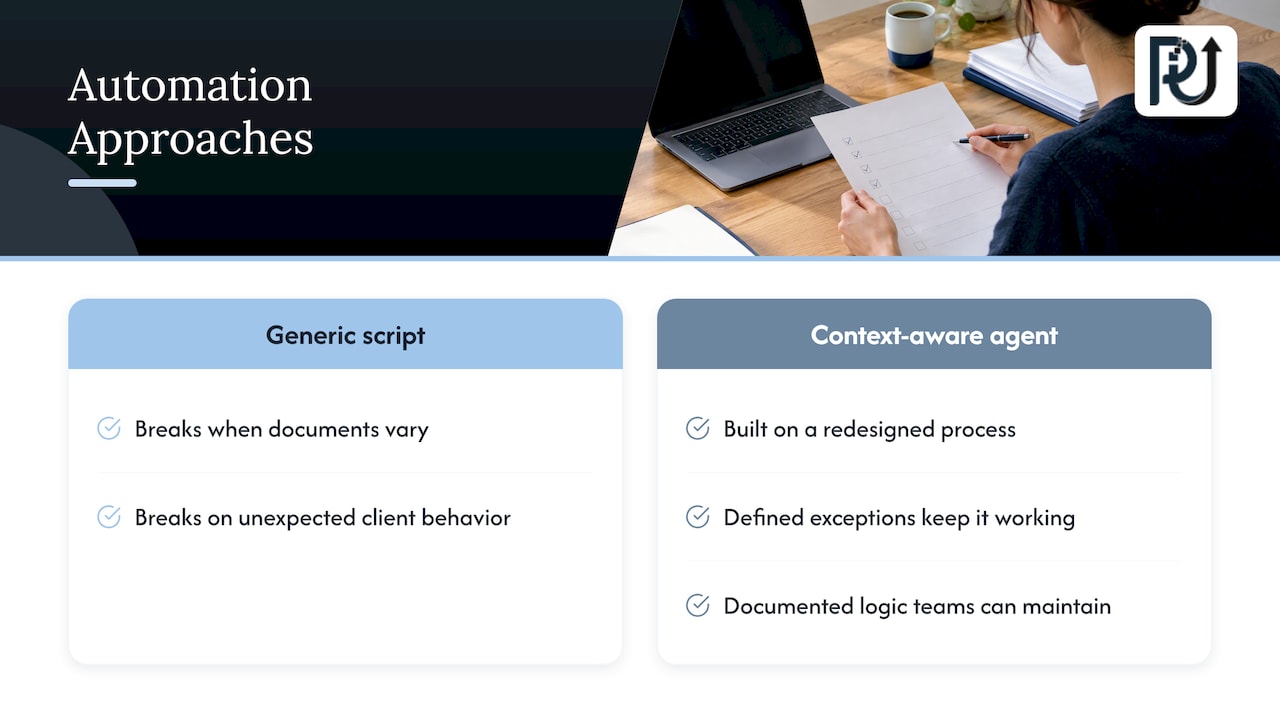
We think of automation as engineering, not scripting. A generic script breaks when a document looks different or a client behaves unexpectedly. A context-aware agent, built on a redesigned process with defined exceptions, keeps working because it was designed for how the work really runs. That also means the client owns the result: documented logic, transparent processes and a system their team can maintain.
Our advice to any operations leader: pick one end-to-end process, redesign it on paper, automate the repetitive core, and prove the gain with a baseline. Then scale volume without scaling headcount at the same rate.
— Syed Naveed Abbas
Where we can help
If you have a process that is mapped and ready, or one you suspect is leaking time, our AI automation services turn the redesign into working systems. For document-heavy steps such as intake, invoices or applications, DocuPOW reads and validates documents, and we can show it in a live demo. If your process needs autonomous, context-aware workers, see our AI agents development service, or start from our homepage to tell us about your operation.
FAQ
What is the difference between process design and process automation?
Process design decides what the work should look like: the steps, owners, decisions and measures. Process automation is the execution layer, where software carries out parts of that design. Doing design first keeps you from encoding waste into software.
Which processes should I redesign first?
Start with processes that are high-volume, repetitive and rule-based, and that touch customers or cash, such as onboarding, invoicing or document intake. Look for the ones with the most rework and waiting time in your baseline sample. A process that is both painful and well understood is the safest first project.
What do L1, L2, L3 and L4 mean in process mapping?
They are levels of detail. A common convention uses L1 for major end-to-end processes, L2 for subprocesses, L3 for detailed activities and handoffs, and L4 for work instructions or system detail. Choose the level that matches who will read the map.
How do I know if my redesigned process is better?
Compare it with a baseline measured before the change, using time, cost, quality and customer measures together. A faster process with more errors or more complaints is not an improvement. Review the numbers on a fixed schedule so that drift is caught early.
Sources
- Challenges of Smart Business Process Management
- APQC: What is Business Process Management?
- Workflow vs orchestration vs BPM
- Real-Life BPMN excerpt
- CIO: Why AI should begin with redesign
- ASQ: Process mapping documentation
- SAP Signavio: Business process mapping levels
- EPA Lean Government Metrics Guide
- ASQ: DMAIC process
- APQC: Process Analysis and Design Methodology
- NIST: AI RMF concept note
- NIST: AI risk management and human-AI interaction
- Mapping Human–AI Teaming in Risk Analysis
- APQC: Measures to assess process performance
- Automate One Workflow First: CRM Automation