

Start with a small pilot that automates a high-volume, low-risk routine process, built on a clear decision-rights framework and measurable KPIs from day one. McKinsey finds that AI adoption leaders now outperform lower-performing peers by a wide margin, and governance frameworks like the NIST AI RMF exist precisely so that early wins don’t become later liabilities. If you’d rather hand the engineering to a dedicated partner, we at POW IT UP build and govern these pilots for a living.
TL;DR:
- Prioritize processes handling at least a few hundred monthly transactions, with consistent digital inputs and errors staff can correct within one business day.
- Automate low risk routine decisions fully, require human signoff for consequential choices, and keep strategic decisions under human judgment with AI support.
- Record baseline measures before launch, then track time per transaction, throughput, correction rates, cost, cycle time, and the process’s downstream business outcome.
- Run a pilot for two to six weeks on real transactions; scale only after errors stay below agreed thresholds for two to four live weeks.
- Name a business owner before launch to monitor results, escalate accuracy drops, and decide whether the workflow should continue, change, or be retired.
Table of Contents
- What AI Workflow Optimization Means and Why It Matters
- How to Identify and Prioritize Processes to Automate
- Designing Decision Rights and Governance for AI Workflows
- Technical and Architecture Patterns for Dependable AI Workflows
- Tooling and Workflow Patterns From Recent Agentic Research
- Pilot-to-Production Roadmap: Phases, Roles, and Timing
- How to Measure Impact and the Economics of AI Workflows
- Stewardship: Managing Human and AI Teams Together
- How We Approach Production-Grade AI Workflow Engagements
- How POW IT UP Can Help You Automate With Confidence
- FAQ
- Sources
What AI Workflow Optimization Means and Why It Matters
AI workflow optimization is the practice of using machine learning models and autonomous agents to handle the repetitive, rules-based steps inside a business process, while humans retain oversight of judgment calls and exceptions. It differs from basic scripting because the system can interpret unstructured inputs such as emails, PDFs, or chat messages and decide what to do next rather than following a fixed path.
The business case is no longer theoretical. McKinsey research shows that companies leading in AI adoption now post a 3.8x performance improvement gap over organizations in the bottom half of the market, a gap the firm ties to executive sponsorship, cross-department collaboration, and sustained data investment rather than tool choice alone.
AI adoption leaders show a 3.8x performance improvement gap over lower-performing peers, according to McKinsey’s analysis of operations leaders. That gap reflects how leaders combine technology with organizational commitment, not just better algorithms.
Typical high-impact use cases include:
- Document processing: reading invoices, contracts, or claims and extracting structured data for downstream systems.
- Ticket routing: classifying support requests and assigning them to the right queue or specialist automatically.
- Automated triage: scoring incoming leads, claims, or transactions by urgency or risk before a human ever opens them.
- Email and response drafting: generating first-pass replies for common inquiries that a human reviews before sending.
These use cases share a common trait: high transaction volume, repeatable logic, and a clear definition of what “correct” looks like, which makes them easier to measure and easier to trust.
How to Identify and Prioritize Processes to Automate
Not every process is worth automating first, and picking the wrong candidate wastes months. A workable prioritization framework rests on several criteria, including transaction volume, repeatability of the steps, quality and availability of the underlying data, reversibility of a mistake, and how clearly you can measure the outcome.
Processes that score high on volume and repeatability but low on risk, meaning an error is cheap to catch and fix, make the strongest pilot candidates. Processes involving irreversible decisions, such as denying a loan or terminating a contract, belong later in the roadmap, after governance maturity catches up.
Run a focused process scan rather than a sprawling audit:
- Interview the team that owns the process and document the current steps, decision points, and exceptions.
- Pull a sample of real transactions, at least a few dozen, to understand the data’s structure and quality.
- Draft a one-page process brief naming the trigger, inputs, outputs, and current cycle time.
- Define two or three expected KPIs, such as hours saved per week or error rate reduction.
- Score the candidate against the prioritization criteria and rank it against other options.
A simple pilot candidate checklist helps keep the scoring honest:
- Does the process run at least a few hundred times per month?
- Are the steps consistent enough that a written procedure already exists or could easily be written?
- Is the input data digital, structured, or at least consistently formatted?
- Can a human review and correct an error within the same business day?
- Is there a baseline metric you can measure today, before any automation starts?
Processes that clear most of these checkpoints are ready for a pilot. Processes that fail several checkpoints should go back on the roadmap for later phases, once the data is cleaned up or the risk profile is better understood.
Designing Decision Rights and Governance for AI Workflows
Every automated workflow eventually makes a decision, and the question of who owns that decision, and under what conditions a human must step in, determines whether the system earns trust or gets shut off after the first visible mistake.
MIT researchers frame this with a Decision Matrix that maps choices along two axes: how ambiguous the decision is and how much risk a wrong call carries. That produces four decision types: routine decisions (low ambiguity, low risk, safe to automate fully), consequential decisions (low ambiguity, high risk, automate with human sign-off), exploratory decisions (high ambiguity, low risk, good territory for AI-assisted experimentation), and strategic decisions (high ambiguity, high risk, where AI supports but never replaces human judgment). Mapping your pilot candidate onto this matrix tells you immediately how much human oversight the workflow needs.
Once you know the decision type, the NIST AI Risk Management Framework’s Generative AI Profile lists concrete actions worth building into the pilot from the start:
- Document transparency practices so stakeholders understand what the system does and does not decide.
- Set measurable performance thresholds that trigger a pause or human review when the system underperforms.
- Build an incident response plan for third-party AI components before go-live, not after a failure.
- Maintain documentation of model versions, data sources, and known limitations.
- Establish a continuous improvement process that reviews outcomes on a fixed cadence.
Translate these into operational artifacts before the pilot launches: a named human owner accountable for the workflow’s outcomes, a RACI chart clarifying who builds, approves, and monitors, explicit go or no-go thresholds for scaling, and a monitoring plan that flags drift or error spikes automatically.
Pro Tip: Write the go/no-go thresholds down before the pilot starts, not after you see the first results, so success isn’t redefined to fit whatever the system actually delivered.
Technical and Architecture Patterns for Dependable AI Workflows
A reliable AI workflow separates two concerns: orchestration and agent logic. The orchestration layer handles scheduling, retries, error handling, and observability, while the agent or model layer handles interpretation and decision-making within its assigned task. Blurring these two responsibilities is a common reason pilots become fragile once they leave the test environment.
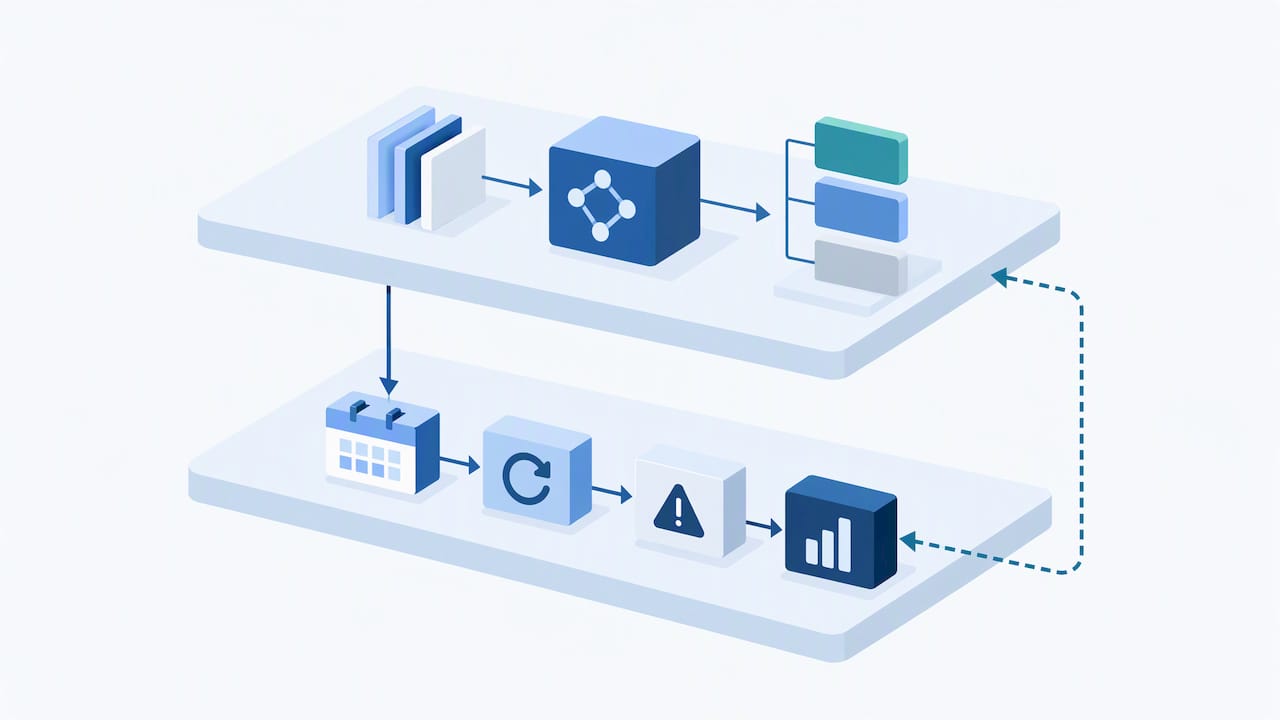
Apache Airflow illustrates what a mature orchestration layer looks like: a Python-based platform for authoring, scheduling, and monitoring workflows, commonly used to coordinate retries, templating, and integrations across cloud providers. Whether or not you adopt Airflow specifically, the pattern it represents, which is treating each workflow as a defined graph of tasks with built-in retry logic and logging, is worth replicating in any production automation.
Underneath orchestration, a dependable workflow needs:
- Data pipelines that clean, normalize, and route information to the right model or agent without manual handoffs.
- Model serving infrastructure that can scale with transaction volume and swap models without rewriting the workflow.
- API-first connectors to the systems of record, such as a CRM, ERP, or document store, rather than brittle screen scraping.
- Observability tooling that logs every decision an agent makes, so you can audit outcomes after the fact.
The decision between off-the-shelf orchestration tools and fully custom agent engineering depends on how standardized your process is. A process that looks like dozens of other companies’ versions of the same task, like basic ticket routing, often fits an existing orchestration platform with light customization. A process shaped by your own systems, data formats, and edge cases usually needs purpose-built agents designed around your actual operations, which is where custom agent development tends to outperform generic tooling.
Tooling and Workflow Patterns From Recent Agentic Research
Agentic workflows, where multiple specialized AI agents coordinate on a task rather than relying on a single model to do everything, are moving from research papers into production systems, and two recent lines of work are worth understanding before you buy or build.
AFlow reports a 5.7% average improvement over baseline workflows on benchmark datasets by using automated search to refine agent workflows, according to the AFlow research. The approach models a workflow as a graph of connected tasks and uses a search process to iteratively improve it, which also lowers inference cost enough that smaller, cheaper models become viable for tasks that once required larger ones.
A related approach described in FlowBank research tackles a different problem: instead of searching for one ideal workflow, it precomputes a portfolio of diverse candidate workflows and matches each incoming query to the best-fitting member of that portfolio. That recovers much of the adaptivity of building a custom workflow for every query type, at a fraction of the runtime cost of generating one from scratch each time.
For operations leaders evaluating a vendor or an internal build, both approaches point to the same checklist:
- Ask whether the system maintains a portfolio of workflow variants rather than a single rigid path.
- Ask how the system selects which workflow variant handles a given query or transaction.
- Ask what monitoring exists to catch a workflow variant that starts underperforming.
- Ask how new workflow variants get added as your processes change.
A system that can only run one fixed workflow will struggle as your transaction mix diversifies, which is exactly the gap this research is trying to close.
Pilot-to-Production Roadmap: Phases, Roles, and Timing
A workflow pilot that never reaches production wastes the organizational goodwill it took to get funded. A phased roadmap keeps momentum while building in the checkpoints governance requires.
- Preparation: audit the data behind your chosen process, align stakeholders on scope, and record a KPI baseline before anything changes. Skipping this step is the most common reason a pilot later can’t prove its impact.
- Phase 1, pilot (two to six weeks): build a minimum viable workflow or agent covering the core path, run it against real transactions in a controlled setting, and assign a named owner accountable for daily results.
- Validate and harden: add monitoring, error handling for edge cases the pilot surfaced, and the governance gates defined in your decision-rights mapping, including the go/no-go thresholds set in advance.
- Phase 3, scale (ongoing): connect the workflow to full orchestration, establish a center of excellence or clear operating model for future workflows, and transfer full operational knowledge to the internal team or retained partner.
Each phase needs its own timebox and exit criteria rather than an open-ended “see how it goes” mandate. Phase 0 ends when you have a documented baseline and a signed-off process brief. Phase 1 ends when the pilot hits its predefined KPI threshold on a representative sample of real transactions, not a cherry-picked batch. Phase 2 ends when the error rate stays below the agreed threshold for a sustained run, typically two to four weeks of live traffic. Phase 3 has no fixed end since scaling is a continuous operating model, but it should include a quarterly review of which workflows are candidates for the next wave.
Pro Tip: Treat the Phase 1 to Phase 2 transition as the real go/no-go moment. A pilot that looks good on a curated demo but hasn’t run against messy, real-world exceptions isn’t ready to harden, let alone scale.
Named ownership matters at every phase. A pilot with no single accountable person tends to drift: nobody notices when accuracy slips, nobody escalates when the vendor’s roadmap changes, and nobody owns the decision to retire a workflow that’s stopped earning its keep. Naming that owner in Phase 0, not after launch, is one of the cheapest risk controls available.
How to Measure Impact and the Economics of AI Workflows
Measurement has to start before the pilot, not after, because you need a baseline to know whether anything improved. Core KPIs worth tracking from day one include time saved per transaction, throughput (transactions processed per period), error rate, cost per transaction, cycle time from trigger to completion, and the downstream business KPI the process ultimately serves, such as customer response time or claims turnaround.
| KPI category | What it measures | Typical data source |
|---|---|---|
| Time saved | Hours of manual work removed per transaction | Time tracking, before/after process logs |
| Throughput | Transactions processed per day or week | Workflow orchestration logs |
| Error rate | Percentage of outputs requiring human correction | QA review samples |
| Cost per transaction | Fully loaded cost divided by volume | Finance and operations records |
| Cycle time | Elapsed time from trigger to completion | System timestamps |
Instrumentation should log every step an agent takes, not just the final output, so you can trace exactly where an error originated when one shows up in QA review. Regular operational reports and executive summaries keep leadership informed without drowning the team in dashboards nobody reads.
On the economics, McKinsey’s research on operations leaders notes that the barrier to entry for AI implementation has dropped as MLOps tooling, cloud applications, and micro-vertical solutions mature, which means payback periods that once required large internal platform teams are now reachable through focused partnerships paired with internal capability building. Leaders tend to pair executive sponsorship with external partnerships and real data investment, a combination that shows up directly in the 3.8x performance gap over slower-moving peers.
Stewardship: Managing Human and AI Teams Together
The organizations getting the most out of automation treat their AI agents the way they’d treat a capable junior employee: given real responsibility, but coached, monitored, and corrected rather than left unsupervised. MIT CISR research frames this directly, recommending a named human business owner responsible for an agent’s performance the same way a manager is responsible for a new hire’s ramp-up.
A real risk worth naming is what practitioners call “AI workslop,” the habit of letting AI output fill in a gap without anyone verifying that the underlying work actually makes sense, a pattern tracked by researchers at gmfus.org as eroding both quality and the learning employees would otherwise gain from doing the work themselves. Auditing outcomes regularly, not just checking that the workflow ran, is the countermeasure.
A workable role list keeps this manageable:
- Business owner: accountable for the workflow’s results and the first point of escalation.
- MLOps or data engineer: maintains the pipelines and model infrastructure behind the scenes.
- Center of excellence lead: coordinates patterns and lessons across multiple workflows.
- Compliance owner: confirms the workflow still meets its governance and regulatory obligations.
Pro Tip: Schedule a quarterly review for every live agent asking one blunt question: is this still earning its keep, or is it quietly coasting on last year’s approval?
How We Approach Production-Grade AI Workflow Engagements
We start every engagement with strategy before a single line of code: mapping your highest-value processes against the same volume, risk, and reversibility criteria outlined above. From there, we build custom agents and orchestration tailored to your actual systems rather than forcing your process into a generic template.
Rollout happens under the governance structures covered in this guide, with named owners, defined thresholds, and monitoring built in before launch, not bolted on afterward. We treat capability transfer as part of the deliverable, not an afterthought, so your team understands and can maintain what we build together.
What that means for you as a leader evaluating a strategic partner: expect measurable outcomes tied to the KPIs you care about, a named point of accountability on both sides, and documentation thorough enough that the workflow doesn’t become a black box the moment the engagement ends.
— Syed Naveed Abbas
How POW IT UP Can Help You Automate With Confidence
We design, build, and deploy custom AI agents and automation systems for operations teams who would rather partner with engineers than stitch together generic tools themselves. Our AI Agents Development service covers the custom build work described throughout this guide, from pilot through governed rollout, while our AI Integration and AI Automation services connect those agents to the systems you already run on.
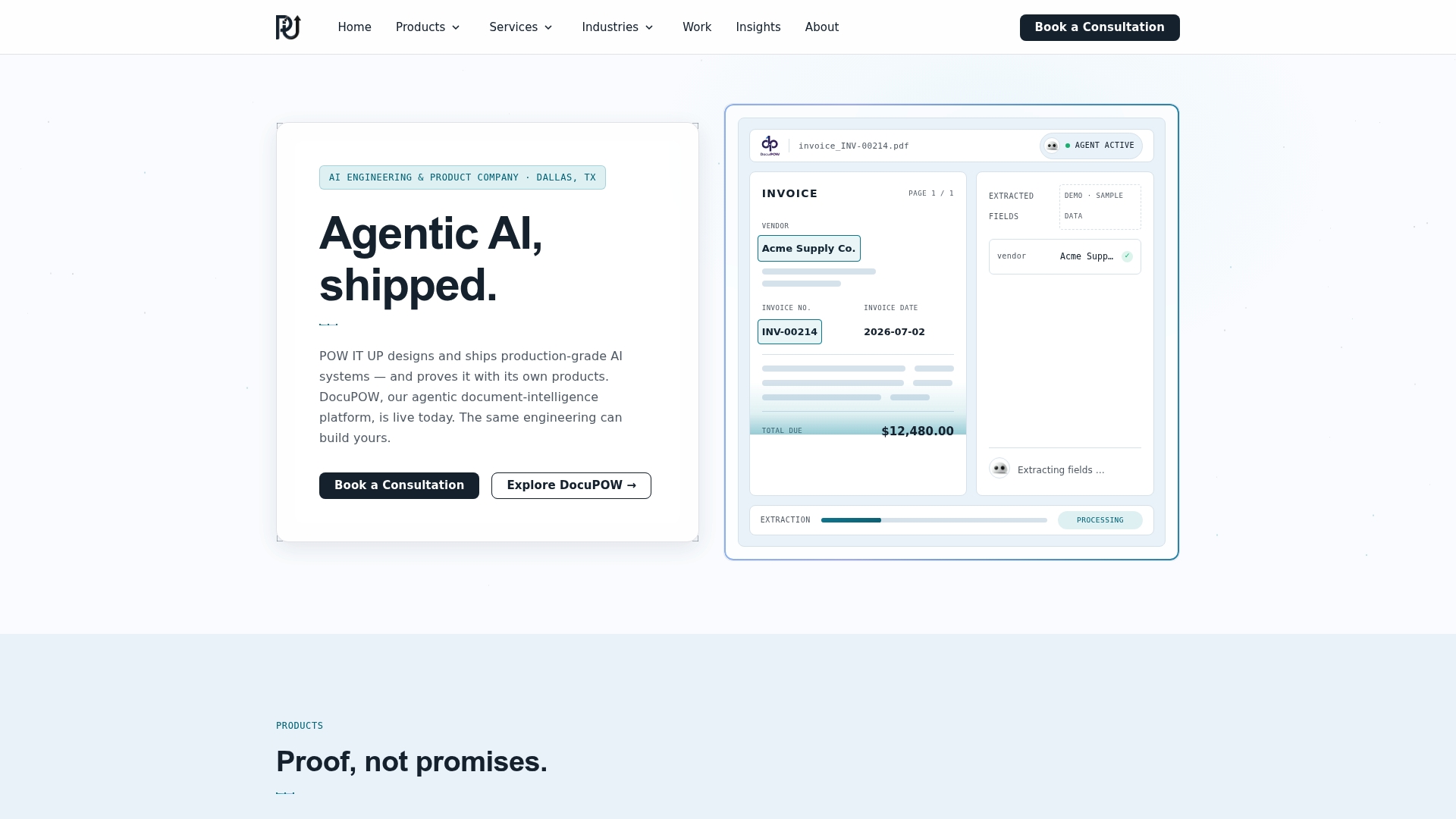
For document-heavy processes specifically, DocuPOW is designed to read and validate documents automatically, a product you can see in action rather than take on faith.
A few ways to start:
- Request a demo of DocuPOW to see document-reading automation.
- Book a discovery call to scope a pilot around your highest-priority process.
- Ask about a fixed-scope pilot engagement with the governance structure this guide describes built in from day one.
If you’re also weighing frontline task verification or human-in-the-loop approval design alongside your automation plans, tools like Bossy’s workforce analytics platform and Otto’s human-in-the-loop guidance are worth a look as complementary pieces. When you’re ready to talk about the engineering itself, reach out to our team and we’ll walk through what a pilot could look like for your operation.
FAQ
How can I improve my workflow?
Start by mapping your process against volume, repeatability, and risk, then automate the highest-volume, lowest-risk steps first with a named owner and measurable KPIs. Running a short one to two week process scan before building anything prevents wasted effort on the wrong candidate.
Does AI actually improve efficiency?
Evidence suggests it can, though results vary by how well governance and data investment are handled. McKinsey finds AI adoption leaders show a 3.8x performance improvement gap over lower-performing peers, a gap tied as much to executive sponsorship and collaboration as to the technology itself.
Will RPA be replaced by AI?
Traditional rules-based robotic process automation (RPA) is increasingly being paired with or extended by AI agents that can handle unstructured inputs and ambiguous decisions that rigid RPA scripts cannot. Rather than a clean replacement, most operations teams are layering agentic AI on top of existing RPA for the tasks that need judgment, while keeping RPA for the fully deterministic steps.
What is AI optimization called?
The practice commonly goes by several names, including AI workflow optimization, agentic workflow optimization, and intelligent process automation, depending on whether the focus is on a single model, multi-agent coordination, or full end-to-end automation. Research like AFlow refers to this specific problem as automated agentic workflow generation.
What does POW IT UP offer for AI workflow projects?
We offer custom AI agent development, AI integration, and AI automation services, along with productized tools like DocuPOW for document reading and validation. Current prices are on our website.
Sources
- Mitsloan
- Artificial Intelligence Risk Management Framework: Generative Artificial Intelligence Profile
- AFlow: Automating Agentic Workflow Generation
- Apache Airflow