
Intelligent scaling means your volume grows while your headcount, error rate and management overhead do not grow with it. Automation gets you there only when it is built as an operating model: shared components, clear limits on what agents may do, and a record of every decision they make. A pile of isolated scripts and pilots will not do it. This guide explains how to build that model, where it breaks, and how to start in the next quarter.
It is written for founders, COOs and operations leaders at service firms, fintechs, healthcare practices, agencies and logistics companies. These are businesses where work arrives in documents, emails and tickets, and where every new client has traditionally meant another hire.
TL;DR
- Scaling through automation fails when each automation is a separate project. It works when automation is treated as a platform with an owner, reusable parts and a backlog.
- “Intelligent” means the system reads context (documents, history, exceptions) and decides within limits, instead of only moving data from A to B.
- Guardrails are what make scale safe: budget limits, permission boundaries, audit trails and human review only for high-impact actions.
- Regulated sectors carry extra duties. US healthcare and California insurers already face AI rules you must design for from day one.
- Start with one high-volume process, measure it, then reuse the parts for the next one.
Table of Contents
- What intelligent scaling actually means
- Why most scaling attempts stall after the pilot
- The five-layer model we use for scalable automation
- Governance is what lets you go faster
- Regulated sectors: design for the rules now
- Where intelligent automation pays off first
- Our perspective: scale the system, not the staff
- A 90-day plan to start
- Mistakes that quietly cap your scale
- How POW IT UP can help
- FAQ
- Sources
What intelligent scaling actually means
Traditional automation follows fixed rules: if field X equals Y, send Z. It is fast and cheap, and it breaks the moment an invoice arrives in a new layout or a client writes an email in an unexpected way. Intelligent automation adds models that can read unstructured input, classify it, extract what matters and route the exceptions to a person. The ActiveBatch overview describes intelligent automation as IT automation that uses machine learning and AI, which is a fair short definition, though it undersells the operational side.
Scaling is the second half. A process scales when doubling the input does not double the cost. For that to be true, three things must hold:
- The routine path runs without people. Most items, typically the clear majority, flow straight through.
- Exceptions are cheap to handle. A person sees the odd case with context, not a raw queue.
- Failure is visible. When the system is wrong, you find out in minutes from a dashboard, not in a month from a client.
If any of the three is missing, volume growth simply moves the pain: from data entry to firefighting.
Why most scaling attempts stall after the pilot
The common pattern is familiar. A team builds a clever workflow for ticket routing or invoice intake, it works in the demo, and then maintenance eats the gains. Practitioners in public forums describe it bluntly: the “set and forget” promise does not survive contact with real data, and someone ends up babysitting the workflow.
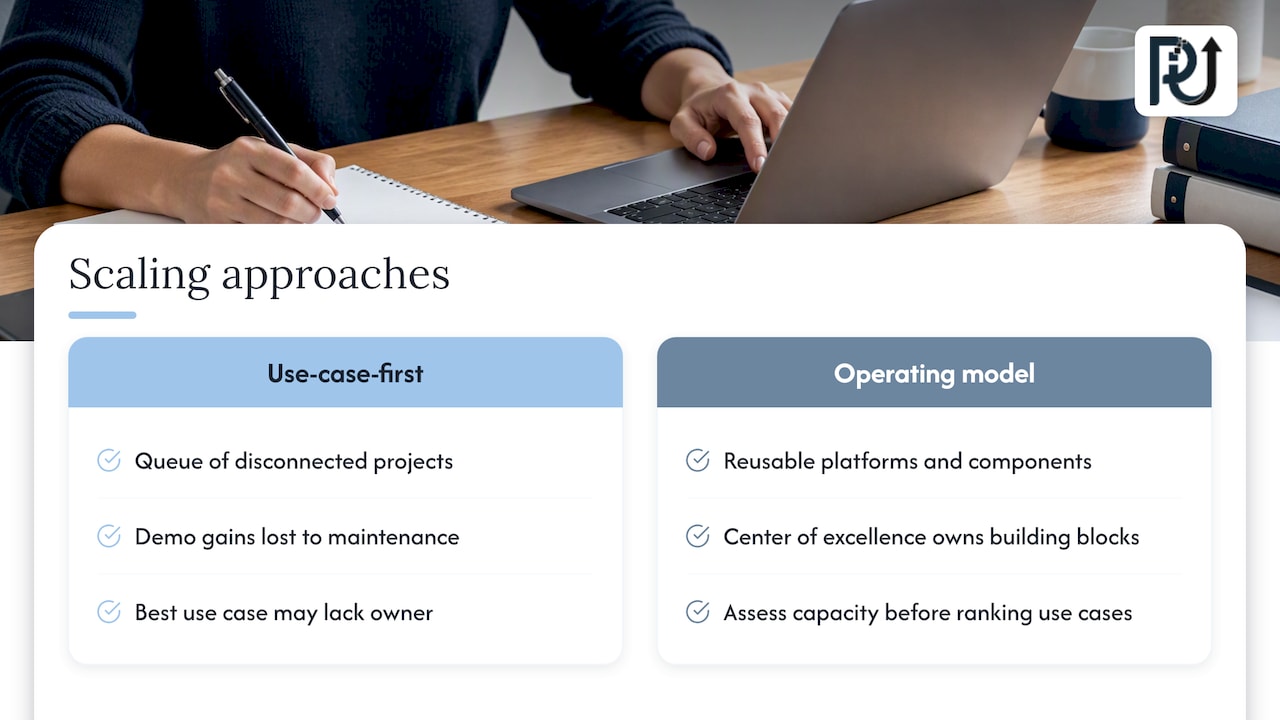
The structural reason is the frame. One analysis argues that enterprises fail at scaling AI by adopting a use-case-first frame, treating automation as a queue of disconnected projects. Organizations that succeed treat it as a change in operating model. They create a center of excellence that behaves like an internal product team and owns platforms and reusable components instead of fielding one-off requests. The same piece suggests assessing organizational capacity, including executive sponsorship, before ranking use cases. That is a point worth taking seriously: the best use case in the world stalls if nobody owns it.
For a 40-person services firm, “center of excellence” sounds grand. In practice it is one accountable person, a short list of approved building blocks (document intake, a validation step, an approval step, a logging layer) and a rule that new automations reuse them. We cover the mid-sized version of this in our guide to engineering steps past the pilot.
The five-layer model we use for scalable automation
Here is the structure we recommend when a business wants to grow volume without growing headcount in proportion.
| Layer | What it does | Example in a service business |
|---|---|---|
| Intake | Captures work from email, portals, PDFs, forms | Client sends a signed engagement letter and tax documents |
| Understanding | Reads, classifies, extracts, validates | Fields pulled from documents and checked against records |
| Decision | Applies business rules and model judgment within limits | Approve, reject or escalate based on thresholds |
| Action | Writes to your systems, sends messages, updates records | Creates the client file, schedules onboarding |
| Oversight | Logs, monitors, alerts, rolls back | Dashboard of volumes, exceptions, error trends |
Most failed projects build the middle three layers and skip the first and last. Intake is where messy reality enters, and oversight is what lets you trust the rest at ten times the volume.
Build the reusable parts once
The reason the second automation costs a fraction of the first is reuse. A document-reading component that works for invoices can be pointed at intake forms, contracts or claims attachments. An approval step built for one workflow becomes a library item. If your vendor or team rebuilds these every time, you are paying the use-case-first tax. We go deeper on this in five rules for scaling AI process engineering.
Keep humans where they add value
Not every action needs approval, because that would defeat the purpose. The sensible rule, as one agentic AI risk guide puts it, is that high-impact decisions such as financial commitments above a threshold, data deletion or external communications should have human review, while routine actions run unattended. Set the threshold in dollars or consequence, write it down, and revisit it quarterly as trust builds.
Governance is what lets you go faster
Leaders sometimes hear “governance” and picture a committee that slows everything. The research points the other way. Analysis of scaling organizations suggests the leaders use the NIST AI Risk Management Framework as their core operating loop, working through its four functions (Govern, Map, Measure, Manage) as a standard for verifiable scaling, not only as a compliance exercise. If you want a plain-language walkthrough of how those four functions help you decide what to test first in an AI risk assessment, that is a practical companion to this section.
For autonomous agents specifically, three controls matter most.
Circuit breakers
Agents should suspend automatically when they reach a token budget limit, cross an anomaly threshold or attempt to call an API that is not approved. The same risk guidance says relying on a model’s internal alignment training is not enough: treat capable agents as untrusted entities and wrap them in network and permission boundaries. In plain terms, give each agent the minimum access it needs, the way you would a new contractor.
Audit trails for every action
Governance is not the same as manual oversight. Effective “Manage” functions rely on real-time dashboards, automated rollback playbooks and a decision audit trail for each agent action. That record is what lets you tell after an incident whether the cause was a system failure, model drift or a logic-layer injection, as described in work on NIST-aligned governance for agentic AI. Without it, you can only guess.
Tiering by risk
Not every automation deserves the same scrutiny. Inventory what you run, tier it by consequence, and apply heavier controls to the top tier. The governance framework above lays out a sequence that takes weeks, not quarters, which is realistic even for a small operations team.
Regulated sectors: design for the rules now
If you operate in healthcare or insurance, scaling automation means scaling your exposure to AI-specific rules too.
- Healthcare. Under Section 1557 of the Affordable Care Act, covered entities must address discrimination risks in patient care decision support tools. According to HHS Office for Civil Rights guidance, the obligation took effect May 1, 2025 and covers tools that use inputs such as race, color, national origin, sex, age or disability. Mitigation includes regular audits and staff training on tool bias. If you run a practice, confirm with your compliance counsel which of your tools are covered.
- Insurance in California. The state’s Department of Insurance has issued guidance on SB 1120 covering AI and algorithms in utilization management, dated May 5, 2025. Insurers and plans should read it with their legal team before automating utilization decisions.
The practical lesson is the same everywhere: log decisions, keep a human on consequential calls, and be able to show how a result was produced. Those are the same controls that make automation safe in an unregulated business, so building them early costs little.
Where intelligent automation pays off first
Pick processes with high volume, repeatable structure and a document or message at the start. Typical candidates:
- Client onboarding. Collect documents, validate them, create records, trigger the first meeting. One marketing automation firm shows how automated client onboarding for service firms can reclaim hours from each new engagement.
- Document intake and validation. Invoices, statements, forms, claims attachments, contracts.
- Task assignment and routing. Matching incoming work to the right person by skill and load. See how to automate employee task assignment.
- Portfolio and client health monitoring. Watching accounts for signs of churn or risk, and surfacing them before a client calls to complain.
- Reporting and costing. Pulling data from several systems into one view, without a week of spreadsheet work each month.
For worked examples with the numbers behind them, read our piece on service business ROI from automation.
Decide with AI, do not hand it the keys
A useful principle in sales and wholesale applies everywhere: AI should inform decisions rather than make them where judgment and relationships matter. Use agents to prepare the facts, rank the options and draft the action. Let people approve what is expensive, irreversible or sensitive.
Our perspective: scale the system, not the staff
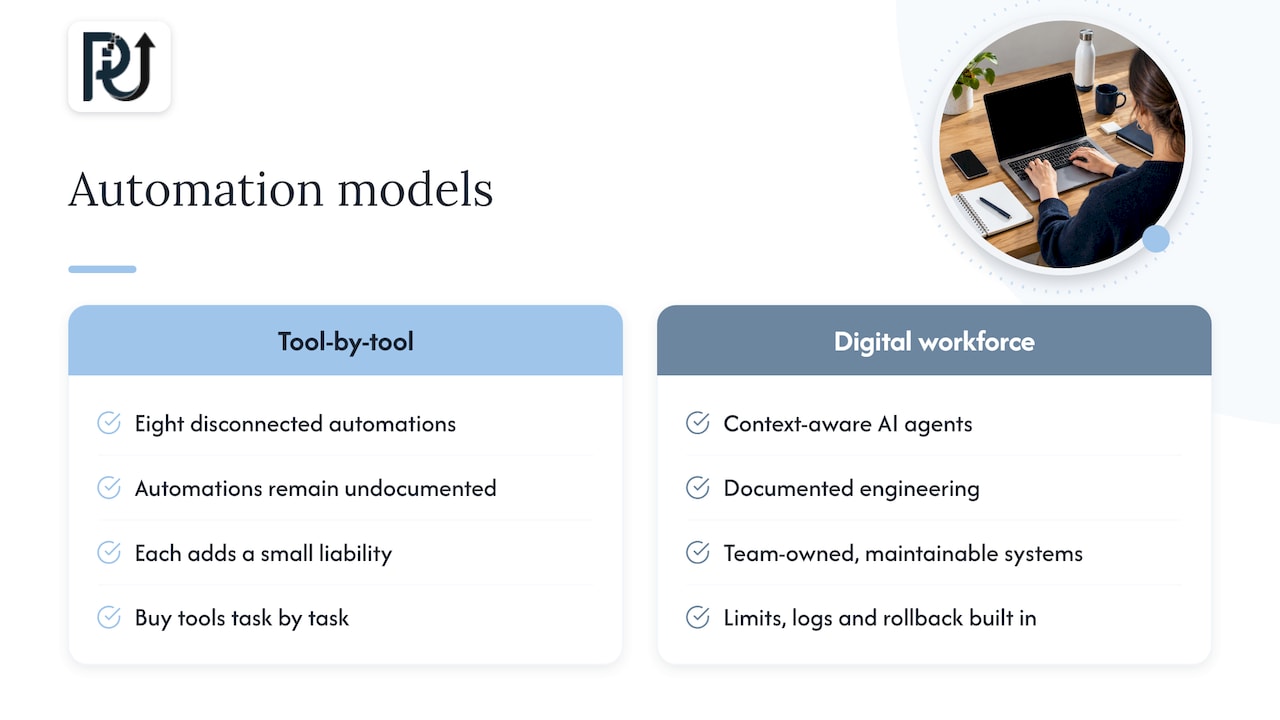
We see the same mistake across the businesses we talk to. Leaders buy a tool, automate one task, feel the gain, then buy another tool. A year later they own eight disconnected automations, none of them documented, and each one a small liability. The result is not a scalable company. It is a more complicated one.
Our approach at POW IT UP is to design what we call a digital workforce: context-aware AI agents that handle high-volume transactional work, built on documented engineering rather than generic scripts. Three commitments shape how we work. First, we hunt for the “time leaks”, the places where skilled people spend hours on work that needs no judgment. Second, we build systems that your team can maintain and that you own, with transparent processes, so you are never held hostage by a black box. Third, we treat oversight as part of the build, not an add-on: limits, logs and rollback exist from the first release.
We also believe the headcount question is framed wrongly. The goal is not fewer people. It is that your best people stop doing keystroke work, and that a surge in volume stops being a hiring emergency. The firms that get this right grow their revenue per employee and keep their quality, because the system does not tire at month-end.
If you want the longer version of this argument, our practical playbook for scaling businesses with AI and our case for why service businesses need AI architects lay it out.
— Syed Naveed Abbas
A 90-day plan to start
You do not need a transformation program. You need one process, one owner and one measure.
Days 1 to 15: choose and baseline
List your five highest-volume repetitive processes. For each, record monthly volume, minutes per item, error or rework rate and who touches it. Pick the one where volume is climbing and the data arrives as documents or messages. Name a single owner with authority to change the process.
Days 16 to 45: build the thin slice
Build intake, understanding and oversight first, with action limited to creating drafts or recommendations. Run it alongside the human process. Compare outputs. Tune thresholds on real items, not samples.
Days 46 to 75: go live with limits
Let the system act on the routine path. Keep human review on anything above your consequence threshold. Switch on dashboards, alerts and the decision log. Write the rollback playbook and test it once.
Days 76 to 90: measure and reuse
Report the same four numbers you captured at baseline. Then list which components the next process can reuse. That list is the real return of the first project, because it shortens every project after it.
Mistakes that quietly cap your scale
- Skipping the baseline. Without before-numbers, you cannot prove anything, and the budget for the second project disappears.
- No owner. Automations without an accountable person drift until they fail.
- Automating a broken process. Standardize first. Service firms that do this get far more from automation, as we explain in our guide to standardizing with AI.
- Unlimited agent access. Broad credentials turn a small bug into a large incident.
- Treating governance as paperwork. Our look at AI workflow optimization and governance shows why the controls are part of the return, not a cost against it.
How POW IT UP can help
If you have a process that is growing faster than your team, we can scope it with you. Our AI automation and AI agents development work covers custom builds with the oversight layer included, and our AI integration service connects agents to the systems you already run. For document-heavy work, DocuPOW reads and validates documents, and a live demo is available so you can test it on your own files. Pricing is scoped to your project, so start with a conversation.
FAQ
What is the difference between automation and intelligent automation?
Standard automation follows fixed rules and fails when input varies. Intelligent automation adds machine learning and AI so the system can read documents, interpret messages and decide within limits, with exceptions routed to a person. That makes it suitable for messy, high-volume work like intake and validation.
Can I scale operations without hiring more people?
Yes for the routine, repeatable parts of the work, as long as exceptions and oversight are designed in. You will still need people for judgment, relationships and approvals on high-impact actions. The aim is for volume growth to stop translating one-to-one into hires.
How do I keep autonomous AI agents safe?
Give each agent minimum permissions, set budget and anomaly limits that suspend it automatically, and keep a log of every action. Require human approval above a defined consequence threshold, such as large financial commitments or deleting data. Review the limits regularly.
Do AI rules apply to my business?
That depends on your sector and state. Healthcare providers face nondiscrimination duties for AI decision support under Section 1557, and California insurers have SB 1120 obligations in utilization management. Ask your compliance counsel which of your tools are covered before you scale them.
Where should a small company start?
Choose one high-volume process whose input is documents or messages, record its baseline, and automate the routine path with human review on exceptions. Measure for 90 days, then reuse the components on the next process.
Sources
- The Use-Case-First Frame Is the Failure
- Agentic AI Risk Management: How to Govern Autonomous AI Systems
- Enterprise AI Governance Framework: The Working Version
- AAGATE: A NIST AI RMF-Aligned Governance Platform for Agentic AI
- Ensuring Nondiscrimination Through the Use of Artificial Intelligence (HHS OCR)
- CDI Guidance on SB 1120
- AI Risk Assessment: Use NIST’s 4 Functions to Choose What to Test
- Automated Client Onboarding for Service Firms
- Why AI Should Inform Wholesale Decisions Not Make Them