

You scale revenue without scaling headcount by taking work off your people that does not need a person, then pointing the freed time at the work that does. In practice that means three moves: find the high-drag tasks that eat selling and delivery hours, automate the ones with clear inputs and outputs, and measure revenue per employee instead of total activity. At POW IT UP we build custom digital workforces of context-aware AI agents for exactly this job, so the steps below come from how we approach it.
TL;DR
- Headcount-linked growth stalls because every new dollar of revenue needs new hands for admin, research, data entry and handoffs. Remove that work and capacity opens up without a hire.
- McKinsey found that top sales performers open up about 20% more sales-team capacity by offloading and automating non-selling work.
- Start with tasks that have clear inputs and outputs: document intake, CRM updates, account research, routing and follow-up. Leave judgment-heavy, customer-facing moments to people.
- Pilot one workflow, set success metrics before you start, keep human oversight in place, and only then scale.
- Track revenue per FTE, cost-to-serve, cycle time and intervention rate, not the number of automations you have switched on.
Table of Contents
- Why growth stalls when it is tied to payroll
- Step 1: Find the work that drags your team
- Step 2: Decide what to automate and what to augment
- Step 3: Offload non-selling work before you hire
- Step 4: Build it so people can trust it
- Step 5: Pilot one workflow, then scale
- Step 6: Measure revenue per person, not activity
- What to expect, honestly
- Where this works best
- Work with POW IT UP
- Our perspective
- FAQ
- Sources
Why growth stalls when it is tied to payroll
Most companies grow linearly. A new client needs onboarding, which needs paperwork, which needs someone to read it, key it in, check it and chase what is missing. Add ten clients and you add a fraction of a person. Add a hundred and you hire a team. Margins stay flat because cost rises with volume.
The problem is rarely that your people are slow. It is that skilled people spend a large share of their week on work that does not use their skill. The sales side shows it clearly. McKinsey’s research on sales productivity reports that top performers lower cost-to-serve by an average of 10% to 20% and increase revenue per sales FTE by an average of 3% to 15% by focusing sales engagement on the most valuable opportunities.
The same logic applies outside sales. In a fintech back office, an accounting firm, a healthcare practice or a logistics desk, the constraint is the number of transactions a person can process in a day. If you change that number, you change the growth curve.
Step 1: Find the work that drags your team
You cannot automate what you have not mapped. Before you buy or build anything, pick one end-to-end flow that matters to revenue, such as lead to signed contract, order to cash, or application to decision. Then trace every step, handoff and decision, and mark which time is active work and which is waiting.
Gartner’s Redefining Revenue Growth material gives a useful frame for sales organizations. It says to isolate sales productivity from seller performance, map high-drag tasks such as account prioritization, research synthesis and value messaging to buyer outcomes, and set new productivity baselines and KPIs that capture units of work.
In plain terms, do this:
- List the recurring tasks in the flow, and who does each one.
- Count the units. How many documents, quotes, tickets or updates per week? A task done 400 times a week is a different problem than one done 12 times.
- Note the wait states. Look for the queue that keeps building: proposals waiting on costing, orders waiting on a scarce specialist, files waiting for review.
- Treat a queue as a clue, not a verdict. A pile of waiting work tells you where to look. The cause may sit one step upstream.
- Set a baseline for time per unit, error rate and cost per unit, so you can prove the change later.
This audit is the cheapest part of the project and the one most teams skip. It is also where “time leaks” show up: small, repeated losses that no one owns because each one looks minor.
Step 2: Decide what to automate and what to augment
Not every task should be handed to software, and not every task should stay with a person. The useful split is automate versus augment.
- Automate tasks with clear inputs, clear outputs and rules you can state: reading and validating documents, updating records, routing requests, generating status reports, scheduling follow-ups.
- Augment tasks where judgment matters: AI drafts, scores or summarizes, and a person decides.
BCG’s 2026 survey of sales leaders supports this split. It reports that AI deployment is more advanced in tasks with clear inputs and outputs, such as data entry, CRM updates and account research, while adoption stays lower in customer-facing and judgment-heavy parts of the sales process. Gartner’s examples of augmentation point the same way: AI-led account scoring, research aggregation and draft messaging, with investment aimed at core processes rather than peripheral tasks.
A quick scoring grid helps. Rate each candidate task from 1 to 5 on volume, rule clarity, cost of an error and revenue impact. High volume, high rule clarity and clear revenue impact go first. Tasks where an error is expensive can still be automated, but with a human check built into the flow.
| Task type | Example | Approach |
|---|---|---|
| High volume, clear rules | Reading invoices, applications, claims or contracts and validating fields | Automate end to end, with exceptions routed to a person |
| Repetitive, research-heavy | Account research, lead enrichment, pipeline hygiene | Automate the gathering, let a person act on it |
| Judgment-heavy, high stakes | Pricing exceptions, negotiations, sensitive client conversations | Augment with drafts and summaries; a person decides |
| Relationship work | Executive calls, renewals, complex discovery | Keep human, and give people more time for it |
Step 3: Offload non-selling work before you hire
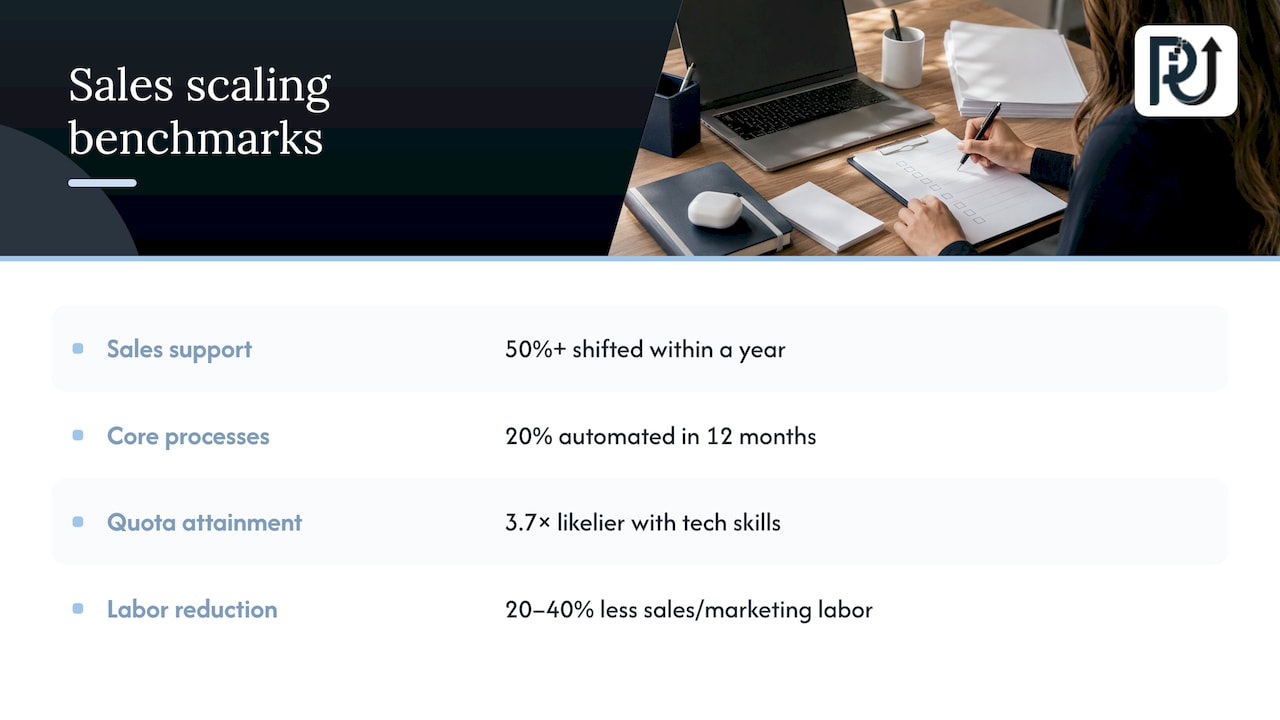
If your question is how to scale a sales team without adding headcount, the answer starts with where the team’s hours go. McKinsey’s recommendation is concrete: cut the three most wasteful non-customer-facing tasks and redirect them to a sales support function or a shared services center, with a plan to shift 50% or more of sales support activities within a year. It also suggests a roadmap to automate 20% of core sales processes over the next 12 months, with leaders held accountable for specific ROI gains.
That shared-services idea does not have to mean a new department. For a small or mid-sized company, a digital workforce can play that role. Agents handle proposal assembly, data entry, document checks and handoffs. The reps sell.
The upside is not only capacity. Gartner reports that sellers with “tech-as-a-teammate” skills are 3.7 times more likely to hit quota. The tools matter, but how people work alongside them matters as much.
TSIA’s research on AI in revenue-generation workflows for technology companies recommends a four-phased framework and says organizations can realistically reduce sales and marketing labor by 20% to 40%. Read that as a range of what is possible when work is redesigned, not a promise for any one company. Your own baseline from Step 1 tells you where you will land.
If you are also working on the marketing side of the pipeline, the idea of proving one workflow before you scale applies there too: pick one repeatable process, show the gain, then widen it.
Step 4: Build it so people can trust it
The fastest way to lose the gains is to ship an agent no one can explain. Two pieces of 2026 research are worth keeping in view.
IMD’s perspective is that what is easy to prototype can be hard to scale, because accountability and auditability get difficult when agentic systems chain many model calls and tools. Its conclusion is that a structured workflow, with the language model as one component rather than full autonomy, is often where the strongest results come from.
Harvard Law School’s corporate governance forum warns about “agent washing”: overstating autonomy or revenue impact without substantiating what a system can measurably do or what human oversight it needs. The lesson for any buyer or builder is to describe what an automation does in measurable terms.
In practice, a trustworthy build has these traits:
- Defined scope. Each agent has a stated job, the systems it may touch and the actions it may take.
- Human checkpoints. Low-confidence or high-stakes cases go to a person with the context attached.
- Logs you can read. Every decision can be traced and audited.
- Rollback. You can pause or reverse the automation without halting the business.
- Ownership. The system is documented and maintainable, so your team is not locked out of it.
These are the principles behind how we engineer our systems: custom, context-aware automation rather than generic scripts, with transparent processes, durable client ownership and engineering accountability.
Step 5: Pilot one workflow, then scale
Pick the single workflow with the best score from Step 2 and run it as an experiment.
- Define success first. Choose three or four metrics before you start: time per unit, accuracy, how often a person has to step in, and a quality measure such as rework or client complaints.
- Run it in a controlled setting. Run the agent alongside the current process, or on a slice of volume.
- Review exceptions weekly. Every case a person had to fix is a rule to improve.
- Decide on evidence. If the metrics beat your baseline, widen the volume. If not, adjust the design before you add scope.
- Repeat on the next workflow. The second one is faster because the data, access and governance are in place.
This is where most do-it-yourself efforts stall. Connecting a tool to a document is easy. Making it hold up on the messy 15% of cases, with the audit trail a regulated business needs, is the engineering work. For a fintech lender, an insurance team or a healthcare practice, that is the difference between a demo and a system you can run daily.
Our AI Agents Development service builds that kind of custom agent. Our AI Integration work connects it to the systems you already run, so staff do not have to learn a new place to work.
Step 6: Measure revenue per person, not activity
The point of the exercise is a change in unit economics. Track these:
| Metric | What it tells you | Where to start |
|---|---|---|
| Revenue per FTE | Whether output is rising faster than payroll | Trailing 12 months, before the pilot |
| Cost-to-serve | Cost of handling one client, order or file | Total team cost divided by units processed |
| Cycle time | How long a unit waits and works | Timestamps from the flow you mapped |
| Capacity freed | Hours returned to selling or delivery | Hours saved per unit times volume |
| Intervention rate | Share of cases a person must touch | Exception log from the pilot |
| Error or rework rate | Whether quality held as volume rose | Your current QA sample |
For benchmarks, McKinsey’s figures are a reasonable ceiling to aim at: 10% to 20% lower cost-to-serve, 3% to 15% higher revenue per sales FTE, and about 20% more sales-team capacity. BCG’s survey adds a realistic early signal: 33% of sales leaders report reduced administrative workloads from early AI returns, and 18% report better forecast accuracy.
One caution on interpretation: freed time is only worth something if it goes somewhere. Decide in advance where the capacity goes, whether that is more outbound calls, faster onboarding, or taking on volume you used to turn away. Otherwise the hours disappear into the day.
What to expect, honestly
The same BCG survey puts adoption in perspective. Although 90% of sales leaders report meaningful AI use, only 13% name win rates as a top area of measurable AI impact, 14% report improved conversion, and 6% report autonomous, end-to-end deployment. Most companies are using AI widely and measuring it narrowly.
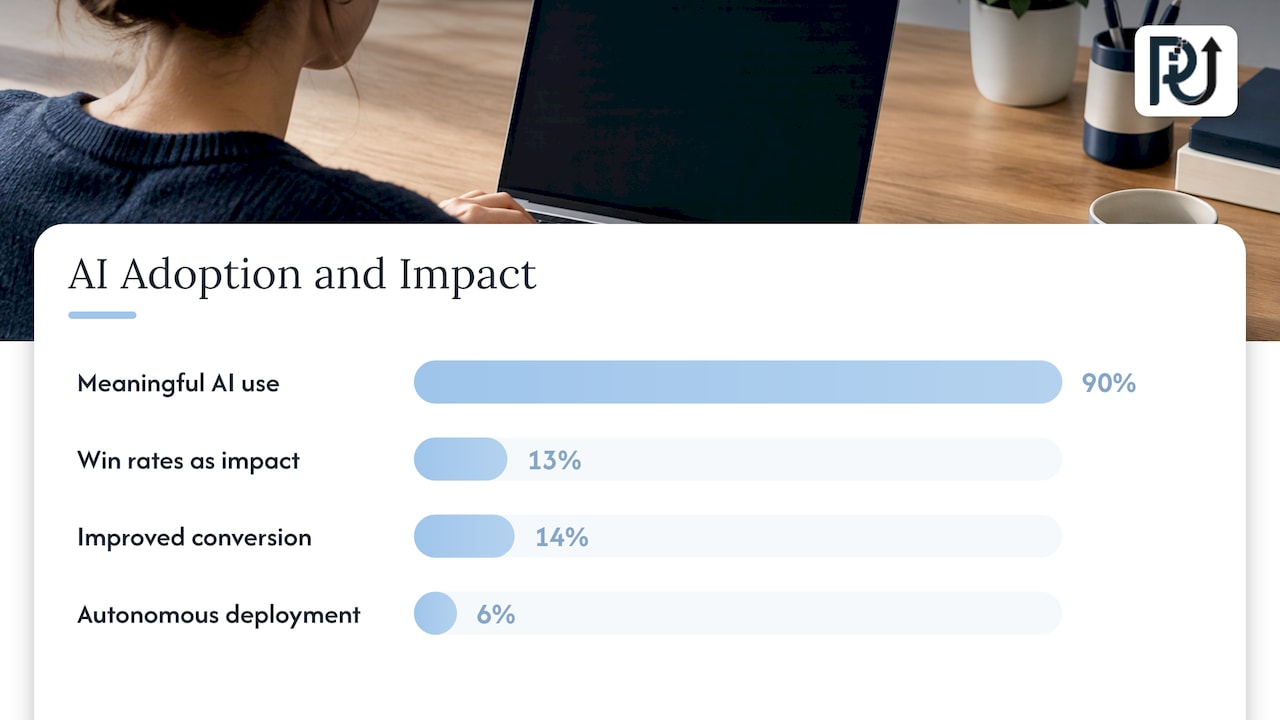
The companies pulling ahead are the ones that tie each automation to a number: hours, cost per unit, cycle time. Aim at administrative and processing work first, where gains are easiest to see and defend. Then move toward the revenue-facing steps as your data improves.
Where this works best
The pattern fits businesses whose growth is limited by transaction volume or document handling:
- Fintech and lending: intake, validation and decision support for applications. See our lender guide to AI automation of loan processing.
- Service businesses: scheduling, task assignment, reporting and client updates. Our write-up of service business ROI examples shows where the returns tend to come from, and our guide to automating employee task assignment covers one of the quickest wins.
- Accounting, insurance, logistics, healthcare practices: document-heavy flows where reading, checking and filing take most of the hours.
- E-commerce: order exceptions, support triage and catalog operations.
For the bigger picture on sequencing, our playbook for scaling businesses with AI and the five rules for AI process engineering go step by step through the operating model.
Work with POW IT UP
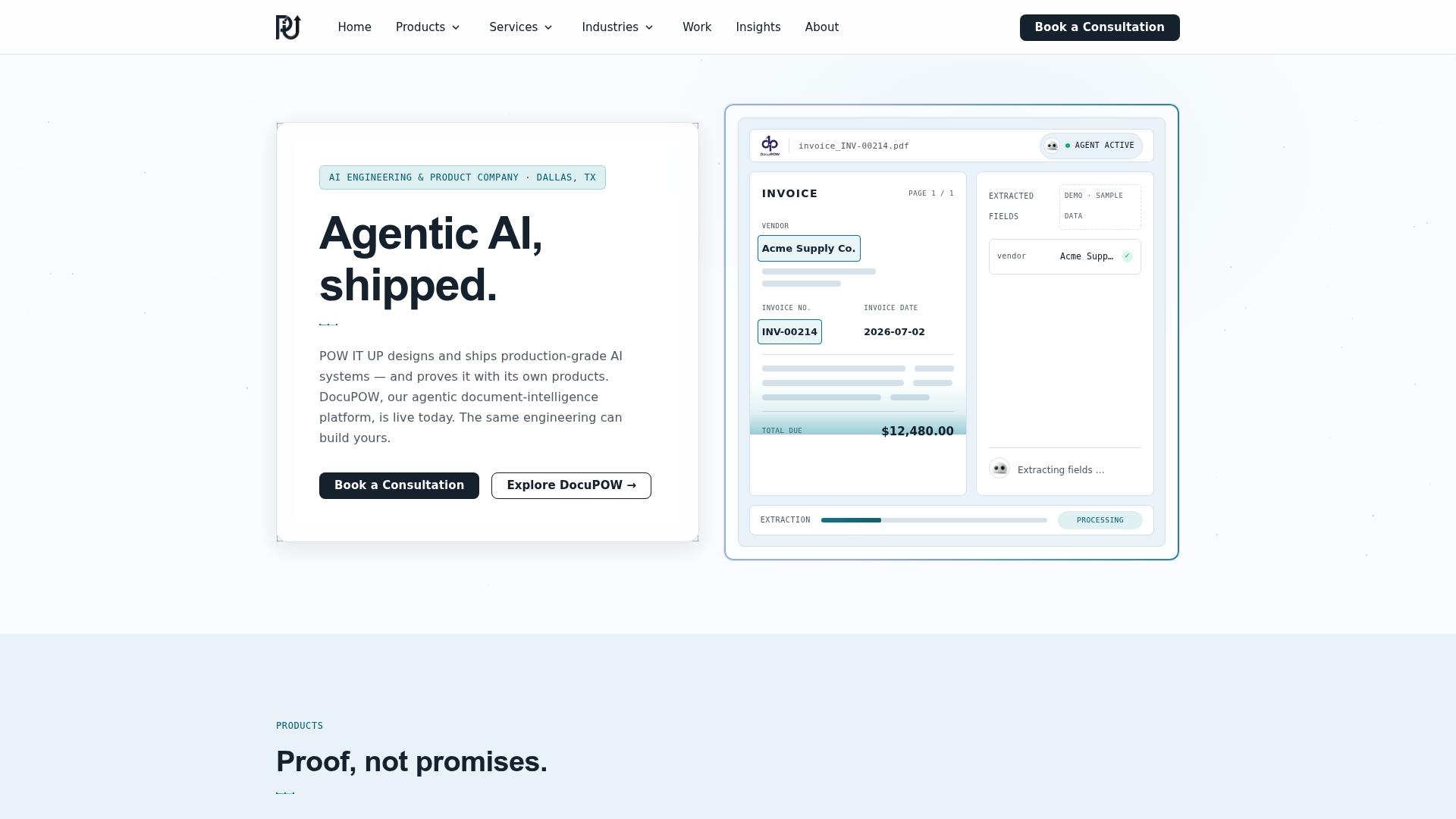
If the audit in Step 1 shows a document-heavy flow eating your team’s week, DocuPOW is our product for reading and validating documents, and it has a live demo you can see before you commit to anything. Where your process is more specific, we design and build custom digital workforces: autonomous, context-aware agents that handle high-volume transactional work so you can add volume without adding a matching number of hires. For portfolio monitoring and client health analytics, we also offer AuraPOW.
You can explore DocuPOW or see how our AI automation services work, and start with one workflow.
Our perspective
Most companies ask how many people they need to hire to hit next year’s number. We think the better question is how many hours of their current team’s week are spent on work that never needed a person.
We build digital workforces, not scripts. A script moves data from A to B and breaks when a field changes. An agent that understands context can read a document, check it against your rules, flag what does not fit and hand the exception to the right person. That is how processing volume grows without a matching rise in headcount.
We also believe the engineering has to be accountable. Systems should be documented, maintainable and owned by the client, with transparent processes, so you can see what they do and why. Products like DocuPOW exist so you can watch the work happen on real documents before you commit.
Start small. Pick the workflow with the most volume and the clearest rules, set your baseline, and let the numbers decide what comes next.
Syed Naveed Abbas
FAQ
Can you really grow revenue without hiring?
Yes, when headcount is not the real constraint. If skilled people spend much of their time on admin, research and data handling, automating that work frees capacity for selling and delivery. McKinsey reports that top sales performers open up about 20% more capacity this way. Hiring still has a place for relationship and judgment roles.
How do I scale a sales team without adding headcount?
Audit where reps spend their hours, then move the three most wasteful non-selling tasks to automation or a support function. McKinsey suggests a roadmap to automate 20% of core sales processes within 12 months. Reps then spend more time with qualified buyers, and you track revenue per rep to confirm it.
Which tasks should I automate first?
Start with high-volume tasks that have clear rules and clear outputs, such as document intake and validation, CRM updates, account research and routing. BCG’s survey finds AI deployment is most advanced in exactly these tasks. Keep sensitive, judgment-heavy conversations with people.
How long does it take to see results?
It depends on the workflow and your baseline. A single well-scoped pilot can show movement in time per unit and intervention rate quickly, because you measure against numbers you set before launch. Treat broader financial gains as something you confirm over a longer period, with the same metrics.
Do I need to replace my current systems?
No. Good automation connects to the CRM, accounting, document and communication tools you already use. Integration work is part of the build, so your team keeps working where it works today.
Sources
- How top performers outpace peers in sales productivity, McKinsey
- Redefining Revenue Growth, Gartner
- Deploying AI in Revenue Generation Workflows, TSIA
- How CROs Are Turning AI Into Sales Growth in 2026, BCG
- Agent Washing: Disclosure Risks in the Emerging Market for AI Agents, Harvard Law School Forum on Corporate Governance
- How a structured workflow can rein in AI’s rogue agents, IMD