

An AI-powered operational ecosystem is a connected set of AI agents, business data, existing software and governed workflows that run your operations together, instead of a pile of separate AI tools each starting from zero. The way to build one is to pick one rule-based, high-volume process, get its data ready, put an agent inside the workflow with human approval where it matters, measure against a baseline, and then add the next process on the same foundation. At POW IT UP we design and build custom digital workforces of context-aware AI agents for exactly this, so the sections below follow the order we would take with an operations leader.
TL;DR
- An ecosystem is an operating layer: software, data capture, feedback loops and governance between the models and the real work, not a collection of chat tools.
- Start with one clear-rule, high-volume, low-risk process such as invoice handling or case triage, and document a baseline before you build.
- Data readiness decides success: only four in ten companies say their data management is ready for AI.
- Build human approval, access control and an audit trail into the workflow from day one.
- Judge results on time saved, cost, throughput, accuracy and adoption, then expand process by process.
Table of Contents
- What an operational ecosystem actually is
- Choose the first process with discipline
- Fix the data before you build the agent
- Design the workflow, not just the agent
- Governance and human oversight
- Prove it in 30 to 60 days
- What mature systems return
- Our perspective
- Where to start with us
- FAQ
- Sources
What an operational ecosystem actually is
Most companies meet AI as a tool: someone opens an assistant, pastes in context, gets an answer, and closes the tab. Nothing is remembered and nothing flows into the next step. An ecosystem works the other way around.
MIT Technology Review describes the lasting enterprise advantage as owning the operating layer: the operation software, data capture, feedback loops and governance that sit between models and real work. In that setup every exception, correction and approval becomes a learning signal. A MindStudio explainer from May 2026 frames the contrast simply: separate tools are like standalone apps with no shared file system, while an operating system gives AI shared memory, integrations and logic, so any workflow can reach customer history, product catalogs and internal processes.
Four parts make up the layer:
- Agents that take actions, not just draft text.
- Data the agents can read and trust: CRM, accounting, ticketing, documents.
- Existing software connected through integrations, so people keep working in the systems they know.
- Workflows and governance: who approves what, what is logged, and how corrections feed back.
The practical consequence: the second automation you build costs less than the first, because the connections, data and rules already exist. That compounding is the reason to build an ecosystem rather than buy another point tool.
Choose the first process with discipline
The most common failure is starting with the most exciting use case instead of the most suitable one. Bessemer Venture Partners says a strong candidate has measurable ROI and a precisely defined, repeatable process your team has mastered, one an AI can execute safely without lowering quality. Salesforce points agents at work with clear rules, high volume, low risk and stable data, such as lead routing, case triage and internal access requests.
A quick screen for any candidate:
| Question | Good sign | Warning sign |
|---|---|---|
| Is the process written down? | Steps and exceptions are known | “Ask Maria, she knows” |
| Is volume high? | Hundreds of repeats a week | A few cases a month |
| Is the data stable? | Same fields, same systems | Free-form, scattered inputs |
| What does an error cost? | Cheap to catch and reverse | Legal or patient-safety impact |
| Can you measure it today? | Time and error counts exist | No baseline at all |
The same logic of starting with a low-risk, rules-based job shows up in other fields too; this piece on handling review replies safely is a small example of keeping a repeatable task inside clear rules.
Where the manual burden sits
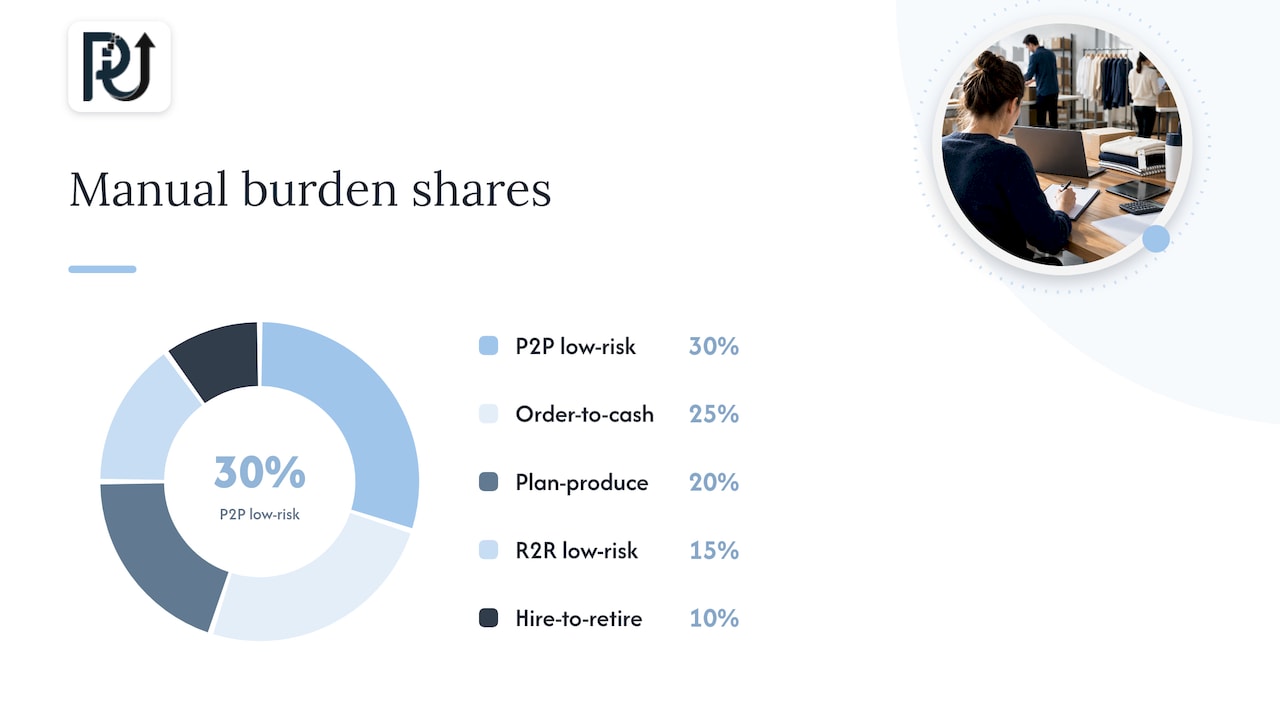
In manufacturing back offices, an AWS Builder Center guide estimates procure-to-pay at 30% of manual burden, order-to-cash at 25%, plan-to-produce at 20%, record-to-report at 15% and hire-to-retire at 10%. It recommends procure-to-pay and record-to-report as low-risk starting points. Treat those shares as a manufacturing illustration and a prompt to run your own count. A fintech lender, a healthcare practice and a Shopify brand will have different leaders on the list, but the pattern holds: the first targets are repetitive, document-heavy, rule-bound tasks.
If you want a menu of candidates, our guide to back-office tasks to automate in 2026 walks through the usual suspects.
Fix the data before you build the agent
Agents are only as reliable as what they read. MIT Technology Review reported in March 2026 that only four in ten companies believe their data management is ready for AI, down from 43% the year before in Deloitte’s State of AI in the Enterprise report, and that two-thirds of business leaders do not fully trust their data.
For your first process you do not need a company-wide data overhaul. You need:
- One source of truth per field. If customer status lives in three systems, decide which wins.
- Clean inputs at the door. Documents, emails and forms should be read and validated before an agent acts on them. This is the job of our DocuPOW product, which reads and validates documents.
- Access scoped to the task. The agent sees what the process needs, nothing more.
- A record of every action. You will need it for debugging, audits and learning.
Integration is the other half. Agents that cannot write back into your accounting, CRM or practice-management system create a new manual step instead of removing one. That is why we treat AI integration as part of the build, not an add-on.
Design the workflow, not just the agent
A useful agent sits inside a workflow with defined inputs, decisions, handoffs and exits. Map the process as it really runs, including the exceptions, before anyone writes a prompt.
- Map the current path. Record each step, who does it, how long it takes and where it stalls. Include the odd cases; they are where automations break.
- Split decisions by risk. Routine, reversible steps can be fully automated. Anything with money, health or legal consequences gets a human approval point.
- Define the exits. When the agent is unsure, it hands the case to a named person with the context attached, rather than guessing.
- Capture corrections. Each human override is data. Feed it back so the agent improves, which is the learning-signal loop the operating-layer idea depends on.
- Keep the system maintainable. Document the logic so your team can change a rule without rebuilding everything. Durable client ownership and transparent processes are how we approach this.
This is the difference between scripting a basic integration and building a context-aware agent. A script follows a fixed path and fails on the first surprise. An agent that understands the case context can route the surprise sensibly.
Governance and human oversight
Governance is not paperwork added at the end. It is what lets a business trust agents with real transactions. The NIST AI Risk Management Framework is the most widely used US reference: voluntary guidance organized around four functions, Govern, Map, Measure and Manage. You do not need to adopt it formally, but its structure is a sound checklist for a first deployment:
- Govern: name an owner for each automated process and decide who can change its rules.
- Map: write down what the agent does, what data it touches and what could go wrong.
- Measure: track accuracy, error types and overrides on a schedule.
- Manage: have a rollback path and an incident routine before launch.
In regulated settings, such as lending, insurance or patient-facing healthcare practices, involve your compliance lead or counsel before go-live so the approval points, data access and retention match the rules that apply to you. For healthcare practices handling patient information, your privacy officer should confirm how the workflow treats protected health information.
Prove it in 30 to 60 days
Salesforce’s process automation playbook defines a quick win as a blueprint live in production within 30 to 60 days that shows a measurable result against a documented baseline. That is a useful discipline: it forces a narrow scope and stops a pilot from drifting into a year-long program.
The same playbook recommends documenting baselines and tracking time saved, cost reduced, throughput gained, agent accuracy, adoption and business impact. A simple scorecard:
| Metric | How to baseline it | What to watch |
|---|---|---|
| Handling time per case | Time a sample of 50 cases before launch | Average and slowest 10% |
| Cost per transaction | Labor hours times loaded rate, plus tools | Trend over 90 days |
| Throughput | Cases closed per week | Backlog size |
| Accuracy | Error and rework rate | Overrides per 100 cases |
| Adoption | Share of cases routed through the agent | Staff workarounds |
What mature systems return
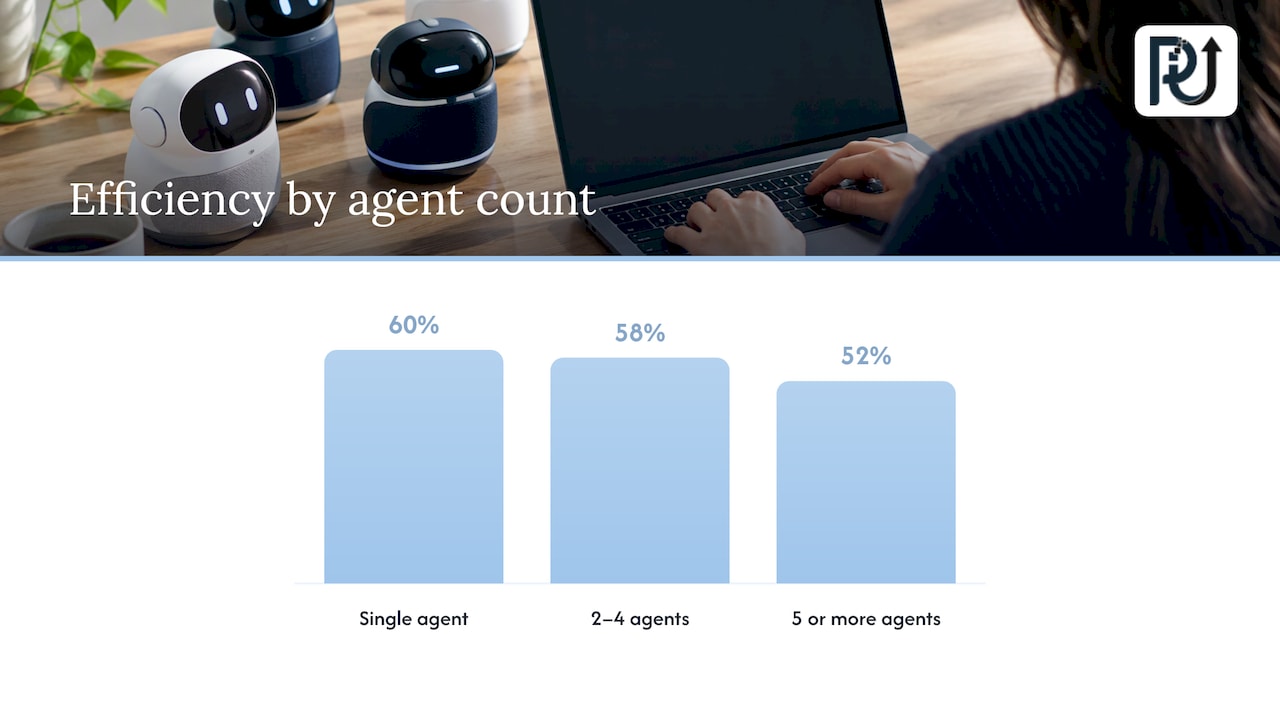
Scale brings results, with a nuance worth knowing. HFS Research’s June 2026 analysis of 202 Global 2000 enterprises with agentic AI in production reports average efficiency improvements of 60% for single-agent deployments, 58% for systems with two to four agents and 52% for five or more. The same analysis reports larger multi-agent systems showing 61% improvement in innovation, 58% in faster decision-making and 55% in agent intelligence, with reported revenue-growth impact rising to 27% at that maturity threshold.
Read that as a shift in what you measure. Raw efficiency gains per agent flatten as systems grow, while the value moves to speed of decisions, innovation and revenue. This comparison of single-agent and multi-agent business impact covers a related angle for agencies. These are large-enterprise figures, so use them as direction, and set your own targets from your own baseline.
For a closer look at how leaders see the first gains and what comes after, see our piece on AI efficiency for leaders and our write-up on operational productivity systems.
Our perspective
We see the ecosystem as the point of the whole exercise. A single automation saves hours. A connected set of agents, sharing data and rules, lets a company grow its processing volume without growing headcount in step.
That is why we do not start by scripting an integration. We start by hunting down the time leaks in a process, then design a digital workforce of context-aware agents around it, with approval points where the risk is real.
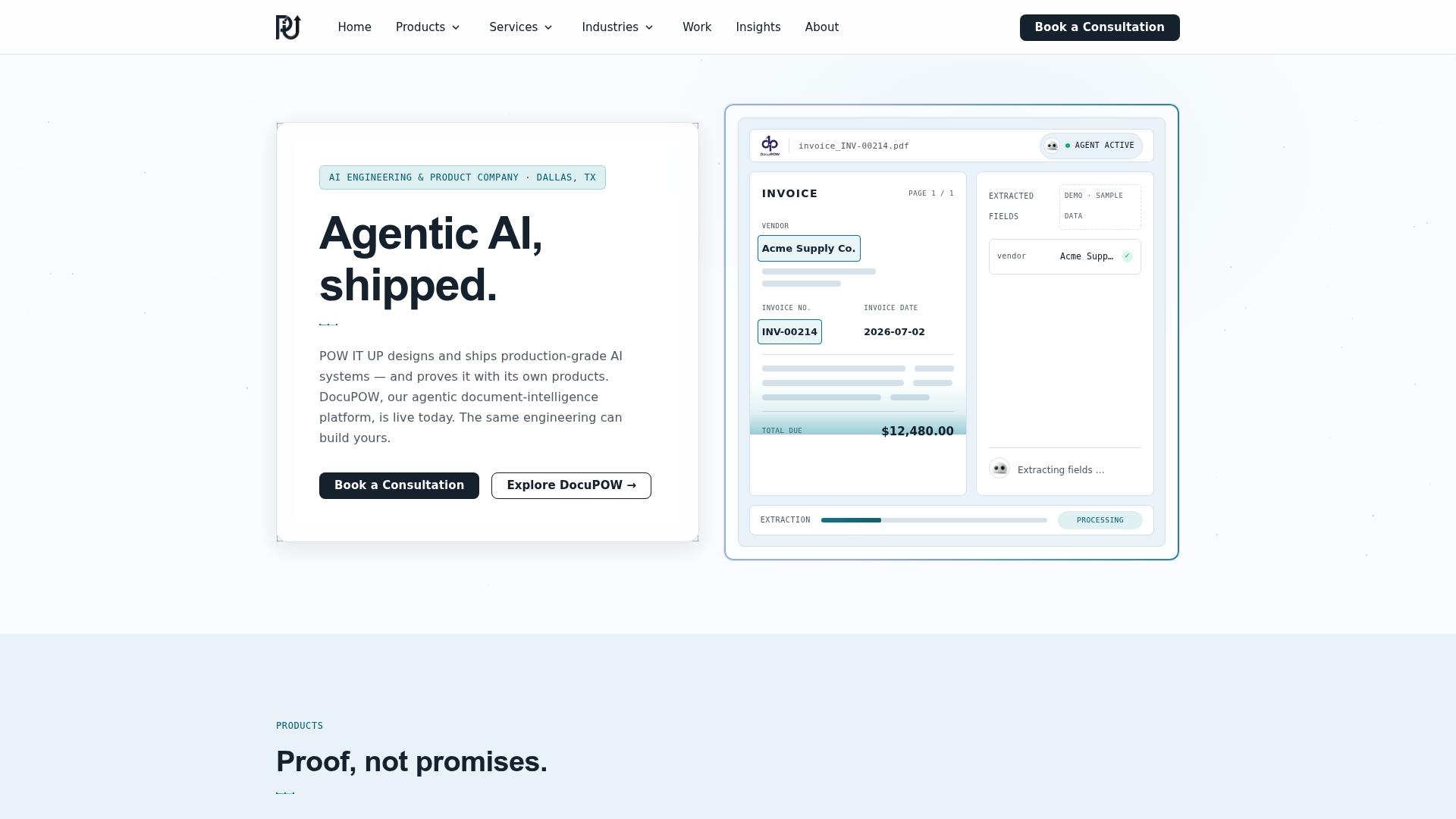
We build for ownership. Our aim is documented, verifiable engineering that your team can maintain, with transparent process and accountability for what we ship. DocuPOW, our document reading and validation product, is a live demo of that approach: you can see it work on real documents rather than take our word.
Our advice to any operations leader is to pick the unglamorous process, measure it honestly, and let the second and third automations ride on the foundation of the first.
Syed Naveed Abbas
Where to start with us
If you want an ecosystem built around your own processes, our AI agents development service designs and builds custom agents for high-volume operations, and our AI automation service covers the workflows around them. For document-heavy work, DocuPOW offers live demos.
Tell us the process that eats the most hours in your business, and we will map it with you. Start at powitup.com.
FAQ
How is an operational ecosystem different from using several AI tools?
Separate tools each start from scratch and rely on someone pasting in context. An ecosystem shares data, memory, integrations and rules across agents, so each workflow benefits from the others and every correction improves the system.
Which process should we automate first?
Choose a documented, high-volume, low-risk process with stable data and a measurable baseline. Invoice handling, case triage, lead routing and internal requests are common first picks.
How long should a first deployment take?
A reasonable goal is a blueprint in production within 30 to 60 days that shows a measurable result against a documented baseline, as Salesforce’s playbook defines a quick win. Scope it narrowly to hit that window.
Do we need perfect data first?
No, but the data for your first process must be reliable. Settle the source of truth for the fields involved, validate inputs, and expand data work as you add processes.
How do we keep humans in control?
Place approval points on steps involving money, health or legal consequences, give agents a clear hand-off when unsure, log every action, and name an owner for each automated process.
Sources
- Treating enterprise AI as an operating layer, MIT Technology Review
- What Is an AI Operating System, MindStudio
- From tasks to systems, Bessemer Venture Partners
- AI Workflow Automation: When to Use Agents, Salesforce
- Achieving an Agentic Back-Office in Manufacturing, AWS Builder Center
- Building a strong data infrastructure for AI agent success, MIT Technology Review
- AI Risk Management Framework, NIST
- AI Process Automation Playbook, Salesforce
- The real value of agentic AI, HFS Research