
AI-powered operational transformation can lift EBITDA by 10 to 25 percent for leaders who redesign workflows around agentic systems rather than bolt AI onto old processes. The single best first move: pick one high-context workflow, run a 60 to 90 day pilot with hard KPIs, and gate the decision to scale on the results, not on enthusiasm.
TL;DR:
- Embedding AI across entire workflows can achieve 10 to 25 percent EBITDA improvement, but successful scaling depends on organizational change and adoption.
- Building a centralized transformation office ensures consistent agent standards and governance, reducing risks associated with diverse, ungoverned tools.
- A 60 to 90-day pilot should focus on clear KPIs, with early metrics like cycle time, error rate, and override rate providing early signals of success or need for redesign.
- Long-running agents require automated controls like output review, escalation triggers, rollback procedures, and audit trails from day one to ensure trust and compliance.
- Legacy systems and siloed data create integration challenges that are best addressed incrementally through component-based platforms and dedicated middleware layers.
Table of Contents
- What Does AI-Powered Operational Transformation Actually Mean?
- What ROI and Productivity Gains Can You Realistically Expect?
- What Are the Core Building Blocks of an Agentic Operating Model?
- How Do You Structure a 60 to 90 Day Pilot?
- Why Do Most AI Pilots Stall Before They Scale?
- What Governance and Risk Controls Do Long-Running Agents Need?
- How Does POW IT UP Approach Agentic Operations Pilots?
- How Do You Know If Your Organization Is Ready?
- How Do You Find the Next Use Case After the First Pilot?
- What Are the Biggest Integration Challenges With Legacy Systems?
- How Should IT, Business Units, and Data Teams Collaborate?
- What Infrastructure Do You Need as the Program Scales?
- What Does This Actually Cost, and What Should You Budget?
- The Operating-Model-First Take on AI Transformation
- Ready to Run Your First AI Operations Pilot?
- Sources
- FAQ
What Does AI-Powered Operational Transformation Actually Mean?
AI-powered operational transformation means redesigning a workflow so autonomous AI agents, not just software tools, own defined pieces of the work end to end. This is the core distinction that separates real transformation from the AI theater most companies practice.
A copilot suggests. An agent acts. That difference sounds small until you watch it play out in a claims department or a supply chain planning cycle. A copilot drafts an email for a human to send. An agentic system reads the claim, checks it against policy, flags exceptions for a human, and closes out the routine cases without anyone touching them. The agent holds context across steps, makes bounded decisions, and escalates only when it hits a condition it wasn’t built to handle.
That’s what “agentic operations” refers to: systems of long-running, context-aware agents woven into the actual operating model, not just the tech stack. It’s a meaningfully different animal from point automation, which handles one task in isolation and forgets everything the moment it finishes.
Scaling this kind of system is why BCG recommends building a centralized transformation office, sometimes called an “agentic process transformation factory.” The idea is straightforward: if every department builds its own agents with its own standards, you end up with dozens of one-off tools nobody can govern, audit, or improve. A transformation office standardizes how agents get embedded, evaluated, and retired, the same way a manufacturing plant standardizes tooling instead of letting each shift invent its own.
For most enterprises, this means treating agent development less like a series of IT projects and more like building a factory that produces reliable, auditable digital labor at scale. Related reading on how this shift reshapes day-to-day operations lives in POW IT UP’s guide to AI-powered business operations.
What ROI and Productivity Gains Can You Realistically Expect?
The honest answer sits in a range, not a single number, and the range depends heavily on how far you’ve actually scaled.
Bain’s research on AI-powered operations finds that leaders who move past pilots and embed AI across workflows report 10 to 25 percent EBITDA gains, with technology and telecommunications companies seeing productivity improvements as high as 15 to 25 percent in some functions. Those numbers aren’t for companies that ran a chatbot pilot last quarter. They’re for organizations that redesigned the workflow itself, not just added AI on top of the old one.
The Confidence Gap: Bain’s survey work found 88 percent of senior leaders believed their organizational redesign would achieve its goals, but only 36 percent of employees agreed. Fewer than 40 percent of employees said the scope and rationale behind the transformation were even clear to them.
That gap is the single biggest risk to the ROI numbers above. You can have the best agent architecture in the industry and still miss your targets if the people running the workflow day to day don’t understand why it changed or don’t trust it. Adoption, not technology, is usually what determines whether the 10 to 25 percent shows up on the income statement or stays a slide in a strategy deck.
A useful, if less dramatic, signal: operational metrics tend to move before financial ones do. Forecasting error drops, exception queues shrink, cycle times compress. Those leading indicators are worth tracking closely in the first 90 days, because EBITDA lags by quarters while cycle time and error rate move within weeks. Treat the leading indicators as your early warning system, and treat the EBITDA range as the destination, not the first checkpoint.
What Are the Core Building Blocks of an Agentic Operating Model?
Four things have to exist before an agent can reliably do real work: a data foundation it can trust, a defined agent pattern, an orchestration platform that can watch what it’s doing, and a control plane that assigns accountability when something goes wrong.
The data foundation comes first, and it’s usually where projects stall. Gartner warns that a lack of AI-ready data puts AI projects at risk, and that risk shows up early, often before a single agent goes live. Structured data (transactions, records, tickets) and unstructured data (PDFs, emails, call transcripts) both need to become usable “data products” with clear tagging and access rules, so an agent doesn’t accidentally read a customer’s private financial record or act on a document nobody validated.
Agent design comes next, and the choice between episodic and long-running patterns matters more than most leaders expect. An episodic agent handles a single, bounded task and shuts down. A long-running agent holds context across a multi-step process, which is more powerful and also riskier, because errors compound instead of resetting. Every agent needs a defined fallback: what happens when it hits a case outside its training or policy scope? A related breakdown of these patterns is available in POW IT UP’s overview of AI agent types for service teams.
Platform and orchestration is the layer that makes the whole thing observable. McKinsey’s guidance on scaling generative AI recommends a data-centric operating model, starting with a centralized center of excellence and evolving toward a federated structure as maturity grows, built on a component-based platform rather than a monolithic rebuild.
That means your platform should let you add gen-AI capability piece by piece without ripping out your entire tech stack every time a new use case appears.
Finally, you need a control plane: a defined set of roles, often including something like an “AI Operator” who owns agent performance the way a plant manager owns line output, plus the transformation office wiring decision rights, verification steps, and escalation paths back to a human.
What this looks like in practice:
- A named owner (not a committee) accountable for each agent’s performance and error rate
- A documented decision-rights matrix showing exactly which decisions an agent can make alone versus escalate
- An audit trail capturing every input, output, and confidence score for later review
- A rollback procedure that can pull an agent out of production within minutes, not days
Pro Tip: Build your audit trail before your first agent goes live, not after. Retrofitting logging into a system that’s already processing live transactions is far harder than designing it in from day one, and regulators rarely accept “we’ll add that later” as an answer.
How Do You Structure a 60 to 90 Day Pilot?
Start where context breaks down, not where the demo looks impressive. That usually means escalation queues, claims adjudication, supplier sourcing, or supply planning, the places where a human currently spends time reconciling information scattered across five systems.
A practical pilot sequence, adapted from operational playbooks that have run this pattern repeatedly, breaks into four phases:
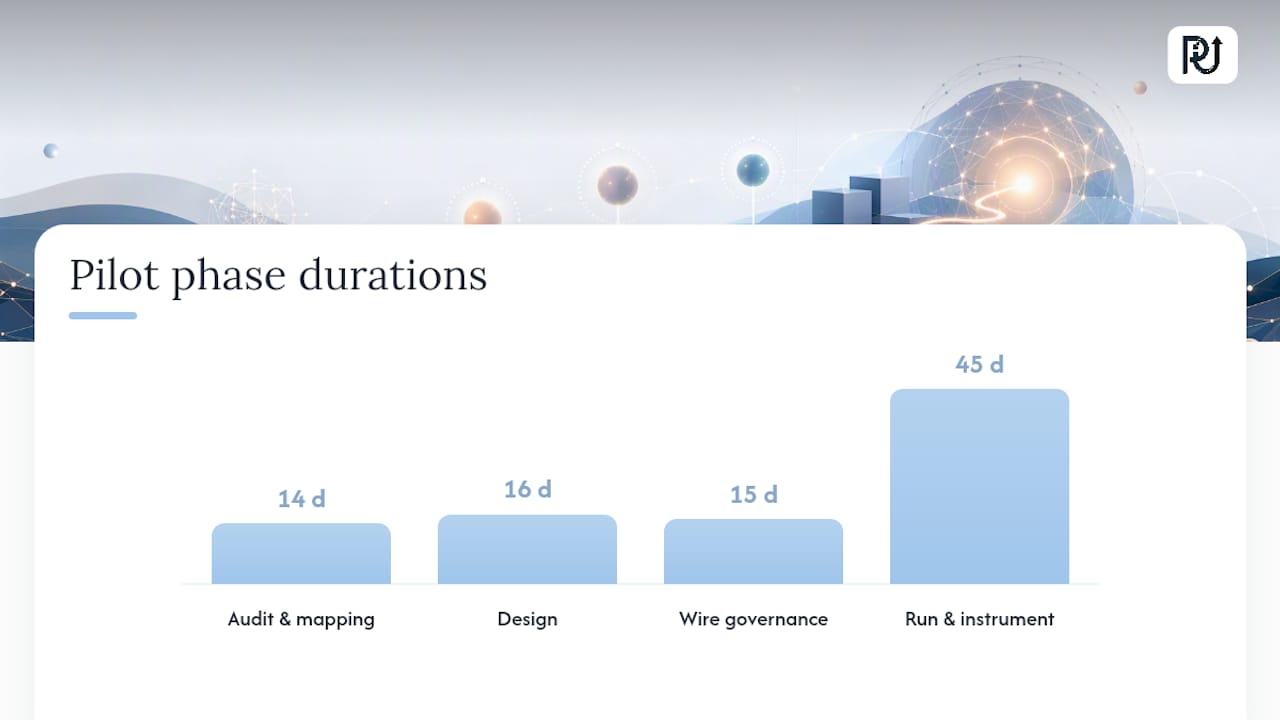
- Days 1 to 14, audit and mapping. Document the current workflow exactly as it runs today, including every manual workaround nobody put in the process documentation. This is tedious and it’s the step people skip, which is exactly why it’s usually where pilots fail later.
- Days 15 to 30, design. Build the end-to-end workflow the agent will actually run, including explicit failover paths for every case it can’t handle. Define your KPIs now, before the agent exists, so you’re not retrofitting success metrics to match whatever numbers show up later.
- Days 31 to 45, wire governance. Put output review, escalation triggers, and audit logging in place before the agent touches a live transaction. This sequencing detail comes straight from operational playbooks built specifically for this handoff, and skipping it is the single most common reason a pilot that works technically still fails organizationally.
- Days 46 to 90, run and instrument. Let the agent handle live volume, track your KPIs weekly, and build toward a formal go or no-go decision at day 90.
Instrument four numbers throughout: decision quality (how often the agent’s call matches what a skilled human would have done), cycle time, override rate (how often a human corrects the agent), and escalation rate. A pilot with a climbing override rate isn’t failing, it’s telling you exactly where the agent’s boundaries need adjustment.
Gate the scale decision on the numbers, not on how the demo felt in the steering committee. If decision quality holds and override rate trends down over the 90 days, you have a real case to replicate the pattern elsewhere. If override rate stays flat or climbs, redesign before you expand.
Why Do Most AI Pilots Stall Before They Scale?
They stall in the handoff to middle management, and this is where the strongest research on AI adoption points directly.
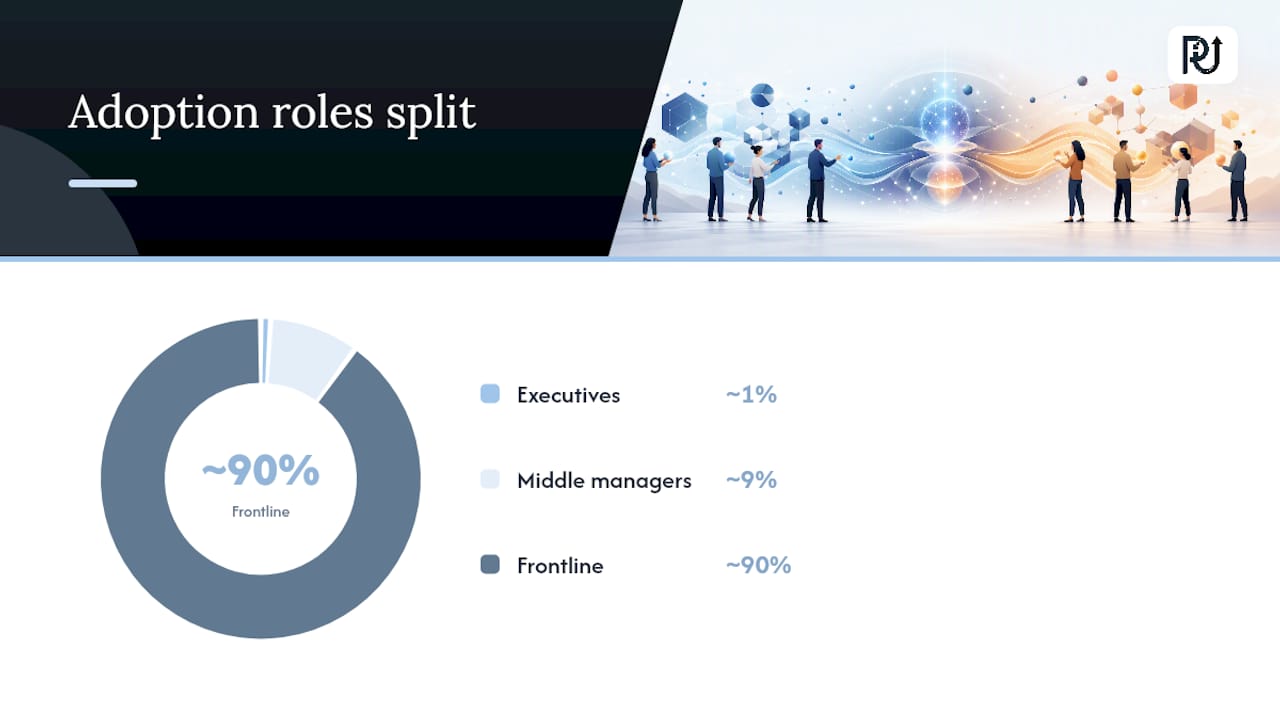
Bain’s framework describes an adoption curve often shorthanded as 20/200/2,000: roughly 20 executives set the vision, 200 middle managers have to translate it into daily practice, and 2,000 frontline employees actually do the new work. The bottleneck almost never sits with the 20 or the 2,000. It sits with the 200, because middle managers are the layer that gets asked to change how their team operates without the same visibility into strategy that executives have, and often without any new tools to help them lead the change.
The fix is concrete, not aspirational. Four things move the needle:
- Give managers a written playbook for the redesigned workflow, not a slide deck they saw once in a town hall.
- Build a decision-rights matrix so managers know exactly when to trust the agent’s output and when to intervene.
- Run structured coaching sessions in the first 60 days, focused on real cases from their own team, not generic AI training.
- Create peer forums where managers across departments compare what’s breaking and what’s working, because they’ll trust each other’s field reports more than a corporate rollout memo.
Measuring adoption health matters as much as measuring the pilot’s KPIs. Tool usage numbers lie; a manager can log into the new system daily and still route every real decision through the old process out of habit. Better signals include whether decision-rights matrices are actually being followed, whether escalations get resolved within their target time, and whether managers report the workflow feels routine rather than exceptional after 60 days. For more on structuring this stage, POW IT UP’s guide to AI transformation strategy covers manager enablement in more depth.
Pro Tip: Ask managers what they’d tell a peer at another company about the new workflow. If the honest answer is “avoid it if you can,” you have an adoption problem no dashboard will show you until it’s expensive to fix.
What Governance and Risk Controls Do Long-Running Agents Need?
Long-running agents need the same discipline you’d apply to a new employee handling sensitive decisions, except the controls have to be automated and continuous, because nobody’s watching over an agent’s shoulder the way a supervisor watches a new hire.
Harvard Business Review’s research argues organizations shouldn’t treat AI agents like employees in the sense of assuming they need the same onboarding and trust-building period. Instead, they need explicit role delineation and human oversight built into the workflow itself, not earned gradually the way a person earns autonomy over time.
Practical controls to wire in from day one:
- Output review, spot-checking or full review of agent decisions before they hit a customer or a financial system.
- Escalation triggers, clear conditions that automatically route a case to a human rather than relying on the agent to “know” when it’s out of depth.
- Rollback procedures, the ability to pull an agent’s decisions back and revert to manual processing within minutes.
- Permissioning, strict limits on what data and systems each agent can touch, scoped as narrowly as the job allows.
- Memory hygiene, regular review of what a long-running agent has stored in context, since stale or incorrect memory compounds errors over time.
Auditability means logging the prompt, the data inputs, the confidence score, and the approval state for every consequential decision, not just the final output. Board-level oversight structures for this kind of accountability are covered well in Ciphrix’s guide to board oversight for AI.
One more decision point that gets underweighted: build versus buy has real portability consequences. An agent built on a vendor’s proprietary platform can trap your institutional memory (the accumulated context, exception handling, and tuning) inside a system you don’t fully control. Weigh that lock-in risk before you commit an entire workflow to a single vendor’s ecosystem.
How Does POW IT UP Approach Agentic Operations Pilots?
Custom AI agents and integration systems should be designed around the exact workflow a client wants to transform, rather than adapting a generic template after the fact. Engagements typically start with a workflow audit, move into agent design and integration work through services like AI Agents Development and AI Integration, and land on a pilot with defined KPIs before any decision to scale.
For document-heavy workflows specifically, DocuPOW handles document reading and validation as a live, demoable product rather than a promised capability. Leaders evaluating a partner for this kind of pilot should expect a clear deliverable set: mapped workflow, agent architecture, governance wiring, and an instrumented pilot with a go or no-go gate, not an open-ended engagement with no defined endpoint.
How Do You Know If Your Organization Is Ready?
Readiness isn’t a binary, it’s a maturity gradient, and most companies overestimate where they sit on it. The honest self-assessment covers three dimensions: data readiness, process clarity, and organizational appetite for change.
Data readiness asks whether the workflow you want to transform already produces clean, structured records, or whether the “data” mostly lives in someone’s inbox and a shared spreadsheet nobody fully trusts. Gartner’s warning about AI-ready data applies directly here: a workflow with scattered, inconsistent records isn’t ready for an agent yet, no matter how good the agent technology is.
Process clarity asks whether the current workflow, as it actually runs (not as the org chart says it runs), is documented well enough that someone unfamiliar with it could follow the steps. If your best employee’s tribal knowledge is the only thing holding the process together, you have a documentation problem to solve before you have an automation opportunity.
Organizational appetite asks the uncomfortable question directly: do middle managers and frontline staff have the bandwidth and psychological safety to try a new way of working, or is the team already stretched thin fighting fires? A pilot launched into a team already in crisis mode almost always fails, not because the technology doesn’t work, but because nobody has the attention to give it a fair test.
A simple maturity check: can you name the three workflows most likely to break under next year’s volume growth? If the answer comes quickly and specifically, you’re closer to ready than a team that has to think hard about it.
How Do You Find the Next Use Case After the First Pilot?
The first pilot proves the pattern works. Finding the next ten use cases is where most transformation programs either compound their gains or quietly stall out.
The strongest signal for prioritization is repeatability: does solving this workflow’s problem give you a template you can copy elsewhere with minor adjustments, or is it a one-off? A claims adjudication agent that works well in one insurance line often transfers to adjacent lines with modest retuning. A highly specialized workflow unique to one team rarely transfers and eats disproportionate engineering time for the value returned.
Look for volume combined with variance. High-volume, low-variance workflows (repetitive, rule-governed tasks) are the easiest agent targets and deliver fast payback. High-volume, high-variance workflows (the ones full of exceptions and judgment calls) deliver bigger payoff but need more governance investment before they’re safe to automate.
Rank candidates on three axes: expected cycle-time reduction, error-rate reduction, and how cleanly the workflow’s data already meets your readiness bar. A workflow that scores well on impact but poorly on data readiness isn’t a bad candidate, it’s a candidate that needs a data cleanup sprint before it enters the pilot queue.
Resist the temptation to run every promising use case simultaneously. The transformation office model that BCG recommends exists partly to enforce sequencing discipline, so you’re building agent number four on lessons from agents one through three, not starting from scratch four separate times.
What Are the Biggest Integration Challenges With Legacy Systems?
Legacy systems and data silos are where the clean architecture diagrams meet reality, and reality usually wins the first round.
Most enterprise workflows still run partly through systems built ten or twenty years ago, systems that were never designed to expose an API an agent can call cleanly. Connecting an agent to a mainframe-era claims system or a decades-old ERP often means building a middleware layer just to translate between the old system’s data format and anything a modern agent can process.
Data silos compound this. Customer information might live in a CRM, transaction history in an ERP, and support history in a separate ticketing platform, none of which talk to each other natively. An agent that needs full context has to pull from all three, which means someone has to build and maintain the integration pipes connecting them, and someone has to own what happens when one system’s data disagrees with another’s.
The component-based platform approach McKinsey recommends helps here specifically because it lets you build integration incrementally, one system connection at a time, rather than attempting a single massive integration project that takes eighteen months and obsolete requirements halfway through.
A practical rule: don’t try to modernize the legacy system and deploy the agent in the same project. Wrap the legacy system with an integration layer first, prove the agent works against that wrapper, and treat any deeper legacy modernization as a separate, longer-term initiative. Services like AI Integration exist precisely to handle this connective layer without requiring a full system replacement first.
How Should IT, Business Units, and Data Teams Collaborate?
The teams that need to collaborate on this rarely share a reporting line, a vocabulary, or even the same success metrics, which is exactly why so many AI initiatives stall at the coordination stage rather than the technology stage.
IT owns infrastructure, security, and system access, and reasonably wants to slow things down until every integration is properly vetted. Business unit leaders own the workflow and the P&L impact, and reasonably want speed because they’re measured on quarterly results, not architecture elegance. Data scientists and engineers own the model and pipeline work, and often speak a technical vocabulary that doesn’t translate cleanly into either group’s priorities.
The transformation office model resolves this by giving all three a shared table and a shared set of standards, rather than leaving them to negotiate priorities project by project. Instead of a business unit leader pitching an idea to IT and hoping it gets prioritized against fifteen other requests, the transformation office holds the backlog, sets the embedding standards, and makes sure a data scientist’s model gets the integration support it needs on a known timeline.
Practically, this means a standing cross-functional forum, meeting on a fixed cadence, with representation from all three groups and clear authority to make prioritization calls. It also means shared metrics: a business leader tracking cycle time, an IT lead tracking uptime and security incidents, and a data scientist tracking model accuracy all need visibility into each other’s numbers, because a win on one dimension that creates a loss on another isn’t actually a win.
What Infrastructure Do You Need as the Program Scales?
The infrastructure that supports one pilot agent rarely supports twenty agents running simultaneously, and the gap between those two states catches a lot of programs by surprise.
Single-pilot infrastructure can get away with lighter monitoring, because a human is watching that one agent closely. At scale, you need centralized observability across every agent in production: a dashboard showing performance, error rates, and escalation volume for the whole fleet, not twenty separate spreadsheets each team maintains independently.
Compute and data pipeline capacity need headroom built in early. An agent handling 500 transactions a day and one handling 50,000 a day have very different infrastructure demands, and the jump between those numbers can happen faster than a procurement cycle can respond if you haven’t planned for it.
The component-based platform architecture pays off directly here, because it means adding agent number fifteen doesn’t require re-architecting the system that supports agents one through fourteen. You’re adding a component to an existing structure, not rebuilding the structure itself.
Security and permissioning infrastructure also need to scale as a system, not as one-off decisions per agent. A permissioning model that made sense when three agents existed becomes unmanageable at thirty agents unless it’s built on role-based, auditable access controls from the start. This is the point where the transformation office’s standardization work stops being a governance nicety and becomes the thing that keeps the whole system from becoming unmanageable.
What Does This Actually Cost, and What Should You Budget?
Total cost of ownership for an AI-powered operational transformation program breaks into four buckets, and leaders who only budget for the first one are the ones who get surprised six months in.
Platform and integration costs cover the orchestration layer, the middleware connecting legacy systems, and any licensing for the underlying agent infrastructure. This is usually the most visible line item and the easiest to quote up front.
Development costs cover the actual agent-building work, whether that’s custom engineering for your specific workflow or configuration of more general agent frameworks. Custom, context-aware agent development typically costs more up front than generic scripting, but generic scripts also tend to break the moment your workflow deviates from the happy path, which shows up as a hidden maintenance cost later.
Governance and oversight costs cover the human review time, audit infrastructure, and compliance work that keeps the system safe and auditable. This bucket is the one most budgets shortchange, and it’s the one that determines whether your agent fleet stays trustworthy as it grows.
Change management costs cover manager coaching, playbook development, and the peer forums that determine whether adoption actually happens. Skipping this bucket to save money is the single most common way a technically successful pilot fails to deliver its projected ROI.
Because pricing for custom agent development, integration, and automation work varies by workflow complexity and scope, exact figures are best confirmed directly, current details are available through POW IT UP’s services page.
The Operating-Model-First Take on AI Transformation
Most of the AI transformation advice circulating right now focuses on the wrong variable. It obsesses over which model or which vendor, when the evidence points somewhere else entirely: the organizations pulling ahead treat this as an operating-model problem first and a technology problem second.
The 88 versus 36 percent confidence gap Bain documented isn’t a communication failure you fix with better slides. It’s a design failure. Leaders who skip the transformation office, skip the decision-rights matrix, and skip manager coaching are building agents on a foundation that can’t hold their weight once the agents move past a demo into real volume.
If there’s one place the conventional wisdom undersells the work, it’s here: everyone talks about picking the right first use case, and almost nobody talks seriously about who owns the agent’s performance after launch. That accountability gap, more than any model limitation, is what turns a promising pilot into a stalled project six months later.
Start narrow. Instrument honestly. Give the middle managers real tools, not just a memo. The 10 to 25 percent EBITDA range is real for organizations willing to do that unglamorous work first.
— Syed Naveed Abbas
Ready to Run Your First AI Operations Pilot?
Most companies exploring this end up choosing between hiring an internal AI team from scratch, which takes months to recruit and ramp, or buying a generic automation tool that handles simple tasks but breaks the moment a workflow gets messy. POW IT UP offers a third path: custom-built agents designed around your actual workflow, engineered by a team that treats agent accountability and auditability as part of the build, not an afterthought.
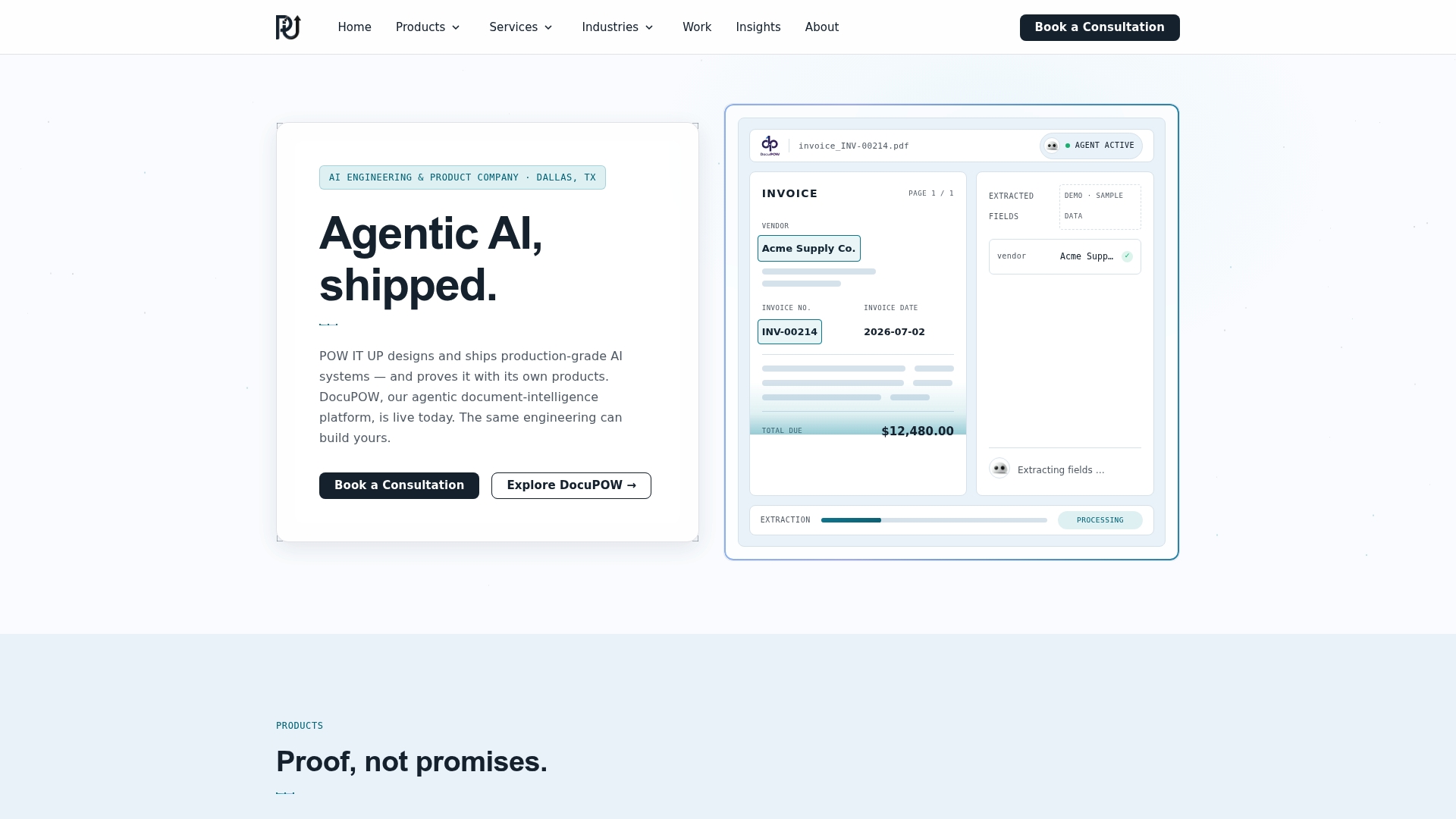
A typical engagement starts with a discovery workshop to map your highest-friction workflow, moves into a scoped pilot design through AI Agents Development, and for document-heavy processes, includes a live demo of DocuPOW so you can see document validation working against your own use case before committing to a build. Expect a mapped workflow and pilot plan within the first few weeks, and an instrumented pilot running within your first 90 days.
If you’re ready to see what a working agent looks like against your own documents, request a DocuPOW demo or start a discovery conversation with POW IT UP today.
Sources
- AI-powered operations: What leaders must know — Bain & Company
- Reinventing the operating system of work with AI — BCG
- A data leader’s operating guide to scaling gen AI — McKinsey
FAQ
What Is AI-Powered Operational Transformation?
It’s the redesign of a business workflow so autonomous AI agents handle defined steps end to end, not just software tools assisting a human. Leaders who scale this beyond pilots report 10 to 25 percent EBITDA gains, largely because the workflow itself changes, not just the tooling layered on top of it.
How Long Should a First AI Pilot Run?
Most practical playbooks recommend 60 to 90 days: two weeks to audit the current workflow, two weeks to design the new one, two weeks to wire governance, and the remaining window to run it live with instrumented KPIs. Gate the decision to scale on measured decision quality and override rate, not on how the pilot felt.
Why Do AI Transformations Fail to Scale Past the Pilot Stage?
The most common failure point is the handoff to middle managers, who often lack the playbooks, decision-rights clarity, and coaching needed to lead a changed workflow. Bain’s research found fewer than 40 percent of employees said the scope and rationale for their AI transformation were even clear to them.
Does POW IT UP Build Custom Agents or Use Off-the-Shelf Tools?
POW IT UP designs and builds custom, context-aware AI agents tailored to a specific workflow, through services like AI Agents Development, rather than deploying generic automation scripts. For document-heavy workflows, DocuPOW is available as a live demo product for document reading and validation.
What Does an AI Operations Pilot With POW IT UP Cost?
Pricing depends on workflow complexity, integration scope, and whether the engagement includes custom agent development or platform integration work. Current pricing details are available directly through POW IT UP’s services page.