

Scalable automation means your output can rise 5x or 10x while headcount stays close to flat. Most businesses get there by combining three kinds of tools: workflow automation for simple handoffs, robotic process automation (RPA) for rules-based work, and AI agents for work that needs judgment. This guide compares those options by type, shows where each one breaks, and lays out a rollout plan you can follow whether you run a 15-person service firm or a regulated enterprise.
TL;DR
-
Scalable automation is a system design problem, not a tool purchase. Volume, exceptions, governance and ownership decide whether it holds up.
-
Workflow tools suit simple handoffs, RPA suits stable rules-based screens, and AI agents suit messy documents and decisions that depend on context.
-
Agents are not magic. A 2025 U.S. GAO review found the best agents tested completed only about 30% of software development tasks on their own, so design for human review.
-
Skills gaps, weak data inventories and unclear goals sink more programs than software limits do.
-
Start with one high-volume process, measure it, and expand only after the first one runs cleanly.
Table of Contents
What “scalable” actually means in automation
An automation is scalable when doubling the volume does not double the cost, the error rate or the number of people babysitting it. That is a higher bar than “it works.” Plenty of automations run fine at 200 invoices a month and fall apart at 20,000, because they depend on one person’s laptop, one brittle screen layout, or one lucky data format.
Four properties separate a scalable system from a clever script:
-
Elastic capacity. It can take on more volume without a rebuild.
-
Exception handling. Odd cases get routed to a person with context, not dropped or guessed at.
-
Observability. You can see throughput, failures and cost per transaction.
-
Ownership. Your team can maintain it, and you hold the logic, not a vendor or a departed contractor.
The economic reason to care is visible in federal data. The U.S. Bureau of Labor Statistics reports that industry-level exposure to AI is positively correlated with faster labor productivity growth, and that highly exposed industries are shifting investment toward software and AI-integrated assets. Companies are not just trying tools. They are reallocating capital toward them.
The main types of scalable automation compared
Enterprise tooling is usually sorted by function. One 2026 overview of enterprise automation tools groups the field into workflow automation, robotic process automation and business process management. Add AI agents and custom-built digital workforces and you have the realistic menu.
| Type | Best for | Scales well when | Breaks down when |
|---|---|---|---|
| Workflow automation (no-code connectors) | App-to-app handoffs, notifications, simple approvals | Triggers and data fields are clean and stable | Logic branches multiply, or inputs are unstructured |
| RPA (software bots on screens) | Repetitive, rules-based tasks in legacy systems | The interface and rules rarely change | Screens change, or documents vary in format |
| Business process management suites | Large, governed, multi-department processes | You have a process team and a long runway | You need results in weeks, or the process is still being defined |
| AI agents and digital workforces | Document-heavy, judgment-adjacent, multi-step work | Inputs vary and context drives the decision | Nobody defines review points, or the data is poor |
| Custom-engineered systems | Processes that are core to how you compete | You want durable ownership and tailored logic | You only need a simple connector |
No row wins everywhere. The honest answer to “which is best” is that it depends on how structured your inputs are and how costly an error is.
Workflow automation: the fastest first step
If a process is a clean chain (form submitted, record created, email sent, task assigned), a connector-style workflow tool is often enough, and it is cheap to try. Small teams get real value here. The limit arrives when a step needs interpretation: reading a contract, matching a messy invoice, deciding whether a client is at risk. For a rundown of categories aimed at service firms, see our guide to types of service business automation tools.
RPA: powerful, but tied to the screen
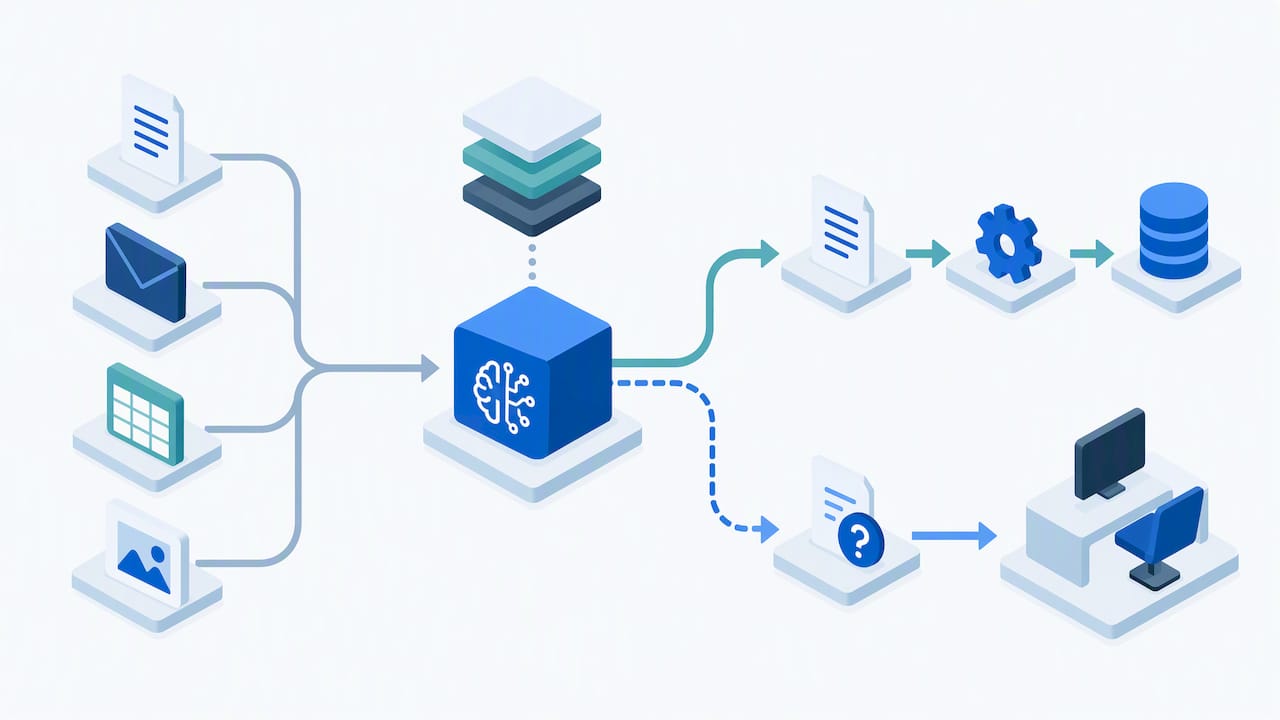
RPA copies what a person does on a screen, which makes it useful when a system has no API. It scales when the process is stable. It becomes expensive to maintain when interfaces change or inputs are unpredictable. Many teams find that RPA handles the “click” work well and still needs something smarter in front of it to understand what the document in front of it actually says.
AI agents: the next layer, with caveats
Agents are AI systems that can operate autonomously to accomplish complex tasks and respond to changing conditions, according to the U.S. Government Accountability Office. That is the difference from rules-based bots: an agent can read context and choose among actions. For a plain-language take on where agents go beyond RPA, this piece on using AI in sales workflows without over-trusting it makes a similar point from the revenue side.
But be realistic about maturity. The same GAO work notes that the best-performing agents tested completed only about 30% of software development tasks autonomously. That is one domain, not every domain, yet it is a useful corrective. Agents are strongest when they take on bounded, high-volume steps and a person reviews the exceptions. Forecasts cited in that report suggest agents may make at least 15% of day-to-day work decisions in some organizations by 2028, which is a reason to build review habits now.
How to choose: five questions that decide it
Before you compare vendors, answer these about the process you want to automate.
-
How structured is the input? Clean fields point to workflow tools or RPA. PDFs, emails, scans and free text point to document intelligence and agents.
-
How often do the rules change? Frequent change punishes screen-based bots and favors systems built around logic you can edit.
-
What does a mistake cost? In lending, claims or patient intake, an error is expensive. Pick designs with validation and human checkpoints.
-
What volume do you expect in 24 months? Size for that, not today’s count.
-
Who will own it? If the answer is “the vendor, forever,” you have bought a dependency, not a capability.
Teams that skip question five tend to regret it. Ask any provider to show you where the logic lives, how you can change it, and what happens if you part ways.
How to implement automation without stalling
A sequence that works for most organizations:
-
Find the time leaks. Track where hours go for two weeks. Look for tasks that are high-volume, repetitive and low-judgment, plus the “swivel chair” work of copying data between systems.
-
Pick one process. Choose something painful but contained: intake, document checking, reconciliation, reporting. Resist automating five at once.
-
Document the real process. Not the official version. Capture exceptions, who handles them and how long they take.
-
Define success numbers. Cycle time, cost per transaction, error rate, hours returned. Record the baseline first.
-
Build with review points. Decide which outputs a person approves, and at what confidence level a case escalates.
-
Pilot, then widen. Run it on a slice of real volume, compare against the baseline, then expand.
-
Monitor and maintain. Assign an owner. Track failures weekly at first.
For back-office specifics, our explainer on back-office automation walks through common starting points.
Governance is what lets automation scale
The tools are rarely the limiting factor. The NIST AI Risk Management Framework centers on four functions: Govern, Map, Measure and Manage, and treats trustworthiness (safety, privacy, fairness) as something designed in from the start. If you operate in fintech or healthcare, this is a practical checklist: who owns each system, what it touches, how you measure it, and how you respond when it misbehaves.
The public sector offers a blunt case study. A 2026 GAO report on the IRS found that skills gaps, uneven quality assurance of its AI inventory and weak alignment with strategy held back its efforts, and recommended an AI workforce plan among eight actions. The IRS had 126 active AI use cases as of June 2025, according to the report highlights. The lesson for a private company is the same: keep an inventory of what you have automated, assign owners, and tie every use case to a business goal.
Oversight also protects against agent misbehavior. GAO notes agents can misread goal parameters or optimize in unintended ways, which is why human-in-the-loop validation matters most while you are scaling up.
Who benefits most, and who should wait
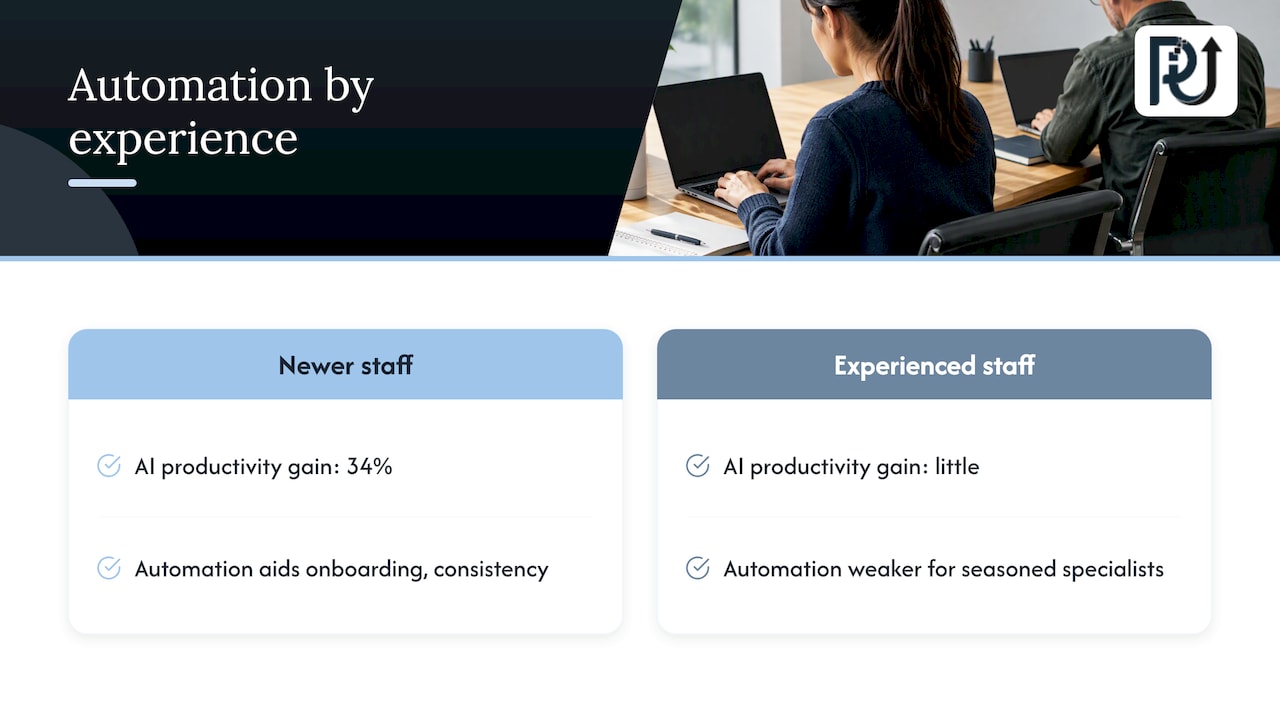
Research on a Fortune 500 software company, summarized by the BLS Monthly Labor Review, found a generative AI assistant raised productivity for newer, less experienced workers by 34%, while the most experienced staff gained little. If you plan around that, automation is a strong tool for onboarding and consistency in high-turnover roles, and a weaker lever for your most seasoned specialists.
Small businesses can scale without enterprise budgets, but they should be choosy. Content and marketing operations are a common first target, and tools like automated SEO content planning and publishing show how a small team can raise output without hiring in proportion. Whichever route you take, keep a person responsible for quality.
Wait if your process is still changing every month, your data is scattered with no owner, or nobody can state what “done well” looks like. Automating chaos produces faster chaos.
Our perspective: build for ownership, not just speed
At POW IT UP, we design and deploy digital workforces made of autonomous, context-aware AI agents. What we see repeatedly is that companies buy automation to save time, then lose the savings to maintenance, because the logic is hidden in someone else’s platform or in a script nobody understands.
So we push on three things. First, find the time leaks before choosing technology, because the process usually tells you what to build. Second, treat custom, context-aware automation as engineering, with documented behavior and accountability, not a pile of one-off scripts. Third, make the system yours: transparent processes and durable client ownership matter more than a fast demo.
We also believe in showing, not claiming. That is why we offer DocuPOW, a live product for document reading and validation, so you can see how an agent handles real paperwork before committing to a larger build. And we are candid that agents work best with defined review points. Scaling volume without scaling headcount is realistic. Removing human judgment from high-stakes decisions is not something we recommend.
— Syed Naveed Abbas
Where POW IT UP fits
If your bottleneck is documents, handoffs or monitoring, we can help. Our AI automation work targets high-volume transactional operations, AI agents development covers custom digital workforces, and AI integration connects them to the systems you already run. To see document intelligence in action, explore DocuPOW. Pricing is scoped to your project, so reach out through our site to start a conversation about your process.
A simple scorecard for any option you evaluate
When you shortlist providers or platforms of any type, score each from 1 to 5 on these:
-
Fit to your input type: structured, semi-structured or unstructured.
-
Exception handling: how cases escalate and who sees them.
-
Transparency: can you inspect and edit the logic?
-
Integration: does it connect to your core systems without fragile workarounds?
-
Security and compliance: especially for financial or health data.
-
Total cost at 5x volume: licenses, usage fees, maintenance and staff time.
-
Exit path: can you leave with your logic and data intact?
A tool that scores high on the first two and low on the last two is often a trap. Weighted honestly, this scorecard usually shows that simple connectors win for simple jobs, and custom systems win where the process is part of your competitive edge.
FAQ
What are scalable automation solutions?
They are systems that handle growing volume without a matching rise in cost, errors or staff. They combine tools such as workflow automation, RPA and AI agents with monitoring and exception handling. The scalable part comes from design, not just software.
Is RPA still worth using?
Yes, for stable, rules-based tasks, especially in systems without APIs. It struggles when screens change or documents vary. Many teams pair it with AI that reads and validates the inputs first.
How do I implement automation in a small business?
Pick one repetitive, high-volume process, document how it really runs, record a baseline, and pilot on a slice of volume. Keep a person reviewing exceptions. Expand only after the first process holds steady.
Can AI agents replace employees?
Current evidence says they are better at augmenting people. GAO’s testing found top agents completing only about 30% of software development tasks autonomously. Treat agents as capacity for bounded work, with human review where mistakes are costly.