

TL;DR:
- Effective productivity improvement focuses on high-impact work, protects core focus time, and integrates AI into workflows.
- Most organizations measure productivity incorrectly by activity metrics instead of meaningful output, risking misaligned efforts.
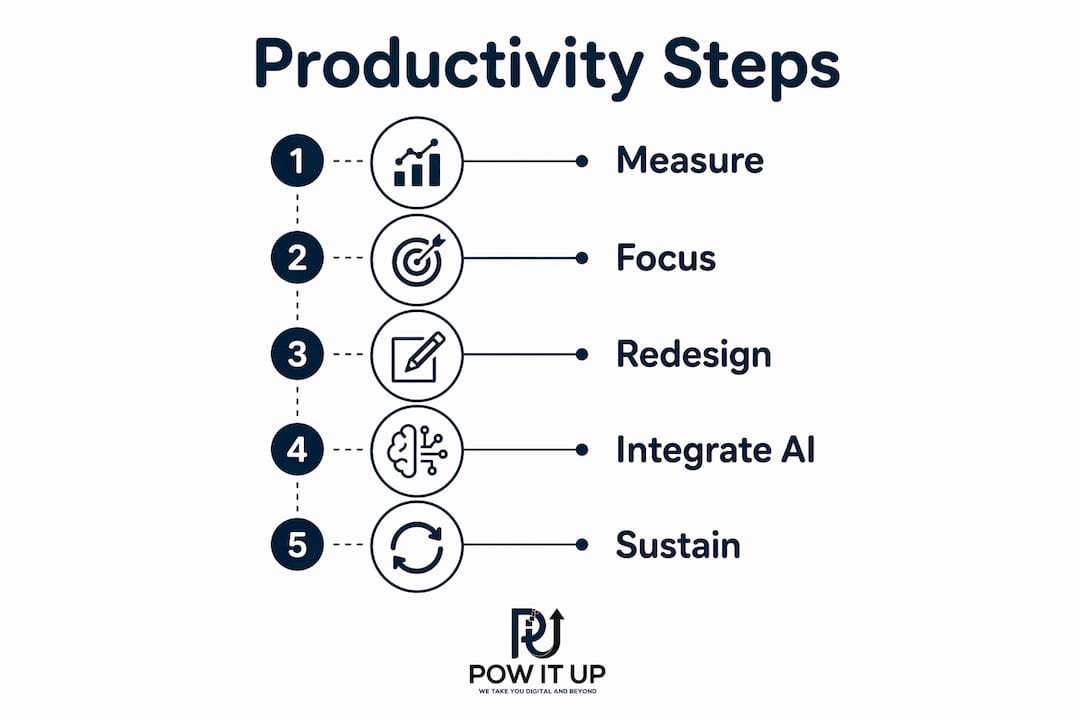
Productivity improvement is the process of generating higher-value output in less time by focusing on the right work, protecting cognitive resources, and removing friction from workflows. For business leaders, this is not about working longer hours. True productivity is high-quality output relative to input time and effort. The leaders who consistently outperform their peers do not grind harder. They design systems that make high-impact work easier and low-value work disappear. This guide covers how to measure what matters, protect your best thinking time, redesign workflows, and use AI to scale output without scaling headcount.
What does productivity improvement actually measure?
Most organizations measure productivity wrong. They track hours logged, meetings attended, and emails answered. None of those metrics tell you whether the work moved the business forward.
The right metrics are focus hours (uninterrupted time spent on high-value tasks), task quality (output that meets or exceeds the standard without rework), and billable utilization (the percentage of time spent on work that directly generates revenue or results). These three numbers reveal where your team’s capacity actually goes.
The 80/20 rule applies directly here. In most knowledge work environments, roughly 20% of tasks produce 80% of meaningful results. Auditing your task list against this principle is the fastest way to identify what to cut, delegate, or automate. Start by listing every recurring task your team performs weekly. Then ask one question for each: does completing this task directly advance a business goal? If the answer is no, it is a candidate for elimination or automation.
- Focus hours per day: Track uninterrupted blocks of 60 minutes or more. Fewer than two per day signals a structural problem.
- Rework rate: The percentage of completed tasks that require revision. High rework means unclear briefs or poor prioritization, not just execution errors.
- Task completion ratio: Planned tasks completed versus started. A low ratio exposes overloading and poor time estimation.
- Meeting-to-output ratio: Hours spent in meetings versus hours spent producing deliverables. Most teams are shocked by this number.
| Metric | What it measures | Red flag threshold |
|---|---|---|
| Focus hours per day | Deep work capacity | Below 2 hours |
| Rework rate | Output quality and clarity | Above 20% |
| Task completion ratio | Planning accuracy | Below 60% |
| Meeting-to-output ratio | Time allocation | Meetings exceed deliverable hours |
Pro Tip: Run a one-week time audit before making any changes. Log every task in 30-minute blocks. The patterns you find will be more useful than any framework.
How do you protect high-value focus time at work?
Continuous interruptions silently erode knowledge workers’ productivity because the cost of refocus time is far higher than most leaders realize. After an interruption, it takes 23 minutes to fully regain deep focus. A single unplanned meeting mid-morning can effectively eliminate two hours of productive capacity.
The fix is structural, not motivational. Protecting focus time requires changing how your calendar and communication systems work, not just trying harder to concentrate.
- Block the first 90 minutes of your workday for deep work. Protecting this window consistently produces the largest efficiency gains among knowledge workers because it aligns effort with peak cognitive energy. No meetings, no email, no Slack. Treat it like a client appointment you cannot cancel.
- Batch reactive tasks into two daily windows. Email, messages, and administrative responses belong in a late-morning slot and an end-of-afternoon slot. Grouping these tasks into dedicated time slots is measurably more efficient than scattering them throughout the day.
- Disable non-essential notifications during focus blocks. Every notification is a micro-interruption. Turning off alerts for email, chat, and social platforms during focus time is not optional. It is the baseline condition for deep work.
- Set explicit communication expectations with your team. Focus blocks must be protected culturally, not just personally. Negotiating communication norms with your team prevents the social pressure to respond immediately from undermining the system.
- Single-task deliberately. Multitasking causes up to a 40% drop in cognitive performance due to task-switching costs. The research is unambiguous. Doing one thing at a time is not a productivity hack. It is how the brain works best.
Pro Tip: Schedule your three most important tasks the night before. When you sit down in the morning, you spend zero time deciding what to work on. You just start.
What workflow redesign actually looks like in practice

Workflow redesign is not about adding new tools. It is about removing the work that should not exist in the first place.
Eliminating or automating the bottom 20% of recurring low-value tasks does not impact outcomes but significantly improves efficiency. Most knowledge workers can cut a fifth of their weekly administrative load without any measurable effect on results. The challenge is that low-value tasks feel productive because they keep you busy. Status update emails, redundant approval steps, and over-engineered reporting cycles all fall into this category.
- Audit meetings first. Every recurring meeting should have a stated output. If a meeting produces no decision, no deliverable, and no clear next action, it should be canceled or replaced with an async update.
- Redesign approval workflows. Most approval chains exist because they were set up once and never reviewed. Map each approval step and ask whether removing it would create a real risk. Most steps exist out of habit, not necessity.
- Use end-of-day task audits. Spending five minutes at the end of each workday reviewing what was completed, what was not, and why closes cognitive loops. It also makes the next morning’s planning faster and more accurate.
- Design your environment for focus. Environmental design fits productivity better than willpower. Putting phones out of reach, closing browser tabs unrelated to the current task, and using a dedicated workspace outperforms self-control efforts every time.
The comparison below shows how the same workday looks before and after workflow redesign:
| Workflow element | Before redesign | After redesign |
|---|---|---|
| Morning routine | Email first, reactive start | 90-minute deep work block |
| Meetings | Scattered throughout day | Batched to afternoon |
| Approvals | Multi-step, slow chain | Single-owner decisions |
| End-of-day | Tasks left open, no review | Five-minute audit and plan |
For teams looking to get more from their existing tools, small business productivity guides offer practical starting points that apply equally well to larger organizations.
How does AI integration boost work efficiency sustainably?
Building AI into workflows upfront, rather than using it reactively, compounds productivity gains over time. The leaders who treat AI as a tool they reach for occasionally get occasional results. The leaders who build AI into their standard operating procedures get structural gains.
The Delegate, Direct, Decide framework provides a practical way to categorize tasks for AI handoff. Delegate covers repetitive, rule-based tasks with defined outputs, such as drafting routine emails, summarizing meeting notes, or generating first-draft reports. Direct covers tasks where AI assists but a human guides the output, such as research synthesis or proposal outlines. Decide covers tasks that require judgment, relationships, or accountability. Those stay with people.
- Build a trigger list. Document every task that recurs weekly and takes less than 30 minutes. These are your highest-priority AI delegation candidates.
- Create a prompt library. Standardized prompts for common tasks, such as meeting prep, client update emails, and data summaries, eliminate the time spent re-explaining context each time.
- Automate recurring deliverables. AI reduces the number of small decisions per task and cuts mental fatigue, freeing attention for work that requires genuine judgment.
- Run a weekly 10-minute review. A review ritual for AI handoffs is critical to maintain quality and improve output over time. Check AI-generated outputs against your standards and refine your prompts based on what fell short.
POWITUP designs and deploys custom AI agents that handle this kind of high-volume, rule-based work at scale. Their approach treats AI automation for operations as a structural decision, not a software subscription.
Pro Tip: Start with one AI-assisted task, run it for two weeks, and measure the time saved before adding a second. Stacking too many changes at once makes it impossible to know what is working.
Key Takeaways
Sustainable productivity improvement requires protecting focus time, eliminating low-value work, and building AI into workflows as a structural decision, not an afterthought.
| Point | Details |
|---|---|
| Measure the right metrics | Track focus hours, rework rate, and task completion ratio instead of hours worked. |
| Protect the first 90 minutes | Reserve peak cognitive hours for deep work before any reactive tasks begin. |
| Eliminate before automating | Cut the bottom 20% of recurring tasks before investing in tools to manage them. |
| Batch reactive work | Group email and meetings into dedicated windows to reduce context switching costs. |
| Build AI in upfront | Use the Delegate, Direct, Decide framework to assign tasks to AI or people systematically. |
Why most productivity programs fail within 90 days
Most productivity programs fail because leaders try to change everything at once. I have seen this pattern repeatedly. A leadership team returns from an offsite, fired up about deep work, AI tools, and meeting-free Fridays. They announce five new policies simultaneously. Within six weeks, the team is exhausted and nothing has stuck.
New habits take a median of 66 days to become automatic. That number matters because it means a single habit change requires more than two months of consistent practice before it runs on autopilot. Stacking five changes means you are fighting five separate habit formation timelines at once.
The approach that actually works is embarrassingly simple. Pick one change. Run it for 90 days. Measure the result. Then add the next change. I have watched teams double their effective output over 18 months using this method, and I have watched teams with far more resources fail because they tried to do it all in a quarter.
The other failure mode is misaligned metrics. If your organization measures productivity by hours logged or meetings attended, your team will optimize for those numbers, not for output quality. Aligning your measurement system with actual business goals is not a soft cultural exercise. It is the prerequisite for any productivity program to produce real results.
Deliberate oscillation between high-intensity work and structured recovery is also non-negotiable for long-term gains. Burnout comes from sustained effort without adequate recovery, not from working hard during focused time. Build recovery into the system by design, or the system will eventually break the people running it.
— Sameer Abbas
How POWITUP helps organizations build lasting efficiency gains
Business leaders who have worked through the measurement, focus, and workflow redesign stages often reach the same conclusion: the biggest remaining gains come from removing humans from work that should never have required human attention in the first place.
POWITUP builds custom AI agents and AI integration systems that automate high-volume transactional work, from data processing and reporting to client communications and operational workflows. The firm functions as a technical architect, not a software vendor. POWITUP maps your existing workflows, identifies the tasks consuming the most time with the least return, and deploys autonomous agents that handle those tasks without adding headcount. For leaders ready to move from productivity principles to structural change, POWITUP’s automation services are built for exactly that transition.
FAQ
What is productivity improvement in business?
Productivity improvement is the process of increasing high-value output relative to the time and effort invested. It focuses on doing the right work well, not simply doing more work faster.
How do you measure productivity improvement effectively?
Track focus hours, task completion ratio, and rework rate rather than hours worked. These metrics reveal whether effort is producing results, not just activity.
What is the fastest way to increase productivity at work?
Protecting the first 90 minutes of the workday for uninterrupted deep work consistently produces the largest single efficiency gain for knowledge workers.
How does AI help with productivity improvement?
AI handles repetitive, rule-based tasks such as drafting, summarizing, and data processing, which reduces mental fatigue and frees human attention for judgment-intensive work.
Why does multitasking hurt work efficiency?
Multitasking causes up to a 40% drop in cognitive performance due to task-switching costs. After an interruption, the brain takes 23 minutes to fully return to deep focus.