
Modern workflow management means running your business processes on connected, observable systems where automation handles routine steps and humans intervene only on exceptions. The right move for 2026 is not chasing the flashiest AI agent demo. It is building governed, observable automation with exception-based operations, so your team catches problems before they compound and scales volume without adding headcount every quarter.
TL;DR:
- Proper deployment of modern workflow management requires clear governance, observability, and scalable exception handling to prevent costly errors and ensure compliance.
- Platforms should offer reliable retrial, audit logs, and role-based controls, especially when deploying AI agents that can take multi-step actions.
- High-volume transactional and document intake processes, customer service, and data pipelines benefit most from automation, with enterprise-scale demands requiring layered governance.
- Successful implementation follows a phased approach: assess current workflows, pilot with clear metrics, enforce governance, and scale incrementally to avoid technical debt.
- Ongoing review, stakeholder involvement, and disciplined governance are essential to sustain efficiency gains and prevent automation from becoming a source of risk.
Table of Contents
- What Modern Workflow Management Actually Solves
- What To Expect From a Modern Workflow Platform
- Which Teams Get the Biggest Wins From Automation?
- How Do You Choose a Workflow Platform?
- How Do You Roll Out Workflow Automation Without Breaking Things?
- A Practical Framework to Fix Workflows Within 90 Days
- Should Modern Workflows Be a One-Time Fix or a Process?
- Where Companies Get Workflow Automation Wrong
- How Does Automation Change the Way Teams Work Together?
- What Comes After 2026 for Workflow Management?
- Why Exception-Based Design Beats Full Automation Every Time
- How POW IT UP Turns This Into a Working System
- Sources
- FAQ
What Modern Workflow Management Actually Solves
Legacy business process management (BPM) software forced you into rigid, pre-mapped flowcharts. Change one step, and you often needed a developer and a change request ticket. Modern workflow management works differently: it treats a process as a living system with triggers, conditional branches, retries, and feedback loops that adjust without a full rebuild.
Three concepts separate a modern platform from a legacy one. Orchestration coordinates multiple services, APIs, and teams so a single customer request (say, a loan application) moves through credit checks, document validation, and underwriting without someone manually forwarding emails. Automation executes the repetitive, rules-based steps inside that orchestration, things like data entry, status updates, and routing. Observability gives you the dashboard, audit trail, and alerting to know when something breaks, before a customer notices.
AI agents add a fourth layer that did not exist in most 2022-era platforms. Rather than following a fixed script, an agent can read a document, decide which of several paths applies, and take multi-step action across connected apps while still logging every decision for review. Automation platforms are increasingly building this in directly, layering agentic automation on top of traditional trigger-based workflows so AI can act across systems while preserving an audit trail.
Why does this matter to your ROI and risk exposure specifically?
- Manual handoffs are where money leaks. Every time a task passes from one system or person to another without automation, you introduce delay, error risk, and a point where nobody owns the outcome.
- Governance without observability is theater. A policy that says “AI can’t touch customer refunds over $500” means nothing if you can’t see, in real time, whether an agent respected that boundary.
- Exception-based operations scale headcount independently of transaction volume. Instead of hiring more people as volume grows, you build systems that route 90% of cases automatically and surface the remaining 10% to a human, which project management best practices call tracking and variance analysis applied at the operational level.
Companies that treat AI integration as a bolt-on feature rather than a governed capability tend to hit a wall around month six, when the first ungoverned agent makes an expensive mistake nobody caught until the invoice arrived.
What To Expect From a Modern Workflow Platform
Vetting a platform (or an internal build) comes down to five capability areas. Skip any one of them and you inherit risk you probably haven’t priced yet.
Automation and orchestration mechanics. A workflow platform needs to handle triggers (an email arrives, a form is submitted, a database row changes), long-running flows that might take days to complete, and automatic retries when a downstream API times out. Durable orchestration platforms build this recovery logic in natively, so a failed step doesn’t silently kill an entire multi-day process, it retries, logs the failure, and keeps the rest of the flow moving.
Observability. You need to run history you can search, audit logs that satisfy a compliance review, and SLA alerts that fire before a customer complains. Ask any vendor: can I see exactly which step failed, when, and why, without opening a support ticket?
AI and agent governance. This is the area most leaders underestimate. If you’re deploying agents, you need controls on which model they run (sometimes called “bring your own model” or BYOM), what actions they’re permitted to take, and where a human approval gate sits in the flow. Platforms with strong governance let IT set the guardrails, action restrictions, permission scopes, audit requirements, while still letting operational teams build and adjust their own automations inside those boundaries.

Security and deployment options. Not every workload belongs in a public SaaS environment. Regulated industries (healthcare, fintech, insurance) often need on-premises or virtual private cloud deployment for data residency reasons, along with role-based access control (RBAC) that limits who can view or modify sensitive flows. Some open-source and hybrid platforms exist specifically to give teams that control without sacrificing modern automation features.
Extensibility. Your workflow needs will change. Look for a platform with real API access, a visual builder that doesn’t lock you out of custom code, and developer tooling that supports proper testing before a change goes live. Visual-first automation platforms increasingly combine drag-and-drop builders with low-code extensions specifically so both non-technical staff and engineers can ship production automations from the same tool.
Pro Tip: Before you sign a platform contract, ask for a live demo of what happens when a step fails mid-flow. If the vendor can’t show you the retry logic and the audit log entry in under two minutes, that’s a governance gap you’ll discover the hard way later.
Which Teams Get the Biggest Wins From Automation?
Not every department needs the same workflow architecture, and matching the platform to the actual problem saves you from over-building or under-governing.
- High-volume transactional processing and document intake. Insurance claims, invoice processing, loan applications, anywhere a document arrives and needs extraction, validation, and routing. These are the clearest ROI cases because the volume is high, the rules are largely consistent, and the manual alternative is genuinely tedious for staff.
- Service desk and customer operations. Support tickets, IT requests, and customer inquiries benefit enormously from exception routing: automation resolves the routine 70 to 80% of cases, and a human only sees the ones that need judgment. This is where agentic automation shows up first in most companies, because the stakes per transaction are lower than, say, financial approvals.
- Data and ML pipeline orchestration. Data engineering and analytics teams need workflows that run on schedules or triggers, handle retries when a data source is temporarily unavailable, and give visibility into pipeline health. This is a different job than customer-facing automation and usually calls for a purpose-built orchestration tool rather than a general business automation platform.
- Marketing, sales ops, and product delivery. Lead routing, campaign triggers, deal desk approvals, and release management all benefit from workflow automation, though the governance stakes are typically lower than in regulated transactional processing.
- Enterprise vs. SMB scale changes the calculus. A 40-person company might run everything through a single automation platform with a couple of citizen builders. A 4,000-person enterprise usually needs a tiered approach: engineer-built core orchestration for regulated processes, with citizen-builder tools for lower-stakes departmental automations, all under one governance umbrella.
Team maturity matters as much as company size. A company running its first automation project should prioritize one high-volume, well-understood process over spreading automation thin across five departments at once.
How Do You Choose a Workflow Platform?
Six criteria separate a platform that scales cleanly from one you’ll be replacing in eighteen months.
Integration surface. Count the connectors that actually matter to your stack, not the total number a vendor advertises. Some automation platforms offer connectors to thousands of apps, but what matters is whether your core systems (your ERP, your CRM, your legacy database) are among them, and whether custom API integration is straightforward when they’re not.
Observability and runtime SLAs. Ask for the actual dashboard, not a screenshot in a sales deck. Can you see run history going back 90 days? Does it alert your team, not just log an error silently, when an SLA is at risk?
Security, compliance, and data residency. If you operate in healthcare, finance, or any regulated industry, confirm where data physically lives and who can access it, before you evaluate features.
Citizen builder vs. engineer-first trade-offs. A pure no-code tool lets business users move fast but can create governance blind spots when nobody with technical oversight reviews what’s been built. A pure engineer-first platform is safer but slower and more expensive to staff. The better platforms let both coexist under the same permission structure.
According to PMI’s research on transformation program management, governance and exception-based processes have become essential, not optional, as automated systems scale across an organization.
TCO factors. Licensing is the visible cost. Execution costs (per-task or per-run pricing on high-volume platforms), maintenance, and support are the ones that surprise finance teams six months in. Run the math on your actual expected volume before committing, and revisit project costing assumptions once you have real usage data.
AI governance questions. Ask any AI-enabled platform three things directly: What model is this running, and can we choose or restrict it? What actions can the agent take without human approval? Where does every action get logged for audit?
- Integration coverage for your actual core systems, not a headline connector count
- Observability depth: searchable run history, real alerting, not just static logs
- Data residency and RBAC that match your compliance requirements
- A governance model that lets both engineers and business users build safely
How Do You Roll Out Workflow Automation Without Breaking Things?
Rolling out modern workflow management works best as a sequence, not a single big-bang deployment. Skipping steps is how companies end up with automation nobody trusts.
- Assess. Map your current process end to end and get a real baseline: cycle time, number of manual touches, error rate. You cannot prove improvement later if you skip measuring the “before” state.
- Prioritize. Pick the highest-volume process with the clearest “time leak,” the process where staff spend hours on repetitive work with well-understood rules. Resist the temptation to start with the most complex, highest-visibility process first.
- Pilot. Build a production-safe pilot with explicit success metrics and a rollback plan defined before launch. Design pilots with replayable test data and an acceptance checklist tied to SLA metrics, so the runbook you write during the pilot is already production-ready, not a prototype you rebuild later.
- Govern. Put role-based access control, change control procedures, and exception-based monitoring in place before you scale past the pilot. This matches the tracking and variance analysis approach that project management best practices recommend for managing deviations at scale, catch the exceptions, don’t just trust the average.
- Scale. Reuse templates and components rather than rebuilding from scratch for each new process. Teams that adopt template-driven pilots and reuse consistently reduce build time for subsequent automations, and operational runbooks plus continuous audits keep quality from drifting as volume grows.
Pro Tip: Write your rollback plan before you write your success metrics. If you define “what does failure look like and how do we revert” first, your pilot design gets a lot more honest about real risk.
Use a service operations automation checklist during the assess and prioritize steps to avoid picking a process that looks automatable but has too many undocumented exceptions to govern safely on day one.
A Practical Framework to Fix Workflows Within 90 Days
Most workflow projects fail not because the technology is wrong but because nobody defined what “done” looks like before month one. POW IT UP’s approach to custom AI agent development starts with the same discipline PMI’s best-practices framework recommends for any complex project: a defined life cycle, change control, and variance tracking, applied specifically to automation pilots.
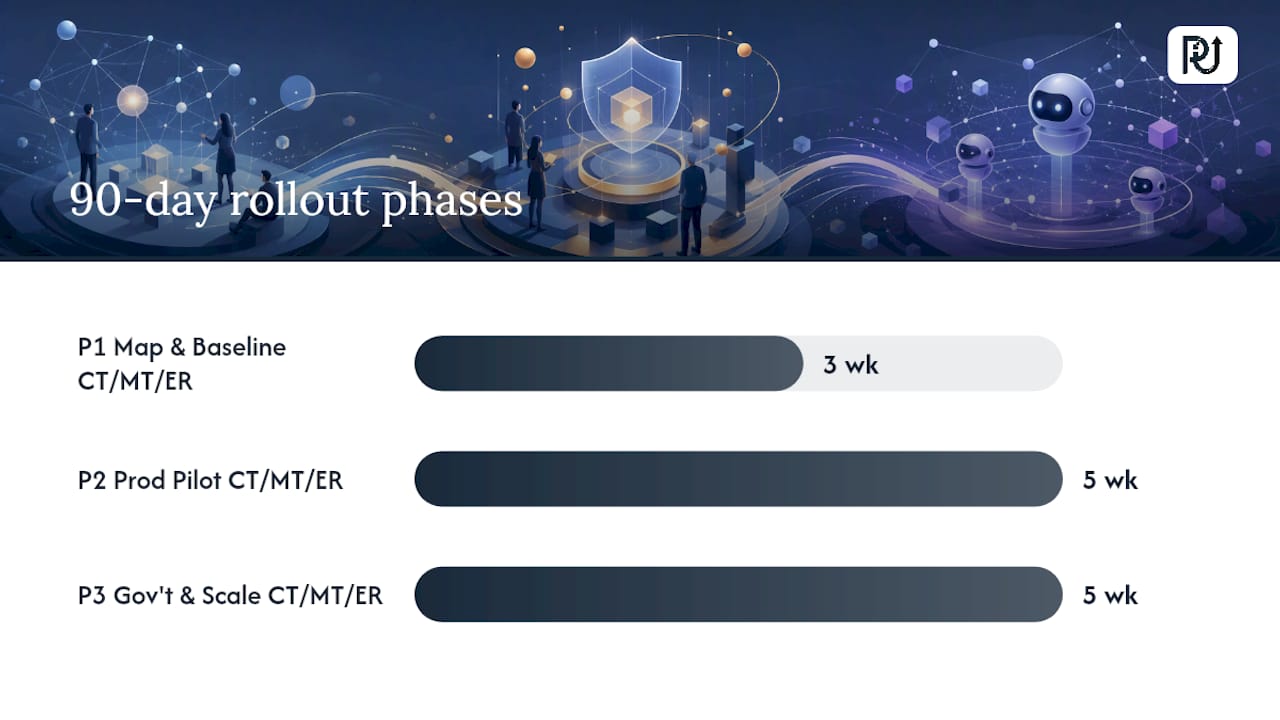
A 90-day framework generally breaks into three phases: weeks one through three for process mapping and baseline metrics, weeks four through eight for a production-safe pilot on one high-volume process, and weeks nine through thirteen for governance hardening and the first scale-out to a second process. The goal at each checkpoint is a measurable number, cycle time reduced by a specific percentage, manual touches eliminated, error rate down, not a vague sense that “things feel more automated.”
The contrast between manual and automated workflows shows up clearest in three numbers: time per transaction, cost per transaction, and how throughput changes as volume grows. POW IT UP’s comparison of manual versus automated workflows shows that automation, done with proper governance and monitoring in place, lets processing volume scale without a proportional increase in headcount, the core economic argument for making this investment now rather than after a headcount crunch forces the issue.
Custom AI agents fit into this framework as a governed capability, not a separate initiative. Each agent gets:
- A defined scope of actions it’s permitted to take without escalation
- An audit log entry for every decision, reviewable by operations staff
- A human approval gate on any action above a defined risk or dollar threshold
- A rollback path if the agent’s output needs correction
The pattern that fails, consistently, is treating agent deployment as a technology switch instead of an operational change. Businesses that skip the governance layer to move faster end up rebuilding it under pressure after the first costly error.
Should Modern Workflows Be a One-Time Fix or a Process?
Modern workflow management is not a project you finish. It’s a discipline you maintain, and the companies that treat it as ongoing consistently outperform the ones that automate once and walk away.
Build a regular cadence, monthly or quarterly depending on volume, for reviewing run history and audit logs, not just when something breaks. Look specifically for processes where the exception rate is climbing: that’s usually a signal the underlying business rules changed and your automation logic hasn’t caught up.
Track a small set of metrics consistently rather than a large dashboard nobody checks: cycle time, error rate, and percentage of cases requiring human intervention. A rising intervention rate on a process that used to run cleanly is often the earliest warning sign of a upstream data quality problem, not a workflow bug.
Retire and consolidate automations as aggressively as you build new ones. Workflows built two years ago for a process that has since changed become technical debt, silent failure points that nobody remembers to check. A quarterly audit of active automations against current business rules catches this before it becomes an incident.
Involve the people who actually run the process in every optimization cycle, not just the team that built the automation. Frontline staff notice edge cases and rule changes months before they show up in your error-rate dashboard.
Where Companies Get Workflow Automation Wrong
The most common pitfall is automating a process before mapping it fully, which locks in whatever inefficiencies already existed, just faster. If your manual process has three undocumented exceptions that only one employee knows how to handle, automating around those blind spots guarantees the automation breaks the first time one occurs.
A close second: treating governance as something you add after the pilot succeeds. Teams that skip role-based access control and audit logging during the pilot phase almost always have to pause and retrofit it once the automation touches anything regulated or customer-facing, work that costs more after the fact than it would have upfront.
Over-indexing on the no-code promise causes a different kind of pain. Citizen builders can move fast, but without any technical oversight, automations pile up with no documentation, no testing discipline, and no one accountable when they break. The organizations that get this right let business users build, but under a permission structure IT actually reviews.
Underestimating change management is the pitfall leaders see coming least. Staff whose jobs shift from doing a task to reviewing an exception queue need training and, often, a redefined sense of what their role now means. Skip that conversation and you get quiet resistance: employees who route everything to the exception queue rather than trust the automation, defeating the purpose of building it.
Finally, companies chase feature lists instead of fit. A platform with agentic automation capabilities is worthless to a team whose real bottleneck is a legacy system with no API. Fit the platform to the actual constraint, not the most impressive demo.
How Does Automation Change the Way Teams Work Together?
Workflow automation changes more than throughput numbers. It changes what people spend their day doing, and that shift, handled well, tends to improve morale rather than threaten it.
Staff who previously spent hours on data entry or status updates get reassigned to the exceptions and judgment calls that automation can’t handle, the parts of the job that actually require expertise. Teams that communicate this shift clearly, this is what changes, this is what stays yours, see less resistance than teams that roll out automation quietly and let rumors fill the gap.
Cross-functional visibility improves almost as a byproduct. When a workflow spans sales, operations, and finance, a shared automation platform gives all three teams the same run history and status view, replacing the old pattern of separate spreadsheets and status-update emails that never quite matched. That shared visibility often surfaces process problems, duplicate work, conflicting priorities, that no one noticed when each team only saw its own slice.
Trust becomes the real currency. Employees who see an automation fail without warning stop trusting the system and start double-checking its work manually, which erodes the entire efficiency case. Employees who see clear audit logs, sensible exception handling, and a fast fix when something breaks tend to lean into automation rather than around it.
The cultural shift matters most at the manager level. Managers who previously supervised task completion now supervise exception patterns and system health, a genuinely different skill. Companies that invest in promoting a digital transformation culture alongside the technical rollout see faster adoption than those that treat the culture piece as an afterthought.
What Comes After 2026 for Workflow Management?
Agentic automation, AI systems taking multi-step action across connected apps rather than executing single scripted tasks, is moving from early adopter territory to standard expectation. The platforms building this in now are setting the governance patterns (action restrictions, audit trails, approval gates) that will likely become baseline requirements industry-wide within a few years.
Model governance is becoming a procurement question, not just a technical one. Expect boards and compliance teams to ask specifically which models power your automations, where they run, and what happens if a model vendor changes its terms or pricing. Digital asset oversight frameworks are already pushing this conversation to the board level, and a board-level oversight checklist gives a useful structure for the questions leaders should be prepared to answer.
Convergence between workflow automation and data orchestration is likely to accelerate. The line between “business process automation” and “data pipeline orchestration” is already blurring as agents need real-time data access to make decisions, and platforms built for one job are adding capabilities from the other.
Expect the citizen builder versus engineer-first debate to resolve toward hybrid platforms rather than a winner. The market pressure is toward tools that let both groups work safely in the same governance structure, because pure no-code and pure engineer-only platforms both hit adoption ceilings companies can’t afford at scale. The companies furthest ahead by 2028 will likely be the ones that started building this governance discipline now, not the ones waiting for a mature standard to emerge.
Why Exception-Based Design Beats Full Automation Every Time
The instinct to automate everything is understandable and almost always wrong. The businesses getting real value from modern workflow management aren’t the ones with the most automated steps. They’re the ones that automated the right 80% and built a genuinely good system for handling the remaining 20% that needs a human.
Leaders consistently underestimate how much of the value sits in the exception path, not the happy path. Anyone can automate a process that always works the same way. The real engineering, and the real payoff, is in designing what happens when a document is malformed, a customer’s request doesn’t fit the standard categories, or two systems disagree about a customer’s status. Skip that work and you’ve built a demo, not an operational system.
— Syed Naveed Abbas
How POW IT UP Turns This Into a Working System
The described approach involves governed, exception-based automation with custom AI agents, document intelligence, and workflow orchestration designed to eliminate manual time leaks without creating new blind spots.
An initial engagement typically starts with an assessment of current processes, baseline metrics, exception patterns, and integration surface, before any code gets written. From there, a production-safe pilot is built on your highest-volume time leak, complete with audit logging, role-based controls, and rollback plans that turn a proof of concept into a trusted production system. Document reading and validation tools handle the processing directly, while portfolio-level visibility tools give operations leaders insight once automation is running.
If your team is evaluating AI integration options or considering custom AI agent development for a specific bottleneck, the next step is a conversation about your actual process, not a generic demo. Request a consult to walk through where your workflow is leaking time and what a governed pilot would look like for your team.
Sources
- Best practices–the nine elements to success
- Zapier: Build and Govern AI Workflows, Agents, and Apps
- Make — Build workflows and AI agents on a visual automation platform
- Prefect – Workflow Orchestration for Data, ML, and Agents
FAQ
What Are Examples of Workflow Management?
Common examples include automated invoice approval routing, insurance claim intake and validation, customer support ticket triage with exception escalation, and marketing lead routing between sales teams.
What Is the Best Workflow Management Tool?
There’s no single best tool. The right choice depends on your integration needs, governance requirements, and whether your team leans toward citizen builders or engineer-first development. Businesses with complex, regulated, or highly custom processes typically get more value from working with an implementation partner like POW IT UP to build a governed system than from a generic off-the-shelf platform.
Does Microsoft 365 Have a Workflow Tool?
Microsoft includes Power Automate, a workflow automation tool built into the Microsoft ecosystem for connecting apps like Outlook, SharePoint, and Teams. It handles many routine automations well, though complex, multi-system, or highly regulated workflows often require the deeper orchestration and governance capabilities of a dedicated automation platform.
What Are the Top Project Management Tools?
Leaders frequently pair dedicated project management software with workflow automation platforms, since project tracking and process automation solve related but distinct problems. The more important question isn’t which tool ranks highest, but whether it supports the governance and variance tracking that project management best practices recommend at scale.
How Long Does It Take to Implement Modern Workflow Management?
A focused pilot on one high-volume process typically takes weeks to a few months to reach production, following an assess, pilot, govern, and scale sequence rather than a single company-wide rollout.