

AI for small and mid-sized businesses delivers the fastest payoff when it automates repetitive admin and customer-facing work, letting a lean team punch above its headcount. The right first move isn’t a company-wide rollout. It’s a single, well-scoped pilot on one workflow, measured for 30 to 90 days before you spend another dollar on anything bigger.
The evidence for that approach is concrete. AWS cites containment rates of roughly 70 to 80% for routine customer inquiries handled by AI assistants, with per-interaction cost reductions in the 60 to 80% range when a partner configures the system correctly. That’s not a hypothetical ceiling.
Three things anchor this playbook: training programs like the Google AI Professional Certificate that build in-house fluency, platforms like Claude for Small Business that ship with human-approval defaults already built in, and an integration partner like POW IT UP for the projects that outgrow a do-it-yourself setup.
What this means for you right now:
- Pick one workflow that eats hours every week but carries low risk if something goes sideways.
- Set a 30 to 90 day pilot window with two or three measurable KPIs, not a vague “see how it goes.”
- Keep a human approving anything that touches money or a customer relationship until the system earns your trust.
Key Takeaways
AI creates the fastest return for small and mid-sized businesses when leaders pilot one repetitive, low-risk workflow first and measure it before scaling anything wider.
| Point | Details |
|---|---|
| Pilot one workflow first | Pick inbox triage, invoicing, or support ticketing before attempting a company-wide rollout. |
| Set a 30-90 day window | Define two or three measurable KPIs upfront so the go/no-go decision isn’t a guess. |
| Require human approval defaults | Route any money or customer-facing action through a person until the system earns trust. |
| Budget training alongside tools | Use the Google AI Professional Certificate to build in-house fluency before or during the pilot. |
| Bring in a specialist for complex integrations | POW IT UP scopes pilots for multi-step transactions and connector work that exceed internal IT capacity. |
Table of Contents
- Three Practical AI Quick Wins to Pilot in 30-90 Days
- How Do You Evaluate AI Tools and Vendors for Your Business?
- What Does a Pilot-to-Scale Roadmap Actually Look Like?
- Where Should Your Team Get AI Training?
- How Does POW IT UP Support SMB AI Adoption?
- What Are the Biggest Risks in AI Adoption, and How Do You Manage Them?
- When Should You Move Fast and When Should You Be Cautious?
- Ready for a Pilot? Here’s What POW IT UP Offers
- Sources
- FAQ
Three Practical AI Quick Wins to Pilot in 30-90 Days
Speed matters more than scope in the first 90 days. These three pilots consistently move fast because they touch high-volume, low-ambiguity work: exactly the kind of task AI handles well and humans find tedious.
-
Inbox and scheduling assistant. Objective: cut the hours a founder or office manager spends triaging email and booking meetings. Time-to-pilot is typically two to four weeks once connected to Gmail or Microsoft 365 and a calendar tool. Track minutes saved per week and the percentage of messages handled without escalation. Minimal tooling needed: an email connector and calendar API access.
-
Invoice and cash-forecast automation. Objective: shrink the days between invoice issuance and payment while giving you a rolling view of cash position. Anthropic’s small business plugin lists prebuilt workflows for cash forecasting and month-end close, with QuickBooks and PayPal as standard connectors. Expect a 30 to 60 day pilot window. Track overdue invoice recovery rate and hours saved on reconciliation.
-
Customer support triage and templated replies. Objective: resolve routine tickets without a human touching every one. This is where the AWS containment figures apply directly: routine-inquiry containment in the 70 to 80% range is a realistic target once the system is trained on your FAQ and ticket history. Track containment rate, average response time, and customer satisfaction score.
Pro Tip: Scope success criteria before you scope the tool. Write down the two metrics that would make this pilot a clear win, and name who signs off on scaling it, before you touch a single integration.
Anthropic’s guidance on human-in-the-loop defaults matters here too. Any workflow that touches a customer refund, a payment, or a contract term should route through a person for approval, at least for the first several pilot cycles. That’s not a limitation of the technology. It’s what keeps a fast pilot from becoming an expensive mistake.

Reviewing common back-office tasks worth automating before you pick a pilot helps you avoid the trap of automating something nobody actually finds painful.
How Do You Evaluate AI Tools and Vendors for Your Business?
Six dimensions separate a tool that earns its subscription from one that becomes shelfware: time-to-value, pricing shape, implementation complexity, human-in-the-loop controls, data security practices, and the specific use cases it actually supports.
Red flags to walk away from:
- No option for human approval before an action touches money or a customer record.
- Vague or absent language about training models on your customer data.
- No native connectors to tools you already run, like QuickBooks, HubSpot, or Google Workspace.
- Pricing that only makes sense at enterprise volume, with no clear entry tier for a 15-person company.
- No reference case from a business anywhere near your size.
Ten questions worth asking on a discovery call:
- What’s the realistic time-to-pilot for our specific use case?
- Which connectors do you support out of the box, and which require custom work?
- What’s the default behavior when an action involves money or a customer?
- Do you train models on our data, and can we opt out?
- What’s your data retention and deletion policy?
- What does pricing look like at our transaction volume, with real numbers?
- Can you show a case study from a business our size?
- What’s the rollback plan if the pilot underperforms?
- What SLA do you offer for support response time?
- Who owns the account after the pilot, us or you?
A simple 1 to 5 rubric across those six dimensions lets you score two or three vendors side by side in an afternoon. Anything scoring below a 3 on human-in-the-loop controls or data security should get cut before you look at price. Reviewing how AI integrates into CRM systems can help you frame questions specific to your customer data setup.
What Does a Pilot-to-Scale Roadmap Actually Look Like?
Four phases, each with a distinct owner and deliverable, take you from idea to a system you can actually depend on.
| Phase | Timeline | Typical owner | Key deliverable |
|---|---|---|---|
| Discovery | 1-2 weeks | Founder or ops lead | Workflow map, success metrics defined |
| Pilot setup | 2-6 weeks | Ops lead + IT or vendor | Connectors live, first test runs complete |
| Measure & iterate | 30-90 days | Ops lead | KPI report, go/no-go decision on scaling |
| Scale & governance | Quarterly | Leadership team | Rollout plan, review cadence set |
Discovery is where most pilots quietly fail before they even start. Skip the workflow map and you’ll spend the pilot phase discovering requirements you should have known upfront. QuickBooks, HubSpot, PayPal, DocuSign, and Google Workspace or Microsoft 365 cover the majority of SMB integration needs, but each has its own quirks that surface only once you’re inside the setup.
This is the point where many leaders bring in an integration partner rather than continuing solo. Internal IT teams at a 30-person company rarely have the bandwidth for custom connector work on top of daily support tickets. A partner like POW IT UP handles the integration work while your ops lead stays focused on the metrics and stakeholder communication.
Where Should Your Team Get AI Training?
Tools only pay off if the people running them know what they’re doing. Three resources cover most of the gap for a small team: external certification, vendor-run workshops, and a lightweight internal ramp-up.
The Google AI Professional Certificate through Grow with Google’s Make AI Work for You program teaches practical use cases: automating customer support, analyzing finances with tools like Gemini Notebook, and generating marketing assets. Eligible businesses can access hands-on workshops and Grow with Google Coaches at no cost.
There’s a real financial incentive here too. Google offers a scholarship for verified U.S. small and mid-sized businesses with 500 employees or fewer and a valid EIN, which can include up to three months of no-cost access to Google Workspace Business Standard and limited-time access to Google AI Pro. That’s a meaningful runway to build fluency before you commit budget elsewhere.
- Ops team: focus training on the specific tool tied to your first pilot before launch, not after.
- Finance team: prioritize cash-forecast and invoicing workflows tied to QuickBooks connectors.
- Marketing team: start with content generation and campaign analysis use cases.
- Whole company: a monthly 30-minute lunch-and-learn keeps AI literacy from stalling after the initial certificate course.
Pro Tip: Train the staff who’ll actually touch the pilot tool a week before launch, not a month before. AI training decays fast without hands-on use, so timing it right up against your pilot start date keeps the knowledge fresh.
How Does POW IT UP Support SMB AI Adoption?
POW IT UP builds custom AI agents and automation systems for businesses whose integration needs go past what a subscription tool can handle out of the box. The work spans two engagement models: project-based consulting for custom builds, and productized software like DocuPOW for document intelligence and validation, plus AuraPOW for portfolio monitoring and client health analytics.
Three scenarios where this kind of specialist work pays for itself:
- Multi-step transaction workflows, like month-end close processes that touch accounting software, a CRM, and a payment processor all in one sequence.
- PII-sensitive automation, where role-based access and audit trails matter more than raw speed.
- Complex connector work, when your existing stack (a legacy ERP, a custom-built CRM) doesn’t have a plug-and-play integration.
To prep for a scoping call, bring three things: a map of your current workflow, the two or three metrics you’d use to judge success, and sample data from the systems you want connected. Reviewing common automation tool categories beforehand helps you talk through options with more specificity.
What Are the Biggest Risks in AI Adoption, and How Do You Manage Them?
Every fast-moving pilot carries the same handful of risks, and every one of them has a straightforward fix if you catch it before launch rather than after.
Red flags to check before any pilot goes live:
- A model trained on your customer data with no opt-out.
- No human approval step for actions involving money or a customer relationship.
- Connectors that bypass your existing role-based access controls.
- No documented rollback plan if the pilot underperforms or breaks something.
Mitigation steps to require upfront:
- Default every money-touching or customer-facing action to human approval for the first full pilot cycle.
- Define scoped boundaries in writing: what the AI can touch, what it can’t.
- Build a small test data set to check outputs before connecting live customer records.
- Confirm the vendor’s data retention and deletion policy in writing, not just verbally.
- Schedule a monthly check on model performance once the pilot moves to production.
- Name one person accountable for pulling the plug if something goes wrong.
Model drift is the quiet one that catches people off guard. A support triage tool tuned on last year’s ticket patterns can start misclassifying new product issues within months. Nothing exotic fixes this: a recurring review of a sample of outputs, done by an actual person, on a calendar you actually keep.
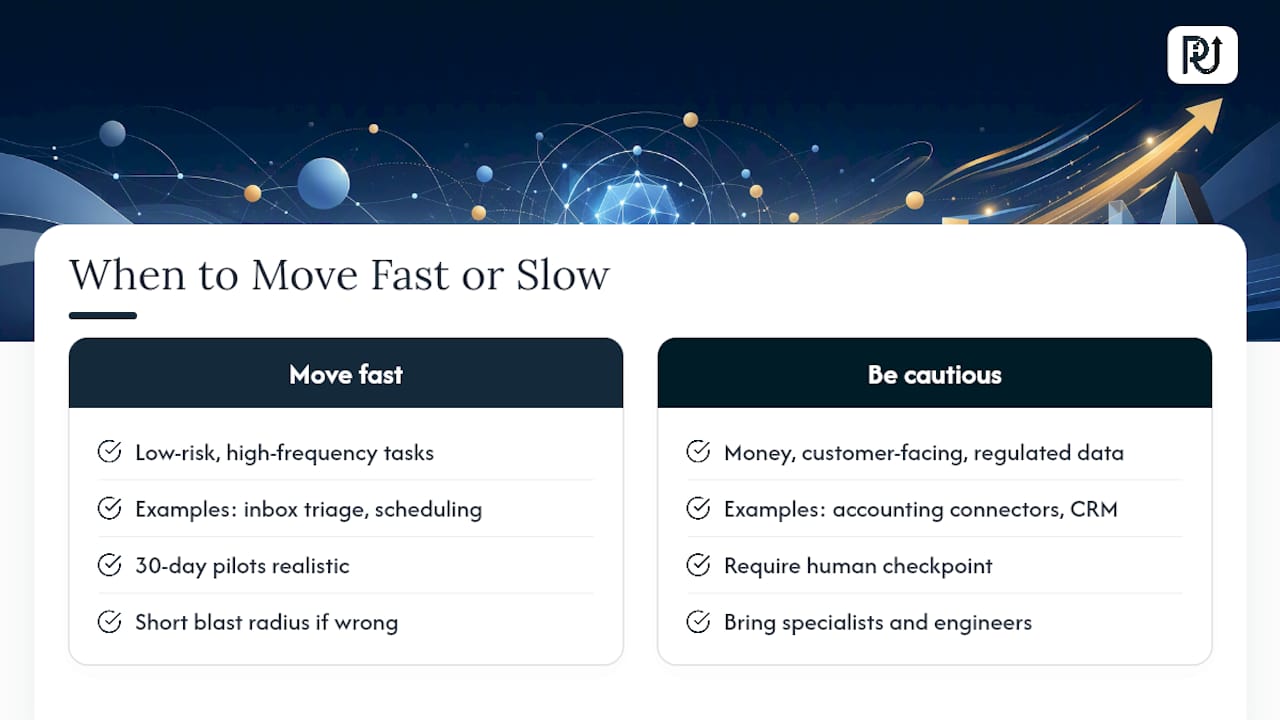
When Should You Move Fast and When Should You Be Cautious?
Speed and caution aren’t opposites here. They’re two settings you apply to different categories of work, and mixing them up is the most common mistake I see leaders make.
For low-risk, high-frequency tasks, move fast. An inbox triage assistant or a scheduling tool has a short blast radius if it gets something wrong: you catch it, you fix it, nobody’s money or trust is on the line. These are the pilots where a 30-day timeline is realistic and where waiting for perfect confidence just burns time you didn’t need to spend.
For money movement, customer-facing decisions, and anything touching regulated or sensitive data, slow down. Not because AI can’t handle it well eventually, but because the cost of an unsupervised mistake in those categories is disproportionate to the time you’d save skipping the human checkpoint. This is also where I’d tell a leader to bring in a specialist rather than stitch it together internally. Complex connector work across a legacy accounting system and a CRM, or a workflow that has to satisfy a regulatory audit trail, is exactly the kind of project where engineering expertise closes the gap between “it mostly works” and “it works reliably every time.” POW IT UP’s engagement model exists for that middle ground: pilots with real ROI potential that need more architecture than a subscription tool provides out of the box.
The instinct to treat all AI adoption with the same level of caution, or the same appetite for speed, is what causes most SMB pilots to either stall out or blow up. Match the pace to the actual risk in front of you.
Ready for a Pilot? Here’s What POW IT UP Offers
Most SMB leaders don’t need a six-month AI transformation. They need one workflow automated well, measured honestly, and built by someone who won’t disappear after the invoice clears. That’s the gap POW IT UP fills for businesses whose pilot needs outgrow a subscription tool but don’t justify a full internal engineering hire.
A scoped pilot engagement with POW IT UP typically covers one workflow end to end: discovery of your current process, connector setup to the tools you already run, a defined test period, and a KPI report you can use to decide on scaling. Expect the conversation to start with the same prep any good vendor call needs: your current workflow map, the metrics that matter to you, and sample data from the systems involved. From there, POW IT UP scopes a timeboxed build built around human-in-the-loop safeguards on anything touching money or customer records.
If your team is weighing a pilot that involves multi-step transactions, sensitive data, or a connector your current stack doesn’t support cleanly, start with a scoping conversation on the AI integration page and bring your workflow map to the first call.
Sources
- Google offers AI certificate free for eligible U.S. small businesses
- AI Solutions for Small and Medium Businesses – AWS
- Claude for Small Business | Claude by Anthropic
FAQ
What’s the fastest AI project for a small business to pilot?
Customer support triage and inbox management typically show results within 30 to 60 days, since AWS reports containment rates of 70 to 80% for routine inquiries handled by AI assistants.
Does AI for small businesses require an in-house IT team?
No. Vendors like Claude for Small Business ship with one-click connectors and prebuilt workflows, and AWS notes partner-delivered solutions can launch without an internal data science team.
How much does the Google AI Professional Certificate cost for eligible businesses?
Eligible U.S. businesses with 500 employees or fewer and a valid EIN can access the certificate through a scholarship, which may include up to three months of no-cost Google Workspace Business Standard.
When should a small business hire an integration partner instead of a subscription tool?
Bring in a partner like POW IT UP when a workflow spans multiple systems, involves sensitive data, or needs custom connector work that a standard subscription tool doesn’t support out of the box.
What’s a red flag when evaluating an AI vendor?
Any vendor without a human approval default for actions touching money or customer records, or one that trains models on your data without an opt-out, should be dropped from consideration.