

IPA, or Intelligent Process Automation, pairs rule-based bots with AI, machine learning, and document understanding so software can read, decide, and act across an entire workflow, not just click through a script. It fits organizations with high-volume, judgment-adjacent transactional work, invoice processing, claims, onboarding, where manual review creates measurable time leaks. Deloitte reports average savings near 27% when companies scale it properly, and firms like POW IT UP now build these systems as custom digital workforces rather than off-the-shelf scripts.
TL;DR:
- High transaction volume and consistent process patterns are necessary to justify IPA implementation and achieve fast ROI, typically within six to twelve months.
- Successful IPA projects require accessible APIs and enough labeled exception data; poor data quality or fragmented systems often delay or prevent scaling.
- Automating entire workflows with architecture-driven systems outperforms point solutions, reducing manual oversight and enabling better handling of exceptions.
- Common pitfalls include automating individual tasks rather than reengineering workflows, which leads to efficiency shifts rather than true automation gains.
- Scalable IPA relies on custom AI agents built around specific bottlenecks, not on off-the-shelf tools, ensuring the system adapts and grows with process complexity.
Table of Contents
- What Is IPA and How Does It Differ from RPA?
- What Technologies Make Up an IPA System?
- Where Does IPA Deliver the Fastest ROI?
- How Do You Evaluate Candidate Processes and Estimate ROI?
- What’s the Implementation Roadmap and Where Do Projects Fail?
- Why Do Custom AI Agents Beat Point Solutions for Scaling IPA?
- Ready to Turn Manual Time Leaks Into a Scalable Workforce?
- Sources
- FAQ
What Is IPA and How Does It Differ from RPA?
Robotic Process Automation moves data between screens using fixed rules. It works well until a document looks slightly different, a field is missing, or a decision requires context, then the bot stalls and a human steps in anyway. IPA closes that gap. It layers artificial intelligence, natural language processing, and computer vision on top of RPA so the system can read unstructured documents, classify exceptions, and adjust as it processes more transactions.
The word “intelligent” here means three specific things:
- Decisioning: the system evaluates ambiguous inputs against learned patterns instead of a fixed if/then tree.
- Learning: model performance improves as exception volume feeds back into training data.
- Adaptability: workflows tolerate format changes, new document types, or shifting business rules without a full rebuild.
McKinsey researchers frame this well, describing automation as an engine at the core of the operating model rather than a bolt-on tool. That distinction shapes everything else in this guide: IPA is architecture, not a script library.
What Technologies Make Up an IPA System?
An IPA stack is a set of layers working together, not one product. Each layer solves a specific bottleneck in a document-heavy or transaction-heavy workflow.
- RPA handles the repetitive, rule-based steps: data entry, system navigation, format conversion.
- AI/ML models score risk, predict outcomes, and route exceptions based on historical patterns.
- NLP extracts meaning from emails, contracts, and free-text fields.
- OCR and computer vision pull structured data from scanned invoices, IDs, or claims forms.
- Process mining analyzes system logs to reveal where transactions actually stall, often surfacing bottlenecks nobody flagged manually.
- Orchestration sequences all of the above into a coherent workflow with handoffs, retries, and escalation paths.
- Analytics tracks throughput, error rates, and exception volume so the system improves over time.
A typical flow looks like this: a document arrives, OCR and NLP extract the relevant fields, an ML model scores the transaction and flags exceptions, and an orchestration layer routes clean cases straight through while sending flagged ones to a human. Before building any layer, confirm you have clean historical data, accessible APIs into source systems, and enough labeled exception samples to train the models. Skip that check and you’ll spend months debugging a model that never had enough signal to learn from.
Where Does IPA Deliver the Fastest ROI?
Document-heavy, high-volume, rules-plus-judgment processes return value fastest because they combine measurable outcomes with repeatable structure. The clearest candidates:
- Accounts payable and invoice processing: extraction and matching replace manual keying and cut approval cycle time.
- Insurance claims: intake, triage, and fraud flagging move from days to hours.
- Customer onboarding and support: identity verification and routine inquiries resolve without a queue.
- Reconciliations: line-item matching across systems that used to eat analyst hours every month-end.
- Portfolio monitoring: continuous data checks replace periodic manual reviews.
Statistic Callout: Some enterprise IPA pilots in document-intensive processes report process improvements of up to 90% in specific workflows once document understanding and orchestration are fully applied, alongside meaningful gains in invoice-processing accuracy.
Beyond raw speed, expect fewer downstream errors and steadier SLA performance across finance, insurance, healthcare, and customer service functions. Headcount doesn’t need to grow with transaction volume once the exception rate stabilizes, which is the real signal that a pilot is ready to scale.
How Do You Evaluate Candidate Processes and Estimate ROI?
Not every process deserves IPA, and picking the wrong one is how pilots die quietly in a backlog. Score candidates against five criteria before committing engineering time:
- Volume: enough transactions monthly to justify build cost, generally in the hundreds or thousands, not dozens.
- Repeatability: the steps follow a consistent pattern even when the specific inputs vary.
- Exception rate: a moderate exception rate is fine, an extreme one signals the process isn’t standardized enough yet.
- Data access: source systems expose APIs or structured exports, not just screens a human has to read.
- Regulatory sensitivity: sensitive processes are viable but require governance built in from day one, not retrofitted later.
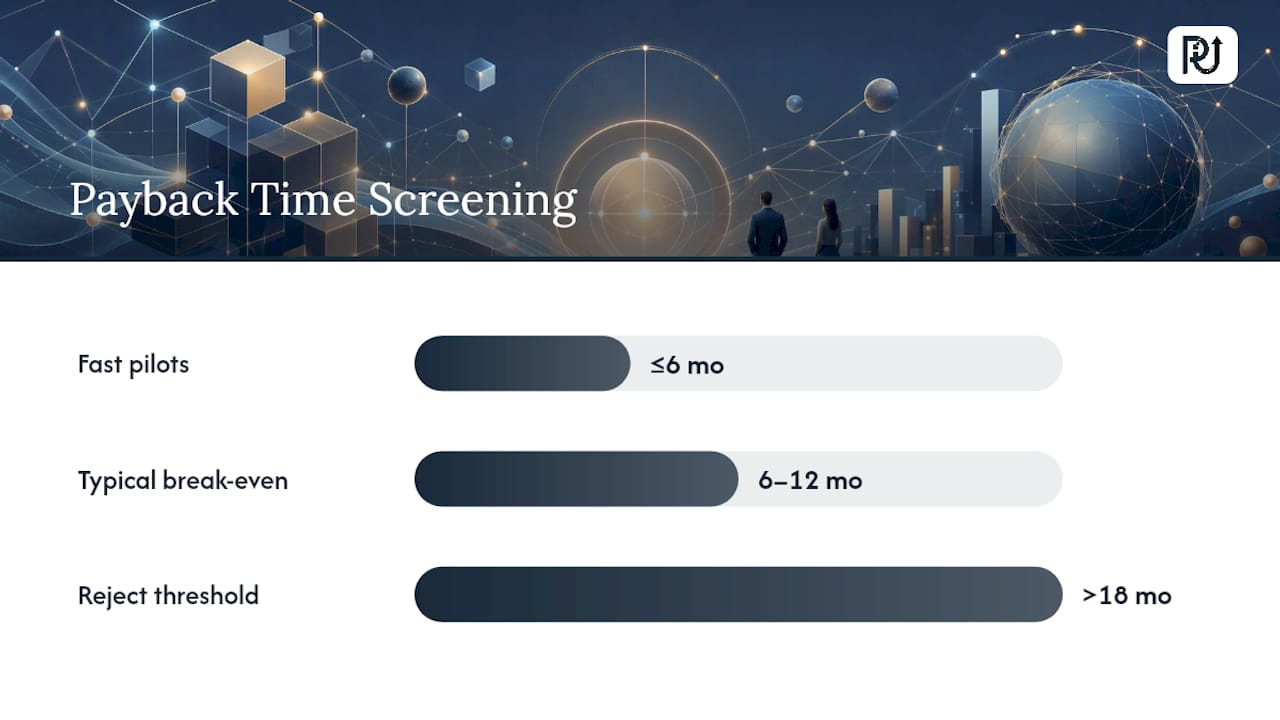
For ROI math, keep the checklist simple: establish your current cost-per-transaction baseline, estimate the percentage reduction a comparable pilot achieved, add realistic engineering effort (build, test, integrate), then calculate payback period against that combined figure. Most well-scoped pilots hit break-even inside six to twelve months, though document-heavy processes with strong data access often move faster.
Pro Tip: Run the ROI math on paper before writing a line of code. If the payback period stretches past 18 months on your first estimate, the process usually needs better data plumbing, not a smarter model.
Watch for red flags that predict a stalled project: fragmented data spread across incompatible systems, transaction volume too low to justify the build, or work that’s genuinely exploratory and changes shape every quarter. Those processes need process redesign first, automation second.
What’s the Implementation Roadmap and Where Do Projects Fail?
A working IPA program moves through four phases, and skipping straight to phase three is the single most common way enterprises waste budget.
- Discover and map: use process mining to find where transactions actually stall, not where stakeholders assume they stall.
- Pilot with a fixed KPI: pick one process, define success as a specific number (cycle time, error rate, cost-per-transaction), and run it end-to-end.
- Productionize: build orchestration, monitoring, and escalation paths so the pilot survives contact with real volume and real exceptions.
- Scale and keep learning: expand to adjacent processes while feeding exception data back into the models.
Security and governance can’t wait until phase three. Access controls, encryption, audit logging, and model monitoring belong in the architecture from the pilot stage, especially for regulated data.
The most common failure mode is the task-level automation trap: teams automate individual clicks instead of reengineering the end-to-end workflow, which just shifts manual effort into bot supervision. Inadequate data governance and weak change management follow close behind, usually because nobody planned for how staff roles shift once exceptions, not raw transactions, become the daily work.
Why Do Custom AI Agents Beat Point Solutions for Scaling IPA?
Point tools solve one narrow task well and stall the moment a workflow spans multiple systems. Architected digital workforces don’t have that ceiling. POW IT UP builds custom AI agents around specific transactional bottlenecks: DocuPOW handles document reading and validation, while AuraPOW monitors portfolio health and flags risk before it compounds. Teams that engineer the workflow first, then automate it, consistently outscale those bolting bots onto unchanged processes. That gap between architecture and add-on is exactly what separates pilots that scale from pilots that stall.
— Syed Naveed Abbas
Ready to Turn Manual Time Leaks Into a Scalable Workforce?
Point solutions patch one task. POW IT UP engineers the whole workflow, so your team gets a system that scales transaction volume without scaling headcount alongside it. That’s the real advantage over stitching together separate automation tools yourself: one architecture, built around your actual bottlenecks, instead of five disconnected scripts that each need their own maintenance plan.
Enterprise finance, claims, and operations teams get the most out of this approach, particularly groups drowning in document review or reconciliation backlogs. POW IT UP’s AI integration work starts with a discovery session focused on your actual exception rates and data readiness, not a generic sales pitch. If you’re further along, the AI automation service handles full engineering and deployment. Book a discovery session and get a straight answer on payback timing before you commit a budget line to it.
Sources
- What is intelligent process automation (IPA) — TechTarget
- Intelligent process automation: the engine at the core of the next‑generation operating model — McKinsey
- IPA versus RPA: what’s the difference? — Deloitte
- What is intelligent process automation? — UST
FAQ
What’s the Difference Between IPA and RPA?
RPA follows fixed rules and breaks when inputs vary; IPA adds AI, NLP, and computer vision so the system can read unstructured data and handle exceptions on its own.
Which Business Processes Are Best Suited to IPA?
High-volume, document-heavy, judgment-adjacent processes work best, including accounts payable, insurance claims, customer onboarding, and reconciliations.
How Long Does an IPA Pilot Take to Show ROI?
Most well-scoped pilots reach payback within six to twelve months, though document-intensive processes with strong data access can move faster.
What Are the Biggest Risks in an IPA Rollout?
The task-level automation trap, tackling isolated clicks instead of redesigning the whole workflow, causes most stalled projects, along with weak data governance and skipped change management.
Does POW IT UP Build Custom IPA Systems or Just Integrate Tools?
POW IT UP engineers custom AI agents and productized tools like DocuPOW and AuraPOW around a company’s specific bottlenecks, rather than reselling generic automation software.