
DWaaS stands for data warehouse as a service. A cloud provider sets up, configures, manages and maintains the warehouse hardware and software. Your team supplies the data and pays a fee for the managed service, according to Google Cloud’s definition. You get a central place to query, report on and model your business data without buying servers or hiring people to babysit them.
This guide covers what DWaaS is, what the provider handles, how it differs from a plain data warehouse, where it fits, and what a US business should check on cost, security and migration before committing.
TL;DR
- DWaaS is a managed cloud model: the provider runs the warehouse infrastructure, and you load data, query it and pay for what the service delivers.
- A data warehouse is the analytical store itself. DWaaS is the way it is delivered and operated.
- Costs usually split across storage, compute and data movement, so model your own workload before you compare vendors.
- Regulated US businesses (healthcare, government work) should check encryption, access logging and the relevant compliance posture first.
- Migrate in iterations, and treat the project as a change to your data pipelines, not a server move.
Table of Contents
- What DWaaS means in plain terms
- How DWaaS works
- DWaaS vs. a data warehouse
- Benefits you can expect
- Where DWaaS fits: use cases
- What a US business should evaluate
- Choosing among warehouse platforms
- Questions to ask any provider
- Perspective
- Put your data to work with POW IT UP
- FAQ
- Sources
What DWaaS means in plain terms
A data warehouse collects data from the systems that run your business, such as your CRM, billing platform, store, ticketing tool and payment processor. It stores that data in a structure built for analysis rather than for day-to-day transactions. That is why finance can ask “what was margin by customer segment last quarter?” without slowing down the system that takes orders.
Historically, a company bought or rented the hardware, installed the software, hired administrators and tuned performance. DWaaS removes that layer. TechTarget’s guide describes it as an outsourcing model that frees customers from buying, installing and routinely administering warehouse infrastructure.
The term is sometimes used loosely for any warehouse that happens to run in the cloud. The stricter meaning is the managed one: the provider delivers and operates the whole environment.
How DWaaS works
Data is collected, stored and processed in the cloud. On top of that sit query processing, business intelligence (BI), advanced analytics, machine learning, AI and reporting tools, as Google Cloud explains. The same page says a cloud offering commonly bundles:
- An analytical warehouse
- Centralized storage
- Resource and access management
- ETL or ELT integration, which moves and reshapes data on its way in
- Reporting and BI
- Advanced analytics, machine learning and AI capabilities
TechTarget adds that pure DWaaS providers handle configuration, performance and data-integration support. Customers can scale compute and storage on demand, or reserve resources in exchange for discounted pricing.
Who does what
In practice the split looks like this:
| Task | Provider | Your team |
|---|---|---|
| Hardware, software installation and patching | Yes | No |
| Warehouse configuration and performance management | Yes | Sets requirements |
| Capacity scaling | Provides the mechanism | Chooses how much and when |
| Data sources and pipelines | Offers integration tooling | Owns what flows in |
| Data models, metrics definitions | No | Yes |
| Access policies and who sees what | Provides controls | Decides and enforces |
The last three rows matter most. A managed warehouse does not decide what “active customer” means or who may see payroll data. That is your business logic, and it is where most of the value (and most of the trouble) lives.
DWaaS vs. a data warehouse
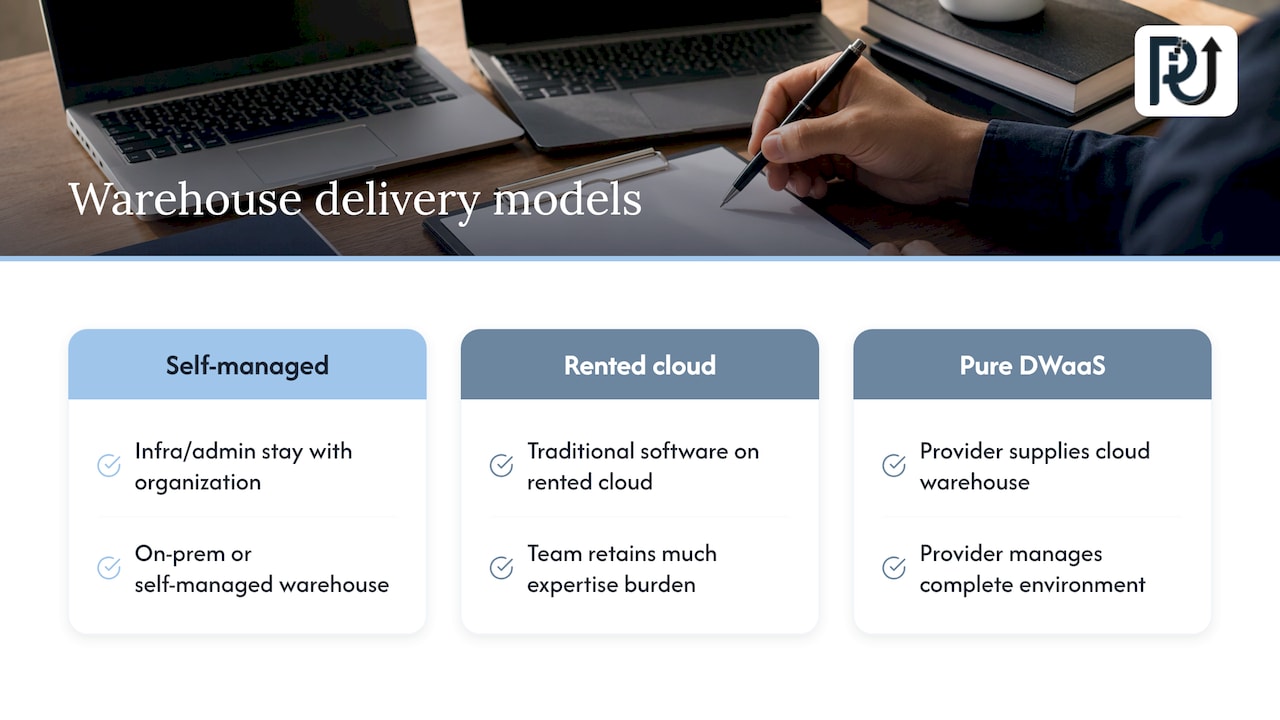
These are not competing choices. A data warehouse is the analytical data store and its architecture. DWaaS is the delivery and operating model in which a cloud provider supplies and manages that warehouse. With an on-premises or self-managed warehouse, infrastructure and administration stay with your organization. Pure DWaaS moves those responsibilities to the provider, per TechTarget.
There is a middle path worth knowing. TechTarget distinguishes installing traditional warehouse software on rented cloud infrastructure, where your team keeps much of the expertise burden, from pure DWaaS, where the provider delivers and manages the complete environment. If someone quotes you “cloud data warehouse,” ask which of the two they mean.
Design differs too. Google Cloud’s migration documentation notes that traditional warehouses commonly extract and transform batch subsets from transactional systems using rigid schemas, which can limit real-time analysis and spontaneous queries. Modern managed services are built to loosen that constraint.
Benefits you can expect
Google Cloud lists these advantages of DWaaS:
- Easy setup
- Elastic capacity
- Lower upfront and maintenance costs
- Improved security
- Faster query-driven insight
- Adaptability to changing requirements
TechTarget frames the money side: DWaaS can cut capital spending on hardware and software, data-center operating costs and staffing requirements, and it gives users faster access to vendor software updates.
For a mid-sized company, the staffing point is usually the real story. An analyst who used to wait on a database administrator to add capacity can now run the query. The administrator can spend time on data quality and modeling.
Plan for connectivity
Because the warehouse lives with the provider, your access depends on a reliable internet connection. TechTarget notes that lost connectivity or a provider outage can affect performance or availability. The practical response is straightforward: confirm the provider’s availability commitments, keep critical reports cached or scheduled where operations depend on them, and make sure your network setup has redundancy.
Where DWaaS fits: use cases
At the core, DWaaS supports BI, advanced analytics, machine learning and AI using enterprise data. Some concrete patterns:
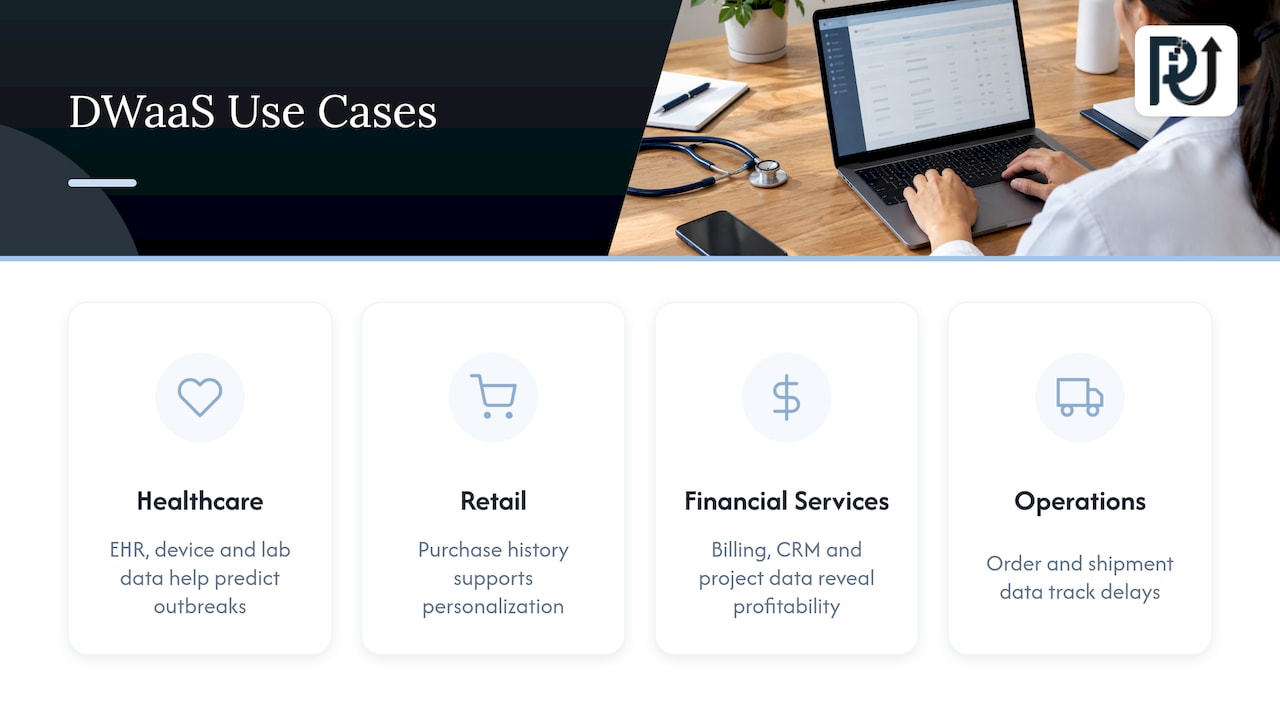
Healthcare. RudderStack’s guide describes centralizing electronic health record, device and laboratory data to analyze patient populations, predict outbreaks, optimize treatment and improve resource utilization.
Retail and e-commerce. The same guide lists analyzing purchase history, browsing and demographic data for personalization, and studying sales seasonality and external factors to forecast inventory.
Financial and professional services. Billing, CRM and project data in one place lets leaders see client profitability and portfolio health without reconciling spreadsheets by hand.
Operations and logistics. Order, shipment and cost data combined supports dashboards for delays, exceptions and unit economics.
A warehouse also becomes the memory layer for automation. Agents that read documents, route work or flag risk perform better when they can draw on clean, consistent business data. We cover that connection in our piece on database technologies and AI.
What a US business should evaluate
Before signing, work through four questions: what will it cost, how is data protected, which rules apply to you, and how will you get your data in.
Cost
Warehouse bills depend on how much data you integrate, store and analyze. Striim notes that providers may charge separately for storage, compute, streaming inserts, concurrency scaling or data transfer. Pricing models also differ: some bill by reserved or on-demand capacity, others by consumption per query or per second of compute.
To compare fairly, do this before you talk to sales:
- List your ten most important recurring reports and how often each runs.
- Estimate current data volume and monthly growth.
- Note peak periods, such as month-end close or holiday sales, when many people query at once.
- Ask each provider to price that exact scenario, including data transfer and any separate charges for concurrency or streaming.
A worked scenario beats a rate card every time. Two providers with similar list prices can produce very different bills depending on whether your workload is steady or spiky.
Security
AWS’s architecture guidance says a cloud warehouse and BI architecture can use access controls, encryption at rest and in transit, monitoring and auditing as security controls. Think of security as layers: identity, encryption, monitoring and auditability working together, not one feature you tick on a checklist.
When you review a provider, confirm each layer and decide who on your side owns it. Who approves new accounts? Who reviews access logs? Who rotates keys, if you manage your own?
Compliance
If you handle electronic protected health information, look for a provider that supports the HIPAA Security Rule’s technical safeguards. One cloud warehouse vendor’s HIPAA technical-safeguards paper describes capabilities such as encryption at rest and in transit, key management, two-factor authentication, logging of access attempts and privileged actions, and activity reports. The same paper says a specific product edition is required for HIPAA-covered environments, so confirm which tier you need. It dates from 2016, so verify current terms with the provider and your compliance counsel. Healthcare practices should also execute a business associate agreement with any vendor that touches patient data.
For work tied to the federal government, FedRAMP matters. Informatica’s FedRAMP guide explains that FedRAMP standardizes security assessment, authorization and continuous monitoring for cloud products and services. Ask any candidate provider for its authorization status at the level your contracts require.
Migration
Google Cloud’s migration overview says moving to a cloud warehouse can be complex and lengthy, and recommends an iterative approach that reduces risk and lets you learn between stages. Schemas, ingestion patterns and downstream workloads all need assessment, so it is a pipeline and operating-model change, not a server relocation.
A sensible sequence:
- Inventory. Catalog sources, tables, reports and the people who use them.
- Pick a first slice. Choose one department or one set of reports with clear value, such as sales pipeline or collections.
- Rebuild and reconcile. Load the data, recreate the reports, and compare numbers against the old system until they match.
- Cut over and retire. Move users, switch off the old reports, then repeat with the next slice.
Choosing among warehouse platforms
Most leaders first ask “which tool?” The better first question is “what are we trying to decide faster?” Start from the questions your business needs answered, then pick a platform. Typical differentiators:
- Ecosystem fit. If your applications, identity and storage already live with one major cloud, a warehouse from that ecosystem usually integrates with less friction.
- Pricing model. Reserved capacity suits steady workloads. Consumption pricing suits irregular ones.
- Workload type. Real-time and streaming needs, heavy BI concurrency and machine learning each stress a platform differently.
- Portability. If you expect to span several clouds, check how the platform handles that.
- Governance tooling. Look at row-level access, audit logs, data lineage and retention controls.
Whichever platform you choose, the warehouse is only as useful as the data that reaches it. That is why integration and data quality deserve as much of the budget as the subscription. Our cloud analytics guide for business leaders walks through how to scope that work, and our data analytics consulting selection guide helps you assess outside help.
Questions to ask any provider
- Which parts of the stack do you operate, and which stay with us?
- What are the availability commitments, and what happens during an outage?
- How are storage, compute, data transfer and concurrency billed?
- What encryption, access control and logging come standard, and what costs extra?
- Which compliance frameworks apply to our industry, and what is your current status?
- How do we export our data and models if we leave?
That last question protects you. Ownership of your data, schemas and transformation logic should stay with you under any model.
Perspective
We see the same pattern in the companies we work with: the warehouse is rarely the bottleneck. The bottleneck is the work around it, the invoices, forms and statements that never arrive in a clean, structured shape, and the manual steps that move numbers from one system to another.
Our view is that DWaaS is the right foundation when you want analytics without running infrastructure, and it becomes far more valuable when it is fed by automation. A digital workforce of context-aware AI agents can read documents, validate them, and load trusted records into the warehouse as they happen. That turns reporting from a monthly scramble into a living picture of the business.
We build this kind of system as engineers, not scriptwriters. We aim for maintainable automation your team owns, with transparent processes, so the pipeline outlives any single tool choice. Start with the decisions you want to make faster, then design the data flow backward from them.
Syed Naveed Abbas
Put your data to work with POW IT UP
A warehouse answers questions, and automation keeps it supplied with reliable data. We design and build custom AI agents and integrations that connect your documents, systems and analytics. For paper-heavy intake, our DocuPOW product is built for document reading and validation, and our cloud and data analytics services cover the reporting side.
If you are planning a warehouse project and want the data flowing into it to be accurate from day one, see how our AI integration work fits, or start from powitup.com.
FAQ
What does DWaaS stand for?
DWaaS stands for data warehouse as a service. It is a cloud model where a provider supplies and manages the warehouse’s hardware and software, and you pay a fee while loading and analyzing your own data.
Is a data warehouse the same as DWaaS?
No. A data warehouse is the analytical data store and its architecture. DWaaS is how that warehouse is delivered and operated, with a cloud provider taking on infrastructure and administration. You can run a warehouse yourself or consume it as a service.
What can a business do with DWaaS?
It supports BI, advanced analytics, machine learning and AI using your enterprise data. Common examples include consolidating patient data in healthcare, forecasting inventory in retail, and building dashboards for finance and operations.
How is DWaaS priced?
Bills generally reflect how much data you integrate, store and analyze, and some providers charge separately for storage, compute, streaming inserts, concurrency scaling or data transfer. Ask for a quote against your own workload, including peak periods, so you can compare providers on equal terms.
Is DWaaS safe for regulated data?
It can be, when the provider supports the safeguards your rules require, such as encryption in transit and at rest, access logging and the right compliance status for HIPAA or FedRAMP work. Confirm the exact edition and terms with the provider, and review them with your compliance counsel.
Sources
- Google Cloud: What is data warehouse as a service (DWaaS)?
- TechTarget: What is data warehouse as a service (DWaaS)?
- Google Cloud documentation: Migrate data warehouses overview
- RudderStack: Data warehouse as a service
- Striim: Cloud data warehouse comparison
- AWS Architecture Blog: Data warehouse and BI technology consolidation
- HIPAA Security Technical Safeguard Rule whitepaper
- Informatica: FedRAMP requirements data sheet