

TL;DR:
- Workflow intelligence transforms digital process traces into AI signals that identify bottlenecks and automate fixes. It combines real-time monitoring, prediction, and automation to improve cycle time and reduce waste across processes involving multiple systems. Starting with mapping and data collection lays the foundation before deploying predictive models and scaling operations.
Workflow intelligence turns the digital traces your operations already leave behind into AI-driven signals that cut cycle time, surface bottlenecks before they compound, and trigger automated fixes without waiting for a manager to notice. The immediate next step: pick one measurable, document-heavy process, instrument it, and run a 30-day pilot. POW IT UP’s DocuPOW is purpose-built for exactly that kind of entry point, capturing document-level events and feeding them into a live throughput and cycle-time view from day one.
Table of Contents
- What is workflow intelligence, and how does it differ from automation?
- What capabilities should you expect from a workflow intelligence system?
- How does workflow intelligence actually work under the hood?
- What business benefits and KPIs should you measure?
- Where does workflow intelligence produce the most value?
- How do you implement workflow intelligence step by step?
- What risks should you plan for before you start?
- How POW IT UP delivers workflow intelligence with DocuPOW and AuraPOW
- How should you protect data in a workflow intelligence deployment?
- How does workflow intelligence scale as your operations grow?
- What does effective change management look like for workflow intelligence?
- Key Takeaways
- Why most workflow intelligence pilots fail before they scale
- POW IT UP can run your first workflow intelligence pilot
- Useful sources
- FAQ
What is workflow intelligence, and how does it differ from automation?
Workflow intelligence is the layer that sits above automation. It uses AI and analytics to map how work actually moves across people, tools, and time, then detects delays, redundancies, and misalignments before they become expensive. Automation executes a predefined sequence. Business Process Management (BPM) documents and governs that sequence. Process mining reconstructs what happened from historical logs. Workflow intelligence does all three simultaneously and adds prediction: it tells you what is about to go wrong, not just what already did.
The inputs are event logs from your existing tools, work artifacts like documents and forms, and connectors to systems such as your CRM, ERP, or ticketing platform. The outputs are bottleneck alerts, routing suggestions, and orchestration triggers that either notify a human or fire an automated intervention.
That distinction matters operationally. BPM tells you the process should take three days. Workflow intelligence tells you it is currently taking seven, identifies the handoff between legal review and contract execution as the culprit, and routes the next case to an available reviewer automatically.
The three concepts compared:
- Workflow automation: executes a fixed sequence of tasks; no learning, no deviation detection
- Business Process Management: models, documents, and governs processes; primarily a design and compliance tool
- Process mining: reconstructs actual process flows from historical event logs; retrospective by nature
- Workflow intelligence: combines real-time monitoring, AI-driven prediction, and automated intervention; forward-looking and adaptive
What capabilities should you expect from a workflow intelligence system?
The capability set varies widely across vendors, so knowing which features are foundational versus advanced helps you avoid buying a roadmap instead of a product.
Foundational capabilities (required before anything else works):
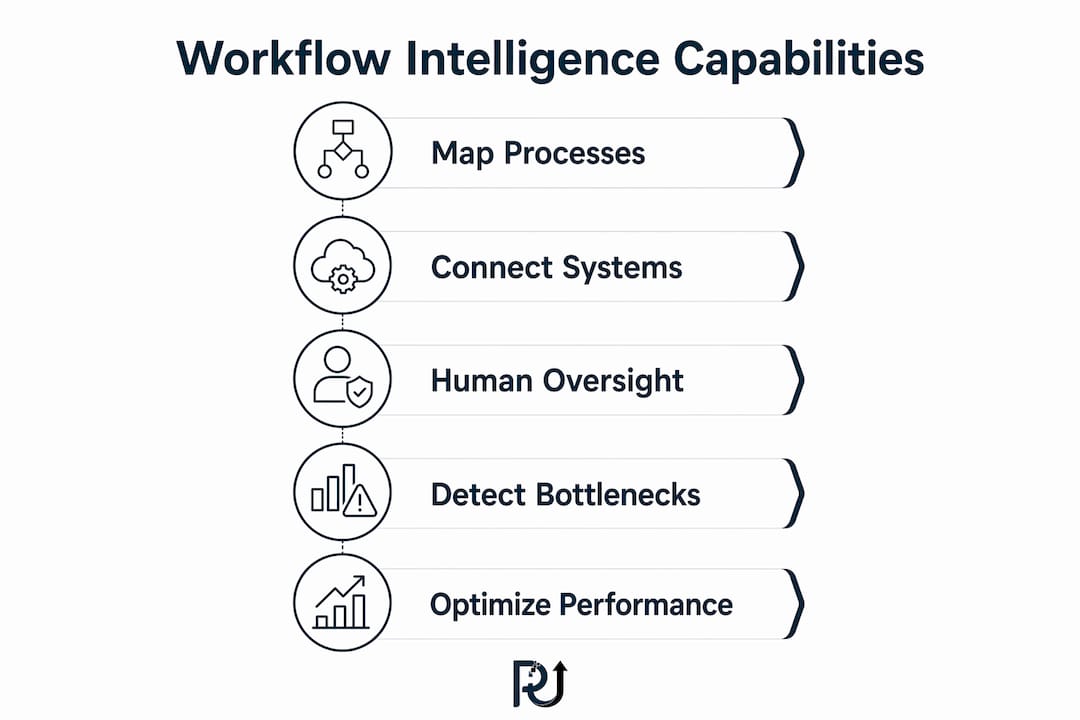
- Workflow mapping and visualization: generates a live process map from actual event data, not from documentation that may be months out of date
- Connector and data ingestion layer: pulls events from your existing tools; without this, the system is blind
- Bottleneck detection: flags where work stalls, how long it stalls, and how often, using cycle-time thresholds you define
- Handoff delay tracking: measures the gap between when one team finishes and the next team picks up, which is where most cycle-time waste hides
Advanced capabilities (add after the foundation is stable):
- Dependency mapping: shows which upstream delays cause downstream failures, so you fix root causes rather than symptoms
- Predictive cycle-time estimates: ML models trained on your historical traces forecast whether an in-flight case will breach its SLA
- Orchestration and automated interventions: triggers a routing change, an escalation, or an RPA action when a threshold is crossed
- Closed-loop feedback: captures the outcome of each intervention and retrains the model, so accuracy improves over time
Pro Tip: Start with mapping and connectors. Operations leaders who skip instrumentation and jump straight to ML predictions end up with models trained on incomplete data. A clean event log for 60 days is worth more than a sophisticated model built on noise.
Cross-tool stitching and human-in-the-loop controls deserve special attention. Most real processes span three or more systems. A system that monitors only one tool gives you a partial picture. Human-in-the-loop controls, where a person approves or overrides an AI recommendation before it executes, are non-optional in regulated industries and in any pilot phase where trust in the model is still being established.

How does workflow intelligence actually work under the hood?
The architecture has six layers, and understanding them helps your IT and architecture teams assess integration effort before a vendor conversation goes too far.
- Collectors and connectors: lightweight agents or API integrations that capture events from source systems (Salesforce, ServiceNow, SAP, Jira, email, document management platforms) and write them to a central event store
- Event store and trace layer: a time-ordered log of every task state change, assignment, and completion, correlated by case ID so the system can reconstruct the full journey of any work item
- Enrichment and context layer: joins event data with work artifacts (documents, metadata, form fields) to add business context; this is where DocuPOW operates, reading and validating document content and feeding structured signals into the trace
- Analytics and ML layer: runs conformance checks (does the actual flow match the intended flow?), cycle-time models, and anomaly detection; models are typically trained on 90 or more days of historical traces
- Orchestration and automation layer: acts on model outputs by triggering routing rules, RPA bots, or AI automation services that execute the remediation
- Dashboards and APIs: surfaces KPIs, alerts, and process maps to operations leaders and exposes data to downstream BI tools
Integration checklist for IT and architecture reviews:
- Connector availability for each source system (native API, webhook, or log export)
- Event latency requirements (near-real-time vs. batch; most operational use cases need sub-15-minute latency)
- Data retention policy alignment (event logs often contain PII; retention must match your data governance policy)
- Identity mapping across systems (unified user and case IDs)
- SLA definitions for the monitoring layer itself (uptime, alert latency)
Pro Tip: Three signs a process is ready for workflow intelligence: (1) it leaves consistent digital traces in at least one system of record, (2) it has fewer than eight stable variants (too many variants means the model trains on noise), and (3) you can define a measurable output, like a signed contract or a closed ticket, that marks case completion.
For professional services firms that lack consistent digital traces, documenting and integrating processes with AI before instrumenting them is a necessary first step, not an optional one.
What business benefits and KPIs should you measure?
The KPIs that matter most to operations leaders are the ones that connect directly to revenue and cost. Here is the core set, with definitions precise enough to put in a pilot charter.
| KPI | Definition | Why It Matters |
|---|---|---|
| Cycle time | End-to-end elapsed time per case from open to close | Directly tied to customer experience and capacity |
| Throughput | Cases completed per unit time | Measures capacity without headcount growth |
| Handoff delay | Time between task completion and next task pickup | Usually the largest hidden waste in multi-team processes |
| Rework rate | Percentage of cases requiring correction after initial completion | Signals upstream data quality or routing failures |
| On-time delivery rate | Percentage of cases closed within SLA | The metric leadership and clients both watch |
| Revenue leakage | Value lost to delays, errors, or missed SLAs | Converts operational KPIs into financial terms |
Realistic pilot timeline:
- Days 1–30: instrumentation, baseline measurement, and first process map; no model changes yet, just observation
- Days 31–90: bottleneck identification, first routing or escalation rules, and early cycle-time improvement; intelligent workflow solutions in procurement contexts have reported notably faster approval times at this stage.
- Days 91–180: ML model training on 90-plus days of clean traces, predictive alerts live, and a documented ROI case ready for the scale decision
Cost factors to budget for:
- Integration and connector development (often the largest line item in a custom build)
- Licensing or subscription for the analytics and orchestration platform
- Data engineering time for identity mapping and event-store setup
- Change management and training (frequently underestimated; covered in detail later)
- Ongoing model monitoring and retraining
Intelligent workflow adoption in procurement has shown a significant reduction in manual effort as a reported vendor metric. Treat that as a ceiling for mature deployments, not a 30-day promise.
Where does workflow intelligence produce the most value?
The processes that benefit most share three traits: they are document-heavy, involve multi-step handoffs across teams, and have a measurable output that defines case closure. Here are the highest-return use cases by industry.

Finance and fintech:
Dispute resolution and loan origination involve multiple reviewers, compliance checks, and document validation steps. Workflow intelligence identifies which review stage consistently delays closure and whether the delay is a data quality issue or a capacity issue. The fix is often automated document pre-screening, which DocuPOW handles directly.
Healthcare:
Radiology and imaging workflows use intelligent routing and automated prioritization to reduce turnaround times for urgent cases. Systems like Conserus Workflow Intelligence apply rules engines and workload distribution to balance radiologist queues and escalate critical findings automatically.
Logistics and supply chain:
Shipment exception management and carrier invoice reconciliation are high-volume, repetitive, and already digital, making them ideal first pilots. Workflow intelligence flags exceptions before they breach SLA and routes them to the right resolver without a dispatcher manually triaging a queue.
Customer service:
Ticket routing, escalation, and resolution tracking benefit from real-time monitoring that detects when a case has been idle too long and reassigns it before the customer notices. Throughput and on-time resolution rate improve without adding agents.
HR and people operations:
Onboarding workflows span IT provisioning, payroll setup, benefits enrollment, and manager tasks across four or more systems. Handoff delays here directly affect new-hire productivity. Workflow intelligence maps the actual onboarding path versus the intended one and surfaces which step most often stalls.
Processes best suited for a first pilot (ranked by readiness):
- Document intake and validation (contracts, invoices, applications)
- Multi-step approval chains (procurement, legal, compliance)
- Customer case or ticket management
- Employee onboarding and offboarding
- Claims processing and exception handling
How do you implement workflow intelligence step by step?
A pilot that runs without a defined scope and success criteria almost always drifts. The structure below keeps it on track.
Phase 1: Assess (Weeks 1–2)
- Identify one process with a measurable output, consistent digital traces, and a sponsor who owns the outcome
- Map the current state manually: who does what, in which system, and in what sequence
- Define success criteria: target cycle time, throughput improvement, or rework reduction
- Assign roles: executive sponsor, process owner, data engineer, automation engineer, change lead
Phase 2: Instrument (Weeks 3–6)
- Connect source systems via API or log export
- Resolve identity mapping across systems
- Validate that event logs capture the full case lifecycle
- Establish baseline KPIs from the first 30 days of clean data
Phase 3: Pilot (Weeks 7–16)
- Build the process map from live event data
- Identify the top two or three bottlenecks by cycle-time contribution
- Deploy routing rules or escalation triggers for the highest-impact bottleneck
- Measure weekly: cycle time, throughput, handoff delay, rework rate
Phase 4: Measure and iterate (Weeks 17–24)
- Compare pilot KPIs against baseline
- Train the ML model on 90-plus days of traces if the data is clean and stable
- Expand automation triggers to the second bottleneck
- Document the ROI case with actual numbers
Phase 5: Scale
- Present the ROI case to the executive sponsor
- Identify the next two or three processes for instrumentation
- Establish a governance model: who owns the process map, who approves model changes, who monitors for drift
Roles and responsibilities:
- Executive sponsor: owns the business case and removes organizational blockers
- Process owner: defines success criteria and validates that the process map reflects reality
- Data engineer: builds and maintains connectors, event store, and identity mapping
- Automation engineer: builds orchestration rules and integrates with RPA or AI agents
- Change lead: manages communication, training, and adoption tracking
Pro Tip: The scale decision should be binary and criteria-based, not political. Before the pilot starts, write down the three numbers that would justify scaling. If the pilot hits them, scale. If it does not, diagnose before expanding.
Recurring deliverable automation follows the same instrumentation logic: the processes most worth automating are the ones you can measure precisely enough to know whether the automation is working.
What risks should you plan for before you start?
Every workflow intelligence deployment runs into the same set of problems. Knowing them in advance cuts the time you spend recovering from them.
- Poor data quality: event logs with missing timestamps, duplicate case IDs, or inconsistent status labels produce unreliable process maps. Mitigation: run a data-quality audit before instrumentation begins; set a minimum completeness threshold (typically 85% or above for event capture) before training any model.
- Tool fragmentation: processes that span systems without native connectors require custom integration work that delays timelines. Mitigation: scope the pilot to processes that touch systems with available APIs; defer fragmented processes to phase two.
- Change resistance: teams whose performance is now visible often push back. Mitigation: involve process owners in defining the metrics from the start; frame visibility as a tool for the team, not surveillance by management.
- Model drift: a model trained on last quarter’s process behavior becomes inaccurate when the process changes. Mitigation: schedule quarterly retraining reviews and monitor prediction accuracy as a KPI alongside operational KPIs.
- Privacy and compliance: event logs frequently contain PII. In the US, HIPAA applies to healthcare workflows, and CCPA applies to California consumer data. Mitigation: apply role-based access controls to the event store, anonymize PII at the enrichment layer where possible, and document data flows for compliance review.
- ROI overclaims: vendor benchmarks like “70% reduction in manual effort” reflect mature, optimized deployments. Mitigation: anchor your business case to your own baseline data, not vendor case studies, and set 90-day targets that are achievable with routing rules alone.
Pro Tip: For US enterprise deployments, treat the event store as a regulated data asset from day one. Retrofitting access controls and audit trails after go-live costs significantly more than building them in during instrumentation.
How POW IT UP delivers workflow intelligence with DocuPOW and AuraPOW
POW IT UP operates as a strategic technical architect, not a tool reseller. The engagement model maps directly to the implementation phases above, with two productized components that accelerate the instrumentation and monitoring steps.
DocuPOW handles document intelligence: it reads, validates, and extracts structured data from contracts, invoices, applications, and forms, then feeds those signals into the workflow event trace. In a loan origination or claims processing pilot, DocuPOW replaces the manual document review step that often accounts for a substantial portion of total cycle time in document-heavy processes.
AuraPOW handles portfolio monitoring and client health analytics. Once a process is instrumented and running, AuraPOW surfaces the KPIs that matter to operations leaders: throughput trends, cycle-time distributions, handoff delay heatmaps, and early-warning signals for cases at risk of breaching SLA.
The POW IT UP engagement flow:
- Assess: scoping session to identify the highest-value pilot process and define success criteria
- Instrument: DocuPOW deployed to capture document-level events; connectors built for source systems
- Model and orchestrate: custom AI agents designed to route, escalate, or remediate based on model outputs
- Monitor: AuraPOW dashboards live for the process owner and executive sponsor
- Iterate: quarterly reviews with model retraining and scope expansion recommendations
POW IT UP’s custom AI agent development capability means the orchestration layer is built to your process, not configured from a generic template. That distinction matters when your process has non-standard variants or compliance requirements that off-the-shelf tools cannot accommodate.
How should you protect data in a workflow intelligence deployment?
Workflow intelligence systems ingest sensitive operational data by design. The security architecture needs to match that reality.
Role-based access control (RBAC) is the baseline. The event store contains case-level data that may include employee performance information, customer PII, and financial records. Access should be scoped to the minimum required for each role, with audit logging on every query.
Encryption at rest and in transit is standard practice, but the enrichment layer deserves specific attention. When DocuPOW or a similar document intelligence component extracts structured data from contracts or applications, that extracted data should be stored separately from raw documents, with its own access policy and retention schedule.
For US healthcare deployments, HIPAA’s minimum necessary standard applies to event logs just as it does to clinical records. For any process touching California residents, CCPA data-subject rights (access, deletion, opt-out) must be addressable in the event store, which requires case-level data tagging from the start.
Data residency matters for enterprise buyers. Confirm that your vendor’s event store and ML training infrastructure runs in US-based data centers if your contracts or compliance posture require it.
How does workflow intelligence scale as your operations grow?
The architecture decisions you make in the pilot phase determine how cleanly the system scales. Three considerations drive most scaling challenges.
Connector sprawl is the first. A pilot typically touches two or three source systems. A scaled program may touch fifteen. Each new connector adds integration maintenance overhead. The mitigation is an event-bus architecture (Apache Kafka is a common choice) that decouples source systems from the analytics layer, so adding a new connector does not require touching the core event store.
Model governance becomes critical at scale. A single pilot process has one model to monitor. A scaled program with ten instrumented processes has ten models, each capable of drifting independently. A model registry with automated accuracy monitoring and a defined retraining cadence is not optional at that point.
Organizational capacity is the constraint most leaders underestimate. Scaling from one pilot to ten processes requires data engineers, automation engineers, and process owners who understand the system well enough to extend it. The types of automation tools you select in the pilot phase should be ones your team can operate and extend without vendor dependency for every change.
What does effective change management look like for workflow intelligence?
The technology is rarely the hard part. Adoption is.
Process visibility is the most common source of resistance. When a workflow intelligence system makes individual and team performance visible in real time, people who previously operated without that visibility often perceive it as surveillance. The framing matters: position the system as a tool that helps the team identify systemic problems, not a mechanism for individual performance management.
Training should be role-specific and timed to deployment. A process owner needs to understand how to read a process map and interpret a cycle-time trend. An automation engineer needs to understand how to modify a routing rule. A frontline worker needs to know what happens when the system flags their case and what they are expected to do. Generic “AI awareness” training delivered six weeks before go-live does not produce adoption.
Visible early wins accelerate adoption faster than any communication campaign. If the first routing rule the system deploys saves the team two hours of manual triage per day, that outcome should be communicated explicitly, with the before-and-after numbers, within the first week it is live. People adopt tools that visibly make their work easier.
Change leads should track adoption metrics alongside operational KPIs: system login rates, alert response times, and the percentage of AI-recommended actions that users accept versus override. A high override rate is a signal that the model is not yet trusted, which is a training and communication problem as much as a model problem.
Key Takeaways
Workflow intelligence delivers measurable operational gains when it is grounded in clean event data, scoped to a specific pilot process, and measured against KPIs defined before the pilot starts.
| Point | Details |
|---|---|
| Start with instrumentation | Clean event logs for 60–90 days are the prerequisite for any reliable model or bottleneck detection. |
| Measure the right KPIs | Cycle time, handoff delay, throughput, and rework rate connect operational performance to business outcomes. |
| Pilot before scaling | A 30–90 day pilot with defined success criteria is the fastest path to a defensible ROI case. |
| Change management is not optional | Role-specific training and visible early wins drive adoption more reliably than technology alone. |
| POW IT UP accelerates the pilot | DocuPOW instruments document-heavy processes and AuraPOW monitors outcomes, compressing the time from assessment to measurable results. |
Why most workflow intelligence pilots fail before they scale
The conventional wisdom says workflow intelligence pilots fail because the technology is too complex or the data is too messy. That is partly true, but it misses the more common cause: the pilot was scoped to prove the technology rather than to solve a specific business problem.
A pilot designed to demonstrate that AI can detect bottlenecks will detect bottlenecks. A pilot designed to reduce the cycle time of contract review by 30% in 90 days will either hit that number or generate a clear diagnosis of why it did not. The second framing produces a decision. The first produces a demo.
Operations leaders also tend to underestimate the organizational work and overestimate the technical work. Getting connectors built and event logs flowing is a solvable engineering problem with a known timeline. Getting a legal team to trust that an AI routing recommendation is sound enough to act on without manual review is a months-long trust-building exercise that no amount of model accuracy can shortcut.
The practical implication: spend as much time on the change management plan as on the technical architecture. Define who owns the process map, who approves model changes, and what the escalation path is when the system flags something the team disagrees with. Those governance decisions, made before go-live, are what separate programs that scale from pilots that stall.
POW IT UP can run your first workflow intelligence pilot
If you have a document-heavy process with measurable cycle time and a clear owner, POW IT UP can scope, instrument, and deliver a working pilot in 90 days. The first engagement covers process assessment, DocuPOW deployment for document intelligence, custom AI agent design for orchestration, and AuraPOW monitoring so you have live KPIs from week one.
The difference from a generic automation project: POW IT UP builds to your process variants and compliance requirements, not to a template. AI integration services are scoped around your existing systems, so you are not replacing infrastructure to get started. The discovery call covers your target process, the data you already have, expected outcomes at 30 and 90 days, and what a realistic timeline looks like for your environment. Book a discovery call at powitup.com to get a scoped pilot proposal.
Useful sources
The sources below cover the technical, operational, and industry-specific dimensions of workflow intelligence in more depth.
- POW IT UP AI Integration Services: primary resource for scoping a workflow intelligence pilot with POW IT UP; covers integration patterns, agent development, and pilot engagement structure.
- POW IT UP AI Automation Overview: explains the automation services POW IT UP deploys as the orchestration layer in a workflow intelligence program.
- How AI Automates Recurring Deliverables: practical guidance on automating recurring operational tasks and the engineering patterns used.
- Workstatus Workflow Intelligence: vendor explainer covering how workflow intelligence maps work across people, tools, and time; useful for capability benchmarking.
- Vertice Intelligent Workflow Solutions: procurement-focused case metrics including approval time and manual effort reductions; useful for building a business case.
- Workflow Intelligence Group: consultancy framing on organizational scalability and the role of workflow intelligence in reducing founder-dependence.
- SuperManager: AI Workflow Intelligence: covers real-time monitoring behavior and how AI workflow monitors detect deviations from intended processes.
- Optum Change Healthcare Workflow Intelligence: healthcare imaging use case with prioritized routing and automated escalation; useful for regulated-industry pilots.
- Dental Lab Guru: AI in Lab Management: partner resource showing how professional services document and integrate processes before instrumenting them for AI.
- TechTarget: Intelligent Workflow Definition: authoritative definition and overview of intelligent workflow concepts for readers who want a vendor-neutral reference.
FAQ
What is workflow intelligence?
Workflow intelligence is the use of AI and analytics to map, monitor, and optimize how work moves across people, tools, and time, detecting bottlenecks and triggering automated fixes in real time rather than after the fact.
What is a workflow intelligence monitor?
A workflow intelligence monitor tracks task completion in real time, identifies bottlenecks, and detects deviations from the intended process so issues surface before timelines slip.
What are the four types of workflows?
Workflows are generally categorized as sequential (fixed order), parallel (simultaneous tasks), state-machine (condition-driven transitions), and rules-driven (logic-based routing); workflow intelligence applies across all four types to detect where each variant stalls.
What is Conserus Workflow Intelligence?
Conserus Workflow Intelligence is a radiology-focused rules engine that supports workload distribution, case prioritization, and integration with PACS systems for enterprise imaging workflows.
How long does a workflow intelligence pilot take?
A well-scoped pilot runs 90–180 days: the first 30 days establish instrumentation and baseline KPIs, days 31–90 deploy initial routing rules and measure early cycle-time improvement, and days 91–180 train predictive models and build the ROI case for scaling.