
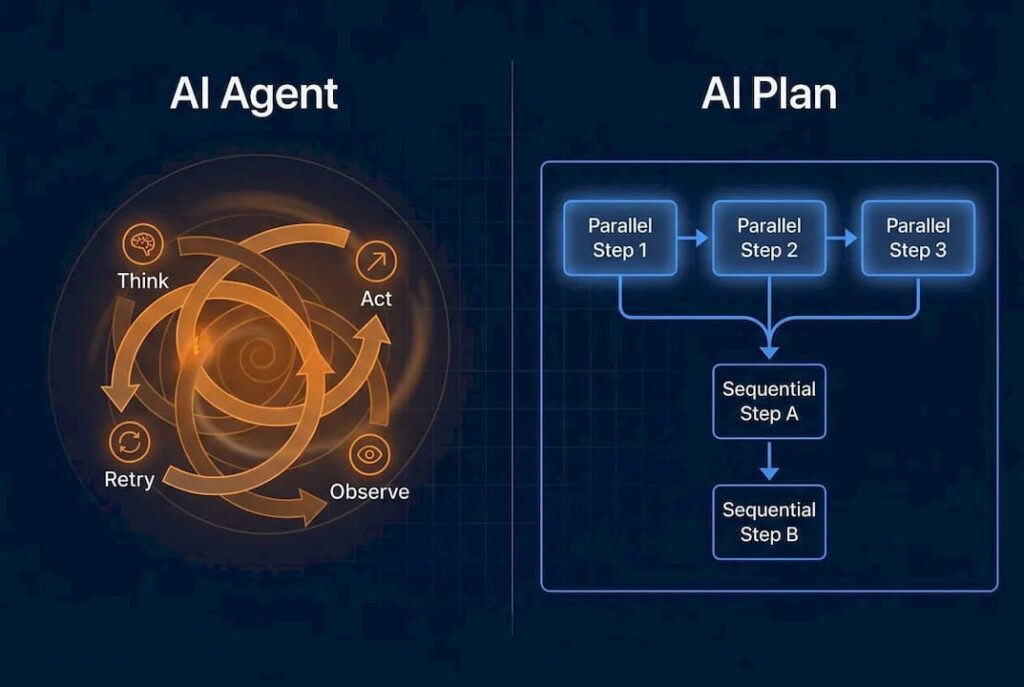
Autonomous AI solutions are software systems that accept a goal, plan a sequence of actions, execute those actions across enterprise tools, observe results, and adjust — all without step-by-step human instruction. The core value is closing the insight-to-action gap: the delay between when a business system detects a problem and when something actually gets done about it. Three things worth knowing upfront:
-
They orchestrate, not just automate. Unlike rule-based scripts, autonomous agents decompose goals into sub-tasks, call APIs, query databases, and replan when something fails.
-
Finance, IT operations, and supply chain see the fastest ROI. These domains have high-volume, well-defined exception patterns that agents can surface and resolve without human queuing.
-
Pilots work best when scoped to one bounded process. POW IT UP and the broader practitioner community consistently find that a single, measurable workflow beats a broad transformation initiative as a starting point.
Table of Contents
-
What do autonomous AI solutions actually mean in enterprise contexts?
-
How does autonomous AI differ from generative AI and traditional automation?
-
What features should enterprise buyers look for in autonomous agents?
-
What business benefits and use cases make the strongest case for autonomous agents?
-
What do real-world agent patterns and tooling look like in practice?
-
How do you plan and build autonomous AI solutions for production?
-
What risks and governance requirements come with autonomous AI deployment?
-
What does the research say about closing the insight-to-action gap?
-
Where is the autonomous AI market heading, and how should you prepare?
-
POW IT UP builds autonomous agent systems that reach production
What do autonomous AI solutions actually mean in enterprise contexts?
The phrase gets used loosely. Microsoft defines autonomous AI agents as systems that can take a goal, understand context, plan, and act with minimal human guidance. That definition is vendor-independent and useful precisely because it draws a clear boundary: an agent is not a chatbot that answers questions, and it is not a workflow script that fires when a trigger condition is met.
The industry term you will encounter in architecture discussions is agentic AI. The distinction from plain generative AI matters. A generative model like OpenAI’s ChatGPT or Anthropic’s Claude produces text or structured output in response to a prompt. An autonomous agent uses that same model as its reasoning engine, but wraps it in a planning loop, gives it tool access, and lets it persist context across multiple steps. The model becomes the brain; the agent is the whole organism.
Three concepts define the boundary of agentic autonomy in enterprise settings:
-
Goal-driven operation. The agent receives an outcome (“reconcile all flagged invoices from the past 48 hours”) rather than a procedure (“query table X, then call API Y”).
-
Bounded decision authority. The agent can act within a defined scope — read, write, call, escalate — but cannot exceed the permissions granted to its identity. This is not optional; it is the governance contract.
-
Persistent context. The agent remembers what it has done within a session and, in more advanced architectures, across sessions. Without this, multi-step workflows collapse into stateless one-shot calls.
Pro Tip: When evaluating vendors or frameworks, ask specifically how they handle context persistence and decision boundaries. A system that cannot explain those two things in concrete terms is not production-ready.
The conceptual flow looks like this: a goal enters the planner, the planner decomposes it into steps, an executor calls tools and APIs, results feed back into the planner for reflection, and the cycle continues until the goal is met or an escalation trigger fires. That loop is what separates agentic systems from traditional automation, which performs task-level execution with no replanning capability.

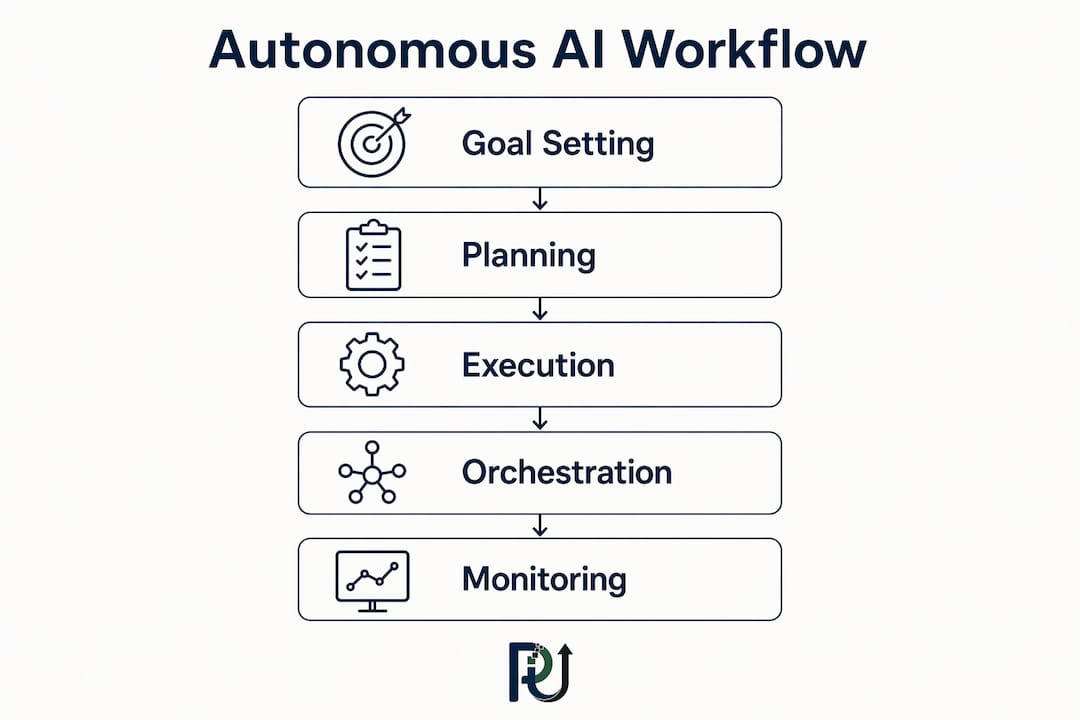
How do autonomous AI agents actually work under the hood?
Understanding the architecture is what separates a successful pilot from a proof-of-concept that never ships. Every production-grade autonomous agent system shares the same core components, even when the specific tooling varies.
Core components:
-
Agent brain (reasoning and planning). A large language model — OpenAI’s GPT-4o, Anthropic’s Claude, or a specialized fine-tuned variant — handles goal decomposition, step sequencing, and reflection. The model does not run the workflow; it decides what the workflow should be.
-
Perception layer (connectors and ingestion). Agents need to read the world: database queries, API responses, document parsers, event streams. This layer translates raw enterprise data into context the model can reason over.
-
Tool bindings. Structured interfaces — REST APIs, RPA hooks, SQL executors, calendar services — that the agent can call with defined inputs and outputs. LangChain popularized the concept of “tools” as first-class objects in agent design.
-
Memory and persistent context. Short-term working memory holds the current session state. Long-term memory, often a vector store or a structured key-value service, lets agents recall prior decisions and outcomes across runs.
-
Orchestration and graph planner. For multi-agent systems, a graph-based orchestrator routes sub-tasks to specialized agents, manages dependencies, and handles parallel execution. Agentic ERP research formalizes this as a Planner–Executor–Reflector–Responder pattern, decoupling role-aligned agent logic from the core ERP system so the underlying platform stays upgradeable.
-
Observability stack. Every action, tool call, model decision, and state transition should be logged. Without this, debugging a failed multi-step run is nearly impossible.
-
Identity and access controls. Each agent runs under a scoped identity with least-privilege permissions. This is not a security afterthought; it is the mechanism that makes bounded autonomy real rather than aspirational.
Typical agent lifecycle:
-
Receive goal and inject into planner context.
-
Decompose goal into ordered sub-tasks.
-
Execute sub-tasks via tool bindings, capturing outputs.
-
Observe results; check against success criteria.
-
Replan if a step fails or produces unexpected output.
-
Escalate to a human if confidence falls below threshold or a circuit-breaker fires.
-
Log the full trace for audit and model evaluation.
Pro Tip: Decouple your agent logic from your core ERP or CRM from day one. Embedding agent prompts and tool bindings directly into a monolithic system makes every model upgrade a migration project. A separate orchestration layer means you can swap the reasoning model without touching business logic.
Production deployments on platforms like Amazon Bedrock AgentCore demonstrate this separation in practice: orchestration layers manage tool access, memory services provide persistent context, and gateway protocols secure external system connections — all as independently managed services.

How does autonomous AI differ from generative AI and traditional automation?
Decision-makers get this wrong more often than architects do. The confusion leads to either over-investing in agentic infrastructure for problems that a simple script solves, or under-investing and wondering why a generative assistant cannot close a support ticket end-to-end.
| Dimension | Autonomous AI (Agentic) | Generative AI (Assistive) | Traditional Automation (RPA/Workflow) |
|---|---|---|---|
| Capability | Multi-step goal execution, replanning, tool use | Single-turn or multi-turn text/content generation | Rule-based task execution on defined triggers |
| Decision scope | Bounded autonomy within defined permissions | Produces output; human decides what to do with it | No decision-making; follows fixed logic |
| Typical tools | LangChain, Auto-GPT-style frameworks, Amazon Bedrock Agents, Microsoft Copilot agents | OpenAI ChatGPT, Anthropic Claude (standalone) | UiPath, Power Automate, Zapier |
| Governance needs | Identity controls, circuit breakers, audit trails, escalation rules | Prompt guardrails, output review | Exception handling, process documentation |
| Best for | Complex, multi-system workflows with variable paths | Content, summarization, Q&A, drafting | High-volume, stable, rule-bound processes |
When to choose each approach:
-
Agentic autonomy fits when the outcome requires decisions across multiple systems, the path to completion varies by case, and the volume justifies the engineering investment. Invoice exception resolution, IT incident triage, and supply chain restocking are canonical examples.
-
Generative assistants fit when a human needs a draft, a summary, or an answer and will review the output before acting. Microsoft Copilot in its assistive mode is the enterprise standard here.
-
RPA or workflow automation fits when the process is stable, the inputs are structured, and the logic never changes. Replacing RPA with agents for these cases adds cost and fragility without benefit.
Evaluation criteria for choosing your approach:
-
Outcome complexity: Does the goal require conditional branching across more than two systems? Lean agentic.
-
Safety requirements: Can a wrong action be reversed? If not, keep a human in the loop or use a generative assistant.
-
Integration scope: How many APIs, databases, and services does the workflow touch? More than three is a strong signal for an orchestrated agent layer.
The shift from traditional automation to agentic AI is not about replacing scripts wholesale. It is about identifying which processes have variable paths and high exception rates — those are the ones where agents pay off.
What features should enterprise buyers look for in autonomous agents?
Not all agent frameworks are built for production. The gap between a demo that impresses in a sandbox and a system that runs reliably at 3 AM on a Tuesday is almost entirely explained by the presence or absence of these capabilities.
Functional capabilities:
-
Goal decomposition. The agent must break a high-level objective into concrete, executable sub-tasks without human scaffolding.
-
Multi-step orchestration. Sequential and parallel task execution across heterogeneous tools, with dependency management.
-
Persistent context and memory. Session state that survives tool failures and, for long-running workflows, persists across runs.
-
Tool bindings. A structured, versioned interface layer between the agent and every external system it calls.
-
Planning and replanning. When a step fails or returns unexpected output, the agent adjusts its plan rather than halting or looping.
-
Bounded autonomy. Explicit permission scopes that the agent cannot exceed, enforced at the identity layer, not just in the prompt.
-
Audit trails. A complete, immutable log of every decision, tool call, input, and output for every run.
-
Rollback and circuit breakers. Automatic halts when error rates, latency, or confidence scores cross defined thresholds, with the ability to reverse recent actions where possible.
Security and compliance requirements:
Every agent runs under an identity. That identity should carry least-privilege permissions: read access where read is sufficient, write access only where the workflow requires it, and no standing access to production systems outside active runs. Context stores — especially those holding customer data — must be encrypted at rest and in transit. Access separation between the agent’s reasoning layer and its tool execution layer prevents a compromised prompt from escalating privileges.
According to Microsoft’s AI strategy research, governance and security is one of the five drivers of successful enterprise AI transformation — not a phase-two concern.
Feature-to-risk mapping:
-
Explainability and decision logging → reduces liability exposure and supports regulatory audit
-
Escalation rules → prevents cascading errors in multi-agent pipelines
-
Rollback triggers → limits blast radius when a model produces an unexpected action
-
Bounded identity → contains data leakage risk to the scope of one agent’s permissions
What business benefits and use cases make the strongest case for autonomous agents?
The business case for autonomous AI workforces rests on four structural advantages over both human teams and traditional automation: reduced cycle time on exception-heavy processes, fewer manual handoffs, capacity that scales with volume rather than headcount, and faster decisioning on time-sensitive workflows.
Core business benefits:
-
Cycle time on multi-system exception resolution drops when agents run 24/7 without queue delays.
-
Exception coverage improves because agents can scan entire data sets, not just the cases a human gets to.
-
Processing capacity scales without linear hiring: the same agent infrastructure handles 10 cases or 10,000 cases with the same staffing model.
-
Decisioning speed increases on well-defined workflows because agents do not wait for a human to open a ticket.
Industry use cases:
-
Finance. Exception mining across accounts payable, automated close checklists, flagging revenue leakage in billing data. Agents query ERP systems, cross-reference contract terms, and escalate only the cases that require human judgment.
-
IT operations. Incident triage and first-response remediation. An agent monitors alert streams, correlates signals across monitoring tools, attempts known fixes from a verified runbook, and escalates to on-call engineers only when automated resolution fails.
-
Supply chain. Outcome-based restocking: agents monitor inventory levels, supplier lead times, and demand signals, then generate and submit purchase orders within pre-approved parameters.
-
Professional services. Project discovery and assessment automation. Agents ingest client documents, extract requirements, flag gaps, and produce structured assessment reports — work that previously consumed senior consultant hours.
-
Customer operations. Autonomous triage and resolution for tier-1 support. Agents classify inbound requests, retrieve account context, attempt resolution via integrated systems, and hand off to human agents with a full context summary when escalation is needed. This pattern also applies to AI-driven recruitment workflows, where agents screen, schedule, and route candidates before a human recruiter reviews finalists.
-
Marketing. Agents can orchestrate outcome-based campaign workflows — pulling performance data, adjusting audience segments, and triggering creative variants — without requiring a campaign manager to touch every decision.
Mini case outcomes:
One enterprise SAP deployment using agentic AI on Amazon Bedrock AgentCore reduced program timelines by approximately 45% and cut discovery effort by 60–70%, with high exception-surfacing coverage reported in operational results. The architecture separated domain intelligence from managed infrastructure, which is the pattern that made rapid configuration possible without rebuilding the underlying platform.
Amazon’s own internal teams redesigned workflows around AI agents and delivered a project scoped for 30 developers in about two and a half months with six engineers, reporting notable productivity gains. The lesson from that result is not the headline number; it is that the gains came from workflow redesign around agents, not from simply adding a model to an existing process.
What do real-world agent patterns and tooling look like in practice?
The gap between “we have an LLM” and “we have a production agent” is mostly an architecture gap, not a model gap. Understanding the common patterns helps teams pick the right design before they write a line of code.
Common agent patterns:
-
Sequential workflow agents. Each step depends on the prior step’s output. Good for close automation, document processing, and structured report generation.
-
Parallel or swarm discovery. Multiple agents run simultaneously against different data sources, then a coordinator synthesizes results. Useful for exception mining across large data sets.
-
Graph or conditional orchestration. A graph-based planner routes tasks based on intermediate results. The right choice when the workflow has branching logic that cannot be predetermined.
-
Exception-mining agents. Continuously scan transaction logs, monitoring streams, or data pipelines for anomalies, then surface findings with context rather than raw alerts.
-
Test-case generation agents. Used in software development to generate, run, and evaluate test cases against a codebase — the pattern behind AWS’s DevOps Agent.
Tooling categories and what they enable:
-
Model runtimes. Amazon Bedrock, Azure OpenAI Service, and direct API access to OpenAI and Anthropic Claude give agents access to reasoning models. Model diversity matters in production: teams often use different models for different agents based on latency, cost, and risk tolerance — Claude for careful reasoning tasks, faster models for high-volume classification.
-
Agent orchestration SDKs. LangChain remains the most widely referenced open-source framework for building tool-using agents. Auto-GPT-style frameworks demonstrated early what goal-directed looping could look like, though production teams typically build on more structured SDKs. Amazon’s Strands Agents SDK offers a managed alternative with less orchestration boilerplate.
-
Memory services. Vector databases (Pinecone, Oracle Autonomous AI Vector Database) and structured key-value stores provide the persistent context layer that multi-step agents require.
-
Tool gateways. Managed connector layers that expose enterprise APIs to agents with authentication, rate limiting, and logging. Amazon Bedrock AgentCore’s tool gateway pattern is a production reference for this.
-
Observability stacks. Tracing and logging infrastructure that captures the full agent run: every model call, tool invocation, input, output, and state transition. Without this, production debugging is guesswork.
Pro Tip: Before selecting an orchestration SDK, map your tool bindings first. The SDK that handles your specific connector types with the least custom code is almost always the right choice — framework preference is secondary to integration fit.
How do you plan and build autonomous AI solutions for production?
The difference between a pilot that scales and one that stalls is almost always planning discipline, not model quality. Here is a practical sequence for architects and engineering leads.
Implementation checklist:
-
Data readiness. Identify the data sources the agent needs to read and write. Confirm API availability, data quality, and access permissions before writing agent logic.
-
API and tool bindings. Document every external system the agent will call. Define input/output schemas, error states, and rate limits for each binding.
-
Identity and access plan. Assign a scoped identity to each agent. Define least-privilege permissions per tool binding. Document who can modify agent permissions and under what conditions.
-
Observability and testing harness. Set up trace logging before the first agent run. Define evaluation metrics: task completion rate, error rate, escalation rate, and latency.
-
Governance and runbooks. Write escalation rules, circuit-breaker thresholds, and rollback procedures before go-live. A runbook that exists only after an incident is not a runbook.
-
Pilot success criteria. Define what “working” means in measurable terms: X% of exceptions resolved without human intervention, cycle time below Y minutes, zero data-leakage incidents.
Tooling recommendations by category:
-
Orchestration runtimes: Amazon Bedrock Agents, Microsoft Copilot Studio (for Copilot-integrated workflows), LangChain for custom builds.
-
Agent SDKs: Strands Agents (AWS), LangChain agents, AutoGen (Microsoft Research) for multi-agent coordination.
-
Memory stores: Oracle Autonomous AI Vector Database, Pinecone, Redis for session state.
-
Connector frameworks: MCP (Model Context Protocol) as an emerging standard for tool gateways; custom REST adapters for legacy systems.
-
Model access and governance: Amazon Bedrock for multi-model access with built-in guardrails; Azure OpenAI Service for Microsoft-ecosystem deployments.
The role of AI architects in this stack is to own the integration contracts — the schemas, permissions, and escalation rules — not just the model selection. That is where most pilots fail.
Sample end-to-end pilot workflow:
-
Inject goal into planner with defined success criteria and tool permissions.
-
Planner decomposes goal; graph orchestrator assigns sub-tasks to specialized agents.
-
Agents execute sub-tasks via tool bindings; outputs logged at each step.
-
Evaluator checks outputs against success criteria; flags low-confidence results.
-
Human escalation triggered for flagged cases; agent pauses and surfaces context summary.
-
Human resolves escalated case; decision fed back into agent memory for future runs.
-
Post-run evaluation reviews trace logs; updates runbook and replanning logic.
What risks and governance requirements come with autonomous AI deployment?
The risks are real, and the organizations that handle them well treat governance as an architecture decision, not a compliance checkbox.
Risk categories:
-
Safety and automation hazards. An agent with write access to production systems can cause damage at machine speed. Circuit breakers and rollback capabilities are not optional.
-
Data leakage. Context stores that hold customer or financial data are high-value targets. Encryption, access separation, and data residency controls must be designed in, not bolted on.
-
Cascading errors. In multi-agent pipelines, a bad output from one agent becomes the input for the next. Without inter-agent validation checkpoints, errors compound before a human sees them.
-
Model drift. The underlying model’s behavior can shift across versions. Pinning model versions in production and running regression evaluations before upgrades is standard practice.
-
Integration fragility. External APIs change. An agent that depends on an undocumented API endpoint will fail silently when that endpoint changes. Versioned, monitored tool bindings are the mitigation.
-
Liability exposure. When an agent takes an action that causes a business or legal harm, the question of accountability is not yet settled in most jurisdictions. Audit trails are your primary defense.
Timeline estimates for common enterprise deployment classes:
| Phase | Scope | Typical Duration |
|---|---|---|
| Pilot | Single bounded process, 1–2 tool bindings, human-in-the-loop | 6 weeks |
| Staged rollout | 3–5 processes, expanded tool bindings, partial autonomy | 3–6 months |
| Production | Full process coverage, multi-agent orchestration, governance toolchain live | 6 months |
These ranges reflect common enterprise patterns. Actual timelines depend on data readiness, integration complexity, and organizational change management — the last factor being the one most teams underestimate.
Cost drivers:
-
Model compute (inference costs scale with agent run frequency and context length).
-
Connector engineering (custom API adapters for legacy systems are often the largest single cost item).
-
Observability infrastructure (trace storage and analysis at production volume is non-trivial).
-
Security and compliance work (identity management, encryption, audit log retention).
-
Ongoing human oversight (escalation handling, runbook maintenance, model evaluation).
Pro Tip: Set rollback triggers before you set go-live dates. Define the specific error rate, latency threshold, or anomaly pattern that automatically pauses the agent and routes all cases to human review. A team that has never discussed rollback conditions is not ready for production.
The research is clear that transitioning to agentic systems requires outcome-based orchestration, modularized processes, and governance mechanisms including escalation triggers and audit trails. The technical build is the easier half.
What does the research say about closing the insight-to-action gap?
The practitioner evidence and academic research converge on a consistent finding: the bottleneck in enterprise operations is rarely data availability. It is the gap between when a system detects a condition and when a human or automated process acts on it.
The Operational Intelligence Architecture (OIA) framework, documented in peer-reviewed research, elevates decision orchestration, safe autonomy, verified runbooks, and feedback-driven learning as first-class architectural responsibilities. The key insight is that closing the insight-to-action gap requires treating the feedback loop itself as a designed system component, not an emergent property of good tooling.
Two anonymized production outcomes illustrate what this looks like in practice:
Case A: SAP program delivery. An enterprise software firm deployed role-aligned agents on a managed cloud platform for SAP program management. The agents handled discovery, exception surfacing, and status reporting autonomously. The result was a roughly 45% reduction in program timelines and a 60–70% reduction in discovery effort. The architecture choice that made this possible was separating domain intelligence from managed infrastructure — agents could be reconfigured for new program types without rebuilding the hosting layer.
Case B: Software development workflow. A team redesigned its development workflow around agents for code review, security scanning, and incident response. The outcome was completing a 30-developer project scope with six engineers in 76 days. The productivity multiple came from workflow redesign, not model capability alone.
Implementation patterns with strong production evidence:
-
Decoupled agent layer. Keep agent logic, tool bindings, and orchestration in a layer that sits above, not inside, your core business systems. This is the pattern that agentic ERP research formalizes as the Planner–Executor–Reflector–Responder model.
-
Multi-agent orchestration. Assign specialized agents to bounded sub-domains (finance exceptions, IT alerts, customer triage) and coordinate them through a graph orchestrator rather than building one monolithic agent.
-
Persistent context design. Design memory as a first-class service with defined retention policies, encryption, and access controls. Agents that lose context mid-workflow produce inconsistent outputs that erode user trust faster than any other failure mode.
POW IT UP’s agent development practice applies these patterns in production deployments, treating the orchestration contract — the defined inputs, outputs, permissions, and escalation rules for each agent — as the primary deliverable before any model is selected.
Where is the autonomous AI market heading, and how should you prepare?
The market is moving in five directions simultaneously, and organizations that wait for the dust to settle will find themselves two to three years behind peers who started pilots now.
Near-term trends:
-
Outcome-based orchestration as the default. The shift from “automate this task” to “achieve this outcome” is accelerating. Vendors are building orchestration layers that accept business objectives and decompose them into agent workflows automatically.
-
Governance toolchains maturing. Circuit breakers, audit log standards, and escalation frameworks are moving from custom builds to managed services. This lowers the governance cost of production deployment significantly.
-
Memory and context services as infrastructure. Vector stores and session context services are becoming commodity infrastructure, similar to how message queues became standard in the 2010s. The cost of persistent context is dropping.
-
Multi-agent ecosystems. Single-agent deployments are giving way to coordinated fleets where specialized agents hand off work to each other. Microsoft Copilot’s agent ecosystem and AWS’s frontier agent portfolio both reflect this direction.
-
Model diversification. Production fleets increasingly use multiple models — Anthropic’s Claude family for careful reasoning, faster and cheaper models for high-volume classification, specialized fine-tuned models for domain-specific tasks. Locking into a single model provider is an architecture risk.
Organizational readiness checklist:
-
Data foundations: Are your key operational data sources accessible via API with documented schemas?
-
Modular processes: Have you identified processes with clear inputs, outputs, and exception paths?
-
Leadership alignment: Does your leadership team understand the difference between a pilot and a transformation program?
-
Measurement plan: Do you have baseline metrics for the processes you plan to automate?
Three prioritized next steps:
-
Select a low-risk, high-value pilot. Choose a process with high exception volume, clear success criteria, and reversible actions. IT incident triage and accounts payable exception mining are the most common first pilots for good reason.
-
Instrument observability before you build. Set up trace logging, define your evaluation metrics, and establish your escalation thresholds before the first agent runs in any environment. Retrofitting observability is expensive and slow.
-
Establish governance milestones. Define the specific governance gates — identity review, runbook sign-off, rollback test — that a pilot must pass before moving to staged rollout. Microsoft’s five-driver framework places governance and security alongside strategy and data readiness as co-equal prerequisites, not follow-on work.
The enterprise automation guide for 2026 covers pilot scoping and readiness assessment in more detail for teams at the planning stage.
Key Takeaways
Autonomous AI solutions close the insight-to-action gap by executing multi-step, goal-directed workflows across enterprise systems — with bounded autonomy, persistent context, and governance built into the architecture from the start.
| Point | Details |
|---|---|
| Agentic vs. generative AI | Autonomous agents execute multi-step workflows with tool access; generative models produce output for human review. |
| Governance is architecture | Bounded identity, circuit breakers, audit trails, and escalation rules must be designed in before go-live, not added after. |
| Pilot scope determines success | Start with one bounded process, clear success criteria, and reversible actions; IT triage and AP exception mining are proven first pilots. |
| Production timelines are real | Pilots typically take about 6 weeks; full production with multi-agent orchestration may take more than half a year depending on integration complexity. |
| POW IT UP delivers this | POW IT UP designs, builds, and deploys custom autonomous agent systems with orchestration contracts, observability, and governance as core deliverables. |
The case for governance-first adoption
There is a version of the autonomous AI conversation that focuses almost entirely on capability: what the models can do, how fast agents run, how many tools they can call. That version is incomplete in a way that causes real problems.
The organizations that have struggled with agentic deployments share a common pattern: they treated governance as a phase-two concern. They built the agent, demonstrated the capability, and then discovered that the production requirements — audit trails, escalation rules, identity controls, rollback procedures — were not retrofittable without rebuilding significant portions of the system. The demo worked. The production deployment did not ship for another year.
The research on agentic AI transformation is direct about this: adopting agentic AI is primarily an organizational design and governance challenge. Technical solutions succeed only when process modularity and decision boundaries are established first. That finding is counterintuitive to engineering teams who want to build, but it is consistent with every production deployment pattern worth studying.
The practical implication is that the most valuable thing a team can do before selecting a framework or a model is to write the orchestration contract: the defined inputs, outputs, permissions, escalation rules, and success criteria for the specific process they are automating. That document is the governance foundation. Everything else is implementation detail.
Pro Tip: Start with the orchestration contract, not the model selection. Define what the agent is allowed to do, what it must escalate, and how you will measure success before you write a line of code. Teams that do this ship to production faster than teams that start with the model.
POW IT UP builds autonomous agent systems that reach production
Most organizations can run a demo. Getting an autonomous agent into production — with observability, governance, and the integration depth that enterprise workflows require — is a different problem entirely.
POW IT UP designs and deploys custom autonomous AI workforces for businesses that need more than a proof-of-concept. The work covers the full stack: orchestration architecture, tool bindings, identity and access controls, observability setup, and the governance runbooks that make production sign-off possible. The starting point is always the orchestration contract — defining what the agent does, what it cannot do, and how success is measured — before any model is selected or any code is written.
If you are evaluating whether autonomous agents fit your operations, or you have a pilot that needs to move to production, the right next step is a scoping conversation. Start with POW IT UP’s AI integration services to map your highest-value automation opportunities and get a realistic timeline for your specific stack.
Useful sources
-
From Closed Loop Operations to Autonomous Enterprises — Peer-reviewed research introducing the Operational Intelligence Architecture (OIA) framework and the insight-to-action gap concept. Core reference for governance and orchestration design.
-
From Tools to Autonomous Agents: Rethinking AI-Driven Business Transformation — AAAI paper on the organizational and governance prerequisites for successful agentic AI adoption. Essential reading for leaders planning transformation programs.
-
Agentic ERP: Multi-Agent LLM Architecture for Autonomous Enterprise Resource Planning — arXiv paper formalizing the Planner–Executor–Reflector–Responder pattern and decoupled agent architecture for ERP contexts.
-
How KTern.AI built agentic AI for SAP on Amazon Bedrock AgentCore — AWS machine learning blog post with production metrics: ~45% timeline reduction and 60–70% discovery effort reduction. Covers memory services, tool gateways, and model diversity in practice.
-
Introduction to Autonomous AI Agents — Microsoft Copilot — Microsoft’s vendor-independent definition of autonomous agents; useful as a reference definition for enterprise audiences.
-
The AI Strategy Roadmap: Five Drivers of Successful AI Transformation — Microsoft Cloud Blog — Executive research summary covering the five prerequisites for enterprise AI success, including governance and security as co-equal drivers.
-
Agentic AI Solutions and Development Tools — AWS — AWS overview of production agentic AI services, frontier agents, and the 4.5x productivity case from internal workflow redesign.
FAQ
What does autonomous AI do?
Autonomous AI accepts a goal, plans a sequence of actions, executes those actions across connected tools and systems, observes results, and adjusts its plan — all without step-by-step human instruction. It closes the gap between detecting a business condition and acting on it.
What is the best autonomous AI agent platform for enterprise use?
There is no single answer, because the right platform depends on your existing stack, integration requirements, and governance needs. Amazon Bedrock AgentCore, Microsoft Copilot Studio, and LangChain-based custom builds are the most widely deployed enterprise options in 2026, each with different tradeoffs on managed infrastructure versus flexibility.
Is ChatGPT an autonomous agent?
ChatGPT in its standard form is a generative assistant, not an autonomous agent. It produces output in response to prompts but does not plan multi-step workflows, call external tools, or persist context across sessions by default. OpenAI’s agent APIs and tool-use features can be used to build autonomous agents on top of the underlying model, but the base product is not agentic.
Who are the leading autonomous AI agent providers?
The most referenced enterprise providers are Microsoft (Copilot agents and AutoGen), OpenAI (Assistants API and operator-mode agents), Anthropic (Claude with tool use), Amazon Web Services (Bedrock AgentCore and frontier agents), and a range of framework-level tools including LangChain. POW IT UP builds custom autonomous agent systems on top of these platforms for organizations that need production-grade delivery rather than off-the-shelf tooling.
How long does it take to deploy an autonomous AI solution?
A scoped pilot on a single bounded process typically takes about 6 weeks. Staged rollout across multiple processes runs 3–6 months. Full production deployment with multi-agent orchestration and a complete governance toolchain can take over half a year, depending on integration complexity and organizational readiness.